M
1
M
2
M
3
I
N
U
SE
ST
O
R
E
D
E
L
ET
E
BO
O
K
D
I
A
L
R
E
C
AL
L
/
ES
C
MEN
U
2
- When the instruction simply say 'press' a button, this means you should press
- When the instruction say 'press and hold' a button, this means you should keep
it pressed until the display changes or you hear a tone.
Important:
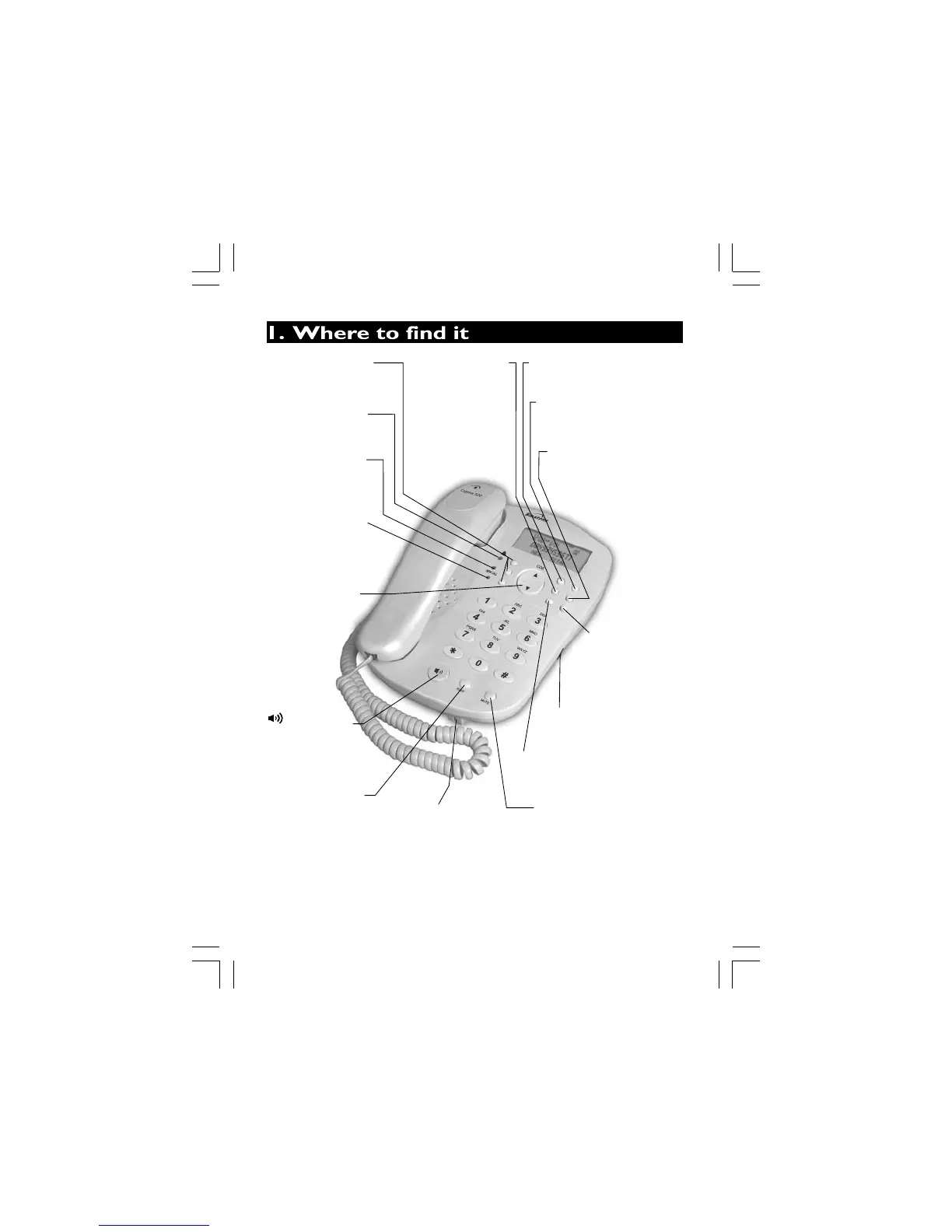
Speakerphone Mic -
Microphone Mic-Speak
into this, from about
8-12 inches away, when
One Touch Memory
Buttons
- Press to call numbers
stored on One Touch Memory.
RINGER light
- Lights up when
receiving a call
.
IN USE light
- Lights up when
the Handset or
Speakerphone is in use.
NEW CALL light
- Flashes when you
have new Caller Display
records.
Button
UP-DOWN (CDS)
- Press to access
the Caller display
records and scrolls
through them.
PHONE Button)
(SPEAKER-
- Press to make,
answer or end a call
using the speakerphone.
P(PAUSE) Button
RD (REDIAL)/
- Press to make,
answer or end a call
using the speakerphone.
Press to scroll
through the
lists and
options.
DELETE Button
- Press to delete the
displayed Caller display,
Phonebook, or
Outgoing call record.
STORE Button
DIAL Button
- Press to store phone
numbers in memory.
MENU Button
- Press to enter
SPEAKER Volume switch
- Used to adjust the volume
level of the Speakerphone.
RECALL/ESC Button
- During programming, press to
return to standby mode. Press if
you use BT's BT Calling Features.
MUTE Button
- Press during a call to mute
the microphone or
mouthpiece.
Options Menu to set
the Date, Time, Screen
Contrast and other
phone settings.
PHONEBOOK Button
- Press to access the
Phonebook records.
- Press to dial out
the displayed record.
it briefly then release it.
you're using speakerphone,
speak clearly,in a normal voice not too loud.


 To Next Page