2. Restricted Access based on MAC Address
Restricting of access to Wireless ADSL router can also be done by putting MAC
Address of NIC Card ( Wireless Adapter / Wireless network connection) from
which only access to be allowed.
The procedure is as explained below:
Step 1. Select Interface setup then click on Wireless .
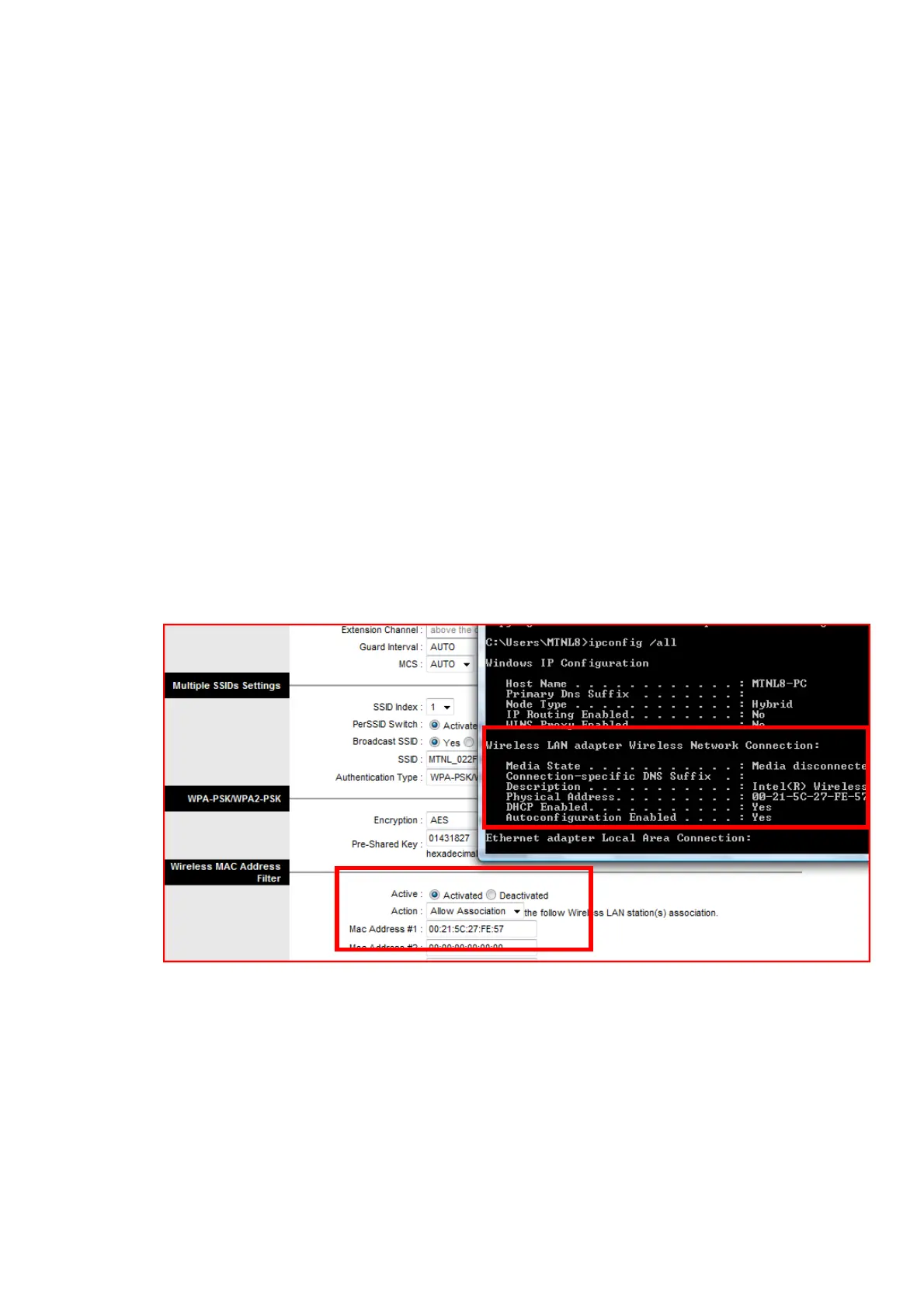
Step 2. Under Wireless MAC address Filter Select Activated button.
Step 3 Enter the MAC address of the Wireless LAN adapter ( Physical address)
in the field Mac Address #1. ( Pl enter the MAC address with “:” separated
fields. )
Step 4. If more devices needs to be connected enter the MAC address in different
fields.
The following figure shows the capture of ipconfig /all command output and
configuration on the ADSL router page.
Step 5: Save the configuration.
Note :
Both the settings (
Secured Access through data encryption
and
Restricted
Access based on MAC Address
) can be used simultaneously. But, once the
Wireless MAC address Filter is activated then MAC address of all the devices
using this Wireless ADSL Router must be registered under “ Mac Address # “ field
as shown in above figure.



 To Previous Page