4
3.1
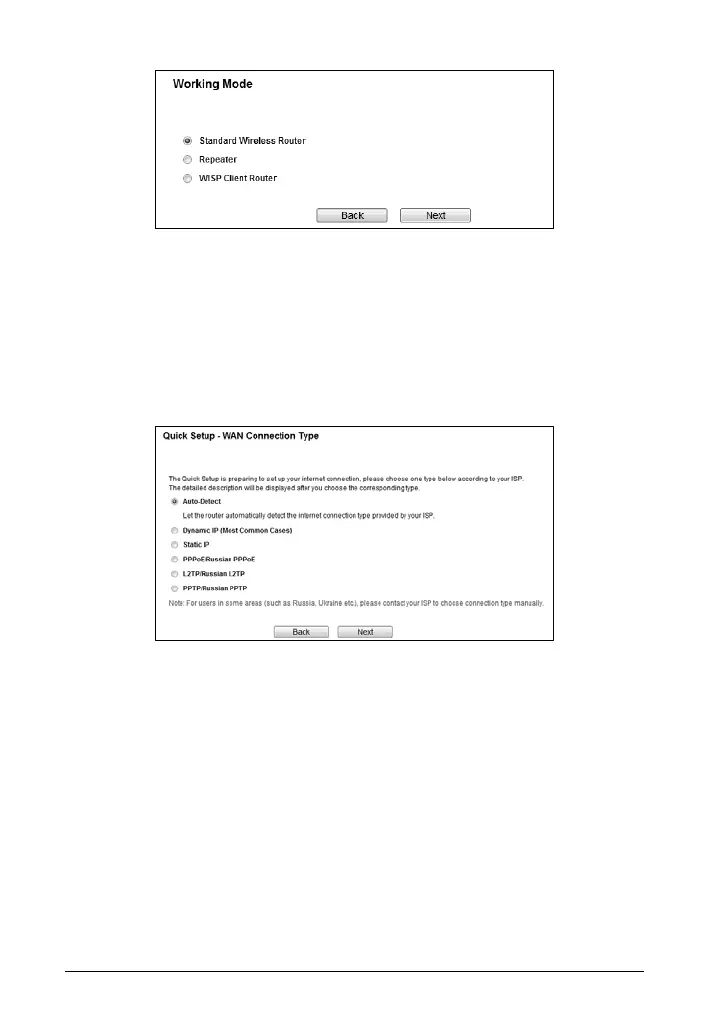
Standard Wireless Router
When you choose Standard Wireless Router on Working Mode page, take the
following steps:
a. The Router provides Auto-Detect function and supports five popular ways to
access the Internet: Dynamic IP, Static IP, PPPoE/Russian PPPoE,
L2TP/Russian and PPTP/Russian PPTP. Choose your WAN connection type
and click Next.
I If you select Auto-Detect, the Router will automatically detect the
connection type your ISP provides. The appropriate configuration page
will be displayed when an active Internet service is successfully detected
by the Router.
II If Dynamic IP is selected, the router will automatically obtain IP parameter
from your ISP. In most cases, there is no need to clone the MAC address.
You can select No, I do NOT need to clone MAC address and then click
Next. If it is necessary in your case, please select Yes, I need to clone
MAC address and then click Next.


 To Next Page