EasyManua.ls Logo

Biobase BSC-3FA2-NA - User Manual

Biobase BSC-3FA2-NA
32 pages
Print Icon
To Next Page IconTo Next Page
Loading...
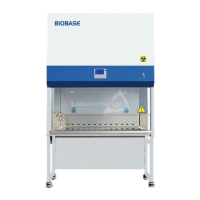
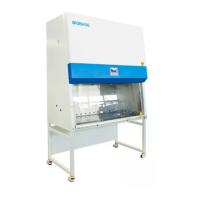
Biological Safety Cabinet
Class II A2
BSC-3FA2-NA/ GL
User Manual
BIOBASE GROUP
Version 2021.06

Questions and Answers

  • D
    dustin57Aug 4, 2025
    How to troubleshoot Biobase Laboratory Equipment that doesn't work?
    • M
      Michelle LeonardAug 4, 2025
      If your Biobase Laboratory Equipment isn't working, first check the power socket connection to ensure it's tightly inserted. Next, inspect the three insurance tubes on the circuit board: the zero line insurance tube F3 12.5A, the fire line insurance tube F2 12.5A, and the transformer insurance tube F1 125 mA, for any signs of burnout. Lastly, check for transformer faults or poor cable contact, as these can cause abnormal circuit board voltage.
  • S
    Sharon WhiteAug 9, 2025
    What to do if the fluorescent/UV lamp doesn't work in my Biobase BSC-3FA2-NA Laboratory Equipment?
    • E
      Eric GallowayAug 10, 2025
      If the fluorescent or UV lamp in your Biobase Laboratory Equipment isn’t working, start by replacing the lamp. If that doesn't solve the problem, check the control panel components or circuit. Also, inspect the corresponding ballast. Finally, check the circuit board fuses: F6 2.5A for fluorescent and F5 2.5A for UV, to see if they are burned out.
  • P
    Pamela McgeeAug 14, 2025
    How to fix a blower that doesn't work in Biobase BSC-3FA2-NA Laboratory Equipment?
    • M
      Michael RandallAug 14, 2025
      If the blower in your Biobase Laboratory Equipment isn’t working, you should check the motor first. If the motor is functional, inspect the components or circuit of the control panel. Verify that the circuit connections are secure. Finally, check the blower circuit board fuse F4 6.3 A to see if it has burned out.
  • C
    Crystal SmithAug 19, 2025
    What causes no electricity in the socket of Biobase BSC-3FA2-NA Laboratory Equipment?
    • S
      stricklandpatriciaAug 19, 2025
      If there's no electricity in the socket of your Biobase Laboratory Equipment, first ensure that the socket is turned on. If it is, check the control panel components or circuit for any damage. Also, inspect the circuit board fuse F7 6.3A to see if it has burned out.
  • O
    ofloydAug 25, 2025
    How do I troubleshoot a front window that doesn't work on Biobase Laboratory Equipment?
    • S
      Sean AguilarAug 25, 2025
      If the front window of your Biobase Laboratory Equipment isn’t working, check the front window circuit board fuse F8 6.3A to see if it's burned out. If the fuse is fine, the motor may be damaged and need replacement.
  • S
    Shawn JohnsonAug 29, 2025
    How to resolve a scratch or friction in the motor or fan set of Biobase Laboratory Equipment?
    • M
      Maureen MillerAug 30, 2025
      If the motor or fan set in your Biobase Laboratory Equipment has a scratch or is experiencing friction, remove any debris from the fan cage. If the wind impeller is sliding on the motor shaft, replace the fan.

Summary

Preface

1. Unpacking, Installation, Debugging

1.1 Unpacking

Detailed steps and methods for safely removing the biological safety cabinet from its packaging.

1.2 Accessories checking

Instructions for verifying all included accessories and materials against the packing list.

1.3 Installation conditions and using environment

Guidelines for selecting an optimal location and environmental parameters for cabinet installation and operation.

1.4 Installation

Step-by-step instructions for assembling and setting up the biological safety cabinet.

1.5 Checking after installation

Procedures for verifying the correct installation and initial functionality of the safety cabinet.

1.6 On-site debugging

Steps for fine-tuning and verifying the performance of the safety cabinet after installation.

1.7 Test and standard

Details on required tests and industry standards for validating safety cabinet performance.

2. User Instructions

2.1 Product instruction

Overview of the biological safety cabinet, its functions, and intended applications.

2.1.5 Circuit of digital control

Explanation of the digital control system, its features, and operation.

2.1.6 Airflow velocity indication

How to interpret and use the airflow velocity readings displayed by the cabinet.

2.1.7 Differential pressure indication

Understanding the differential pressure readings for filter monitoring and system status.

2.1.8 Using of UV lamp

Instructions for proper and safe operation of the UV sterilization lamp.

2.1.9 Using of socket

Information on the internal power socket, its specifications, and usage.

2.1.10 Installation methods of connect to the external exhaust system

Guidance on connecting the safety cabinet to an external exhaust system.

2.1.11 Technical Parameter

Key technical specifications and performance data for the safety cabinet models.

2.2 Structural composition

Diagram and explanation of the main physical components of the safety cabinet.

2.3 Control panel

Detailed overview of the control panel, its buttons, LCD screen, and functions.

2.4 The Usage of Remote Control

Instructions for operating the safety cabinet using the provided remote control.

2.5 Methods and procedures for disinfection

Guidelines and procedures for disinfecting the biological safety cabinet.

2.5.1 Operation

Steps and considerations for performing disinfection operations on the cabinet.

2.5.2 Structural material maintenance

Recommended methods for cleaning and maintaining the cabinet's structural materials.

2.5.3 Clean process

Procedure for cleaning the interior workspace of the safety cabinet.

2.5.4 Vent tank

Information regarding the vent tank and its maintenance, including draining.

2.5.5 Necessary disinfection

Specific conditions and requirements for performing necessary disinfection procedures.

2.6 Replacement part list

List of available replacement parts for the biological safety cabinet with specifications.

2.7 Wiring diagram

Schematic diagram illustrating the electrical connections and wiring of the cabinet.

3. Common faults & solution

3.1 Common faults & solution

Lists common problems and provides solutions for diagnosing and resolving them.

3.1.1 Warning and reminder

Important warnings and reminders related to system alarms and fault indicators.

3.1.2 Trouble shooting

Step-by-step troubleshooting procedures for various equipment malfunctions.

3.1.3 Simple accessories replacement

Instructions for replacing common accessories like lamps and filters.

3.2 Label Description

4. Warranty

APPENDIX 1

Biobase BSC-3FA2-NA Specifications

General IconGeneral
BrandBiobase
ModelBSC-3FA2-NA
CategoryLaboratory Equipment
LanguageEnglish

Related product manuals