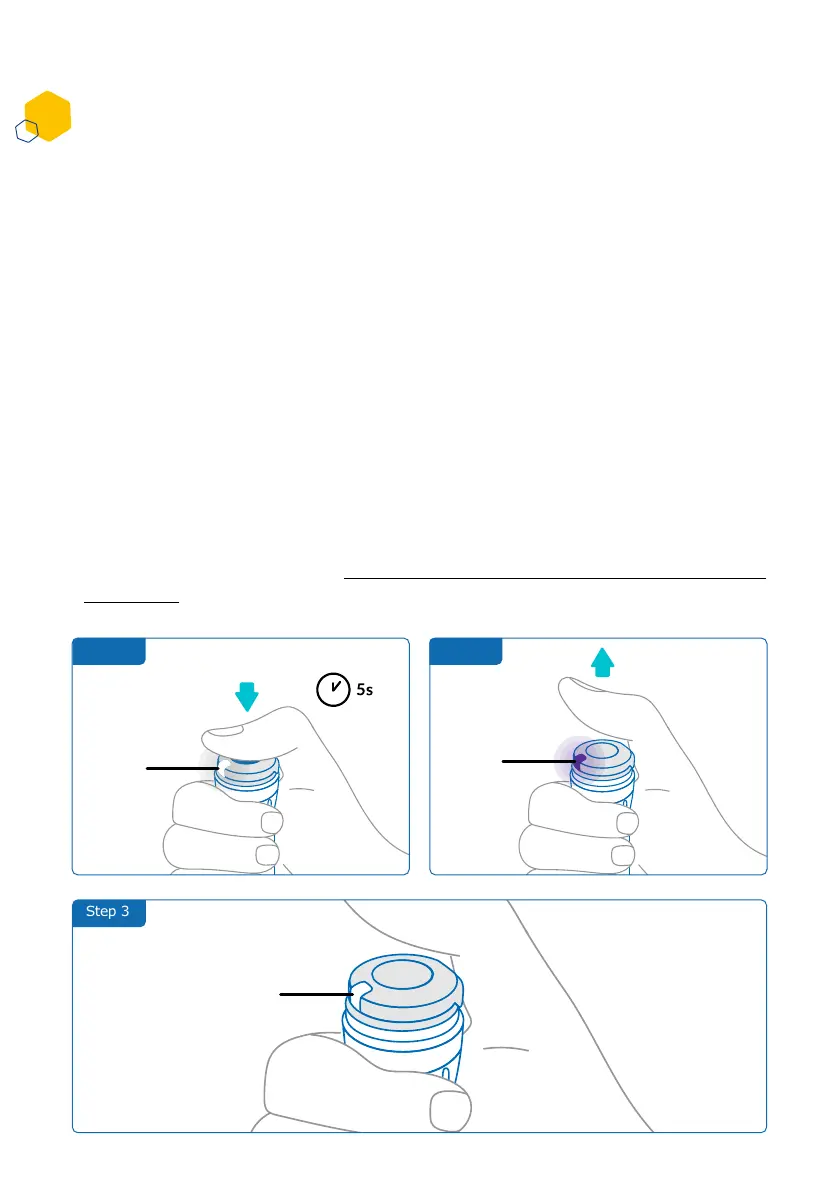
Step 2Step 1
Step 3
How do I deactivate and remove the smartdot™ transmitter?
1. Press smartdot™ for 5s until the white light turns to purple.
2. Release the button as soon as you see the purple light.
3. The light will turn off. smartdot™ is now deactivated, and injections will no
longer be recorded.
You can now remove the transmitter from the aluetta™ pen.
To reactivate smartdot™, see ‘Part 5: Preparing <E. Activating your smartdot™
transmitter’.
• Cleaning smartdot™ or your aluetta™ pen
• Charging smartdot™ when the room temperature is above 25°C.
• Moving smartdot™ to a new aluetta™ pen
smartdot™ must be deactivated before you can remove it from the aluetta™
pen. This will prevent data being recorded in error.
You need to deactivate the transmitter before carrying out the following actions:
White
light
Purple
Light
No light
Part 8: Frequently asked questions
C
16



 To Next Page