PUI.SE
-min
SYS
DIA
-17-
HOW TO TAKE A MEASUREMENT
Please read "A few suggestions before blood pressure
measurement" and "How to apply the wrist cuff" before
taking a measurement.
1.Taking measurements while sitting down
1) Place your elbow on a table.
2) Using the store box or other object as a support position
your wrist at heart level.
3) Relax your hand and keep palm facing up.
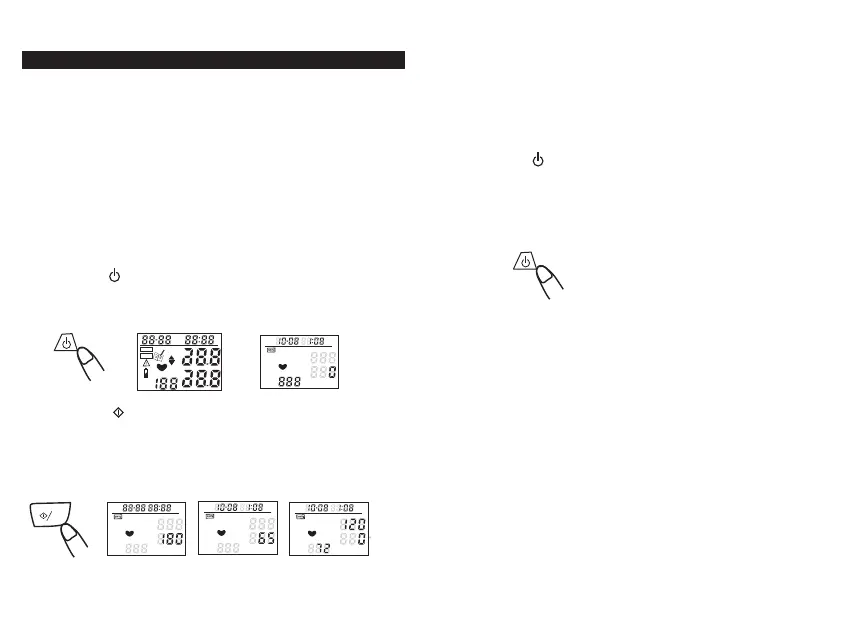
4) Press the " " button, all icons appear in two seconds
on LCD, then display "0" or last measurement data.
5) Press the " " button to start measurement. The
pressure cuff in the strap will automatically inflate.
when the value that LCD display increase to around
150~200mmHg, then start to deflation until
measurement completes, and display results on LCD.
M
PUI.SE
-min
SYS
DIA
PUI.SE
-min
SYS
DIA
PUI.SE
-min
SYS
DIA
6) After measurement the screen will display systolic,
diastolic, and pulse/min value. Meanwhile, Data it
will auto matic ally. store into memory.
7) Press " " button to turn off the unit.
Note:
*
The unit may store 128 measurement records,
if more than 128 records, it will only store
latest 128 records.
Note:
*
The value measured will be too low if you hold your
hand higher than
your heart lever or too high if you
hold your hand lower than your heart lever.
*
Do not bend your wrist inward.
*
The unit may store 128 measurement records
, if
more than 128 records, it will only store latest 128
memories.
*
During measurement avoid speaking and body/hand
shaking which may affect the accuracy of record.
*
During measurement process, If you want to stop,
just
press the power button to stop.
-18-
mmHg
Kpa
PUI.SE
-min
SYS
DIA


 To Next Page