EasyManua.ls Logo

Bioland 3002 - User Manual

Bioland 3002
12 pages
Print Icon
To Next Page IconTo Next Page
Loading...
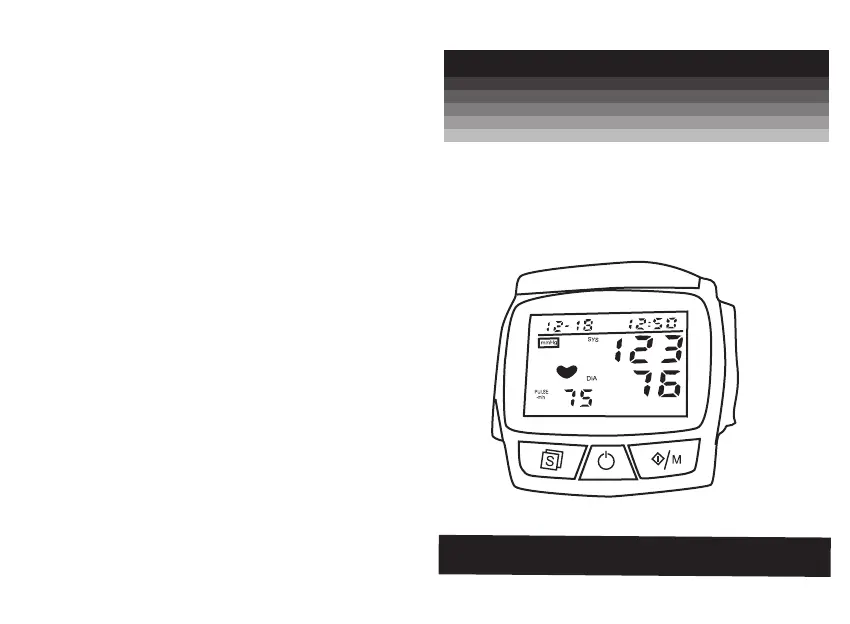
PORTABLE WRIST
BLOOD PRESSURE MONITOR
Model: 3002
INSTRUCTION MANUAL
611-30020-000
VER 1.0, 10/2005

Questions and Answers

  • Z
    zpowellAug 1, 2025
    Why is the battery icon on my Bioland Blood Pressure Monitor?
    • D
      Dwayne WalkerAug 1, 2025
      If the battery icon is illuminated on your Bioland Blood Pressure Monitor, it typically indicates that the battery is low. The solution is to replace the battery with a fresh one and then attempt the measurement again.
  • J
    Jerry MiddletonAug 5, 2025
    What to do if my Bioland Blood Pressure Monitor displays nothing?
    • J
      joel05Aug 6, 2025
      If your Bioland Blood Pressure Monitor displays nothing when you press the POWER button, or if the battery icon is flashing, there could be several reasons: * There might be no batteries installed; in this case, insert batteries. * The batteries may be worn out, requiring replacement with new ones. * The batteries might be inserted with incorrect polarities; ensure they are placed correctly.
  • B
    bsimmonsAug 9, 2025
    What to do if my Bioland Blood Pressure Monitor shows E4 error?
    • J
      Julia BallAug 10, 2025
      If your Bioland Blood Pressure Monitor shows an E4 error, it means there was shaking during the measurement. To resolve this, keep your hand and body still and maintain the correct posture, then try measuring again.
  • R
    ryangreenAug 14, 2025
    What does E2, E7, E8, E9 mean on Bioland Blood Pressure Monitor?
    • M
      Mary BakerAug 14, 2025
      If your Bioland Blood Pressure Monitor shows an E2, E7, E8, or E9 error indicating a measurement failure, it could be due to the wrist cuff not being properly adjusted or positioned, or movement of your hand or body. Readjust the wrist cuff to ensure proper tightness and placement, and keep your hand still during the measurement.
  • J
    Julia PopeAug 19, 2025
    What does E6 mean on Bioland Blood Pressure Monitor?
    • M
      Mark MeyersAug 19, 2025
      If your Bioland Blood Pressure Monitor displays an E6 error, it means the pressure is releasing too slowly. This can occur if the cuff is too loose. Readjust the cuff to ensure a snug fit, and then attempt the measurement again.
  • C
    cherreraAug 22, 2025
    What does E1 error mean on Bioland Blood Pressure Monitor?
    • N
      Nathan SanchezAug 23, 2025
      If your Bioland Blood Pressure Monitor displays 'E1: Can't normally increase pressure', it might be due to an air leak in the cuff. Check the cuff for any leaks, and if found, replace it with a new one.
  • R
    Robert ArmstrongAug 27, 2025
    What does E3 mean on Bioland Blood Pressure Monitor?
    • T
      Tina TaylorAug 27, 2025
      If your Bioland Blood Pressure Monitor displays an E3 error indicating the inflate pressure is too high, re-measure or send it back to the dealer to re-calibrate the pressure.

Summary

Introduction

Safety and Precautions

Safety Notes and Symbols

Explains warning symbols and their meanings for safe use.

General Cautions

General cautions and warnings for safe operation.

Understanding Blood Pressure

Manufacturer Requests

Guidelines and requests from the manufacturer for proper use.

Blood Pressure Basics

Explains what blood pressure is and how it's measured.

Blood Pressure Context and Fluctuations

Lists factors affecting fluctuations and WHO classification.

Device Setup and Operation

Precautions Before Use

Important precautions to take before operating the device.

Main Unit and Features

Overview of the main unit, its features, and accessories.

Battery Installation

Instructions for installing and replacing the device's batteries.

Setting Date & Time

Steps for configuring the date and time settings on the monitor.

Applying the Wrist Cuff

Detailed steps on correctly applying the wrist cuff for measurement.

Measurement Process

Measurement Suggestions

Advice and recommendations to follow before taking a reading.

How to Take a Measurement

Step-by-step guide on how to perform a blood pressure measurement.

Maintenance and Troubleshooting

Recalling Measurement Records

Instructions for accessing and reviewing stored measurement data.

Unit Maintenance and Storage

Guidance on cleaning, maintaining, and storing the blood pressure monitor.

Preventing Malfunctions

Tips and precautions to avoid device malfunction.

Technical Specifications

Product Specifications

Technical details and specifications of the blood pressure monitor.

Troubleshooting Guide

Solutions for common errors and problems encountered with the device.

Bioland 3002 Specifications

General IconGeneral
Measurement MethodOscillometric
Cuff Size22-32 cm
DisplayLCD
Irregular Heartbeat DetectionYes
Automatic Shut-offYes

Related product manuals