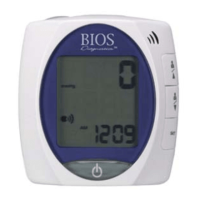
3.7 Medication Reminder
This instrument allows you to set two alarm times at which an alarm signal will then be triggered. This can be
a useful aid, for instance as a reminder to take medication or to remind you to take your blood pressure at the
same time each day.
1. To set an alarm time, press the
button (the instrument must be switched off
beforehand) and immediately afterwards the
button and hold both down until the bell
symbol appears in the bottom left of the display. Then release both buttons. The flashing “1”
in the display indicates that the first alarm time can now be set.
2. Press the
button to set the hours – the hours display flashes and pressing the button
allows you to set the alarm hour. To confirm, press the time button
3. The minute display will now flash. The minutes can be set using the
button. To confirm,
press the
button again.
4. The
symbol will now flash. Use the button to select whether the alarm time is to be active
or inactive . To confirm, press the time button.
To set a second alarm time, proceed as above but if the “1” flashes, press the
button to
select “2” and confirm with the time button.
•Anactivealarmtimeisindicatedbythebellsymbolinthedisplay.
•Thealarmsoundsatthesettimeeveryday.
•Toswitch-offthealarmwhenitissounding,pressthe
button.
•Topermanentlyswitchoffthealarm,proceedasabove(steps1-4)andselectthecrossed
out bell symbol.
This will then disappear from the display.
•Thealarmtimesmustbere-enteredeachtimethebatteriesarereplaced.


 To Next Page