9
5.2. Connect the external power supply to electric circuit. Switch on the unit using the
Power switch (fig. 3/1) on the rear panel.
DEN-1B can operate without external power supply on battery power.
5.3. The following indication may be shown on the display (fig. 2/2):
• . – the unit is calibrated and ready for operation.
• LO BAT (DEN-1B) – low batteries, replace the batteries as described in 4.3 or con-
nect the external power supply.
The display of DEN-1B switches off if the socket is empty for longer that
one minute. Press the On key (fig. 2/2) to activate the unit.
5.4. Shake the tube with the solution. It is recommended to use a vortex for shaking, e.g.
Biosan V-1 plus.
5.5. To ensure measurement precision, check the external diameter of tubes. By default,
the unit works with Ø16 mm tubes, with A-16 adapter.
Recalibrate the unit before using the tubes that are different from factory
calibrated (e.g. with different outer diameter, bottom shape or different
material such as plastic). See the Calibration section of this manual.
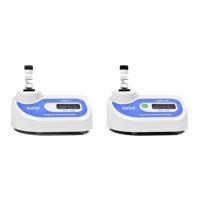
5.6. Insert the tube into the socket of densitometer (fig. 2/1). The McFarland value for the
solution will be shown on the display (fig. 2/3).
5.7. After finishing the operation switch off the unit using the Power switch (position O). If
the external power supply is used, disconnect it from electric circuit.


 To Next Page