12 | Chapter 2: Hardware installaon
Ryzen - DDR Maximum Frequency Support Table
Maximum DIMMA1 DIMMB1
DDR4-2667 SR --
DDR4-2667 DR --
DDR4-2667 SR SR
DDR4-2400 DR DR
Note
»
SR-Single-rankDIMM,1Rx4or1Rx8.
»
DR-Dual-rankDIMMs,2Rx4or2Rx8.
»
ForthebeerDDR4modulecompability,pleasefollowthetabletoinstallyourDDR4modules.
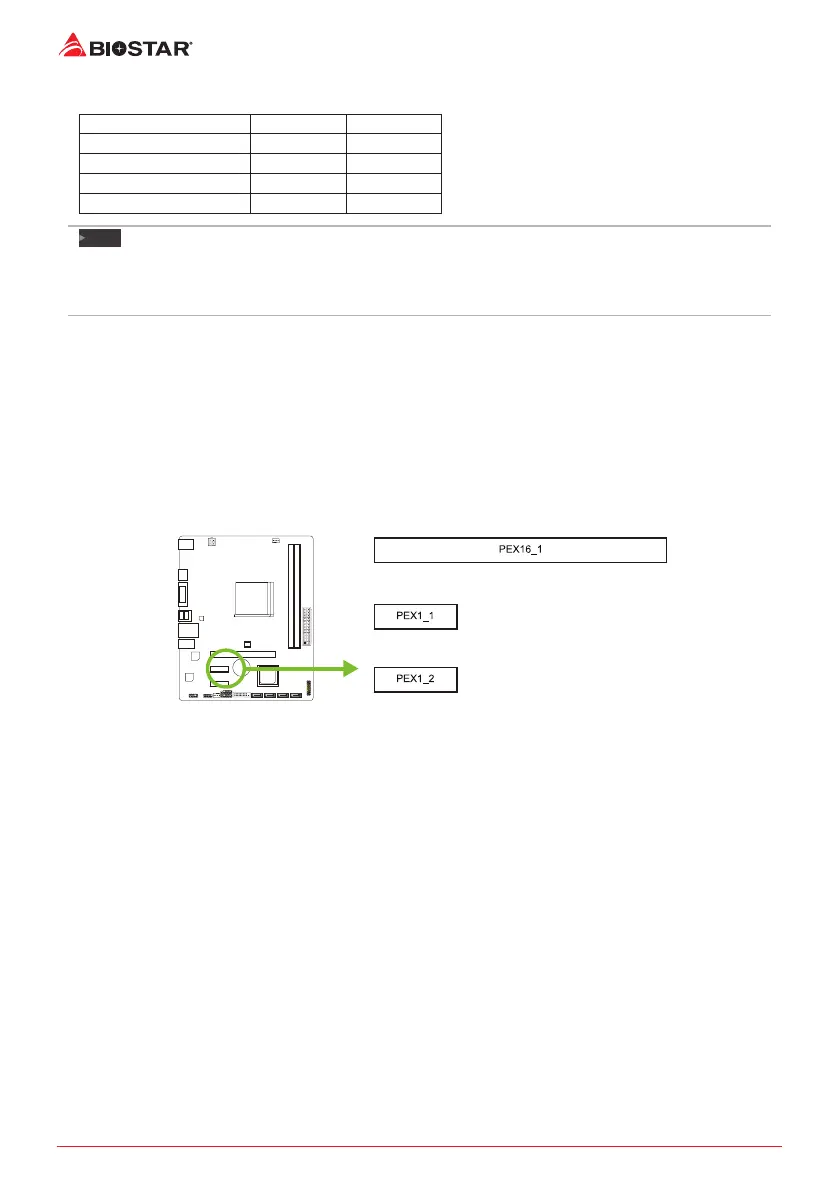
2.5 Expansion Slots
PEX16_1: PCI-Express Gen3 x16 Slot (APU / NPU @x8 speed, Ryzen @x16 speed)
• PCI-Express 3.0 compliant.
• Theorecal maximum bandwidth using two slots simultaneously is 16GB/s for each slot,
a total of 32GB/s.
PEX1_1/1_2: PCI-Express Gen3 x1 Slot
• PCI-Express 3.0 compliant.
• Data transfer bandwidth up to 1GB/s per direcon; 2GB/s in total.
Install an Expansion Card
You can install your expansion card by following steps:
• Read the related expansion card’s instrucon document before install the expansion
card into the computer.
• Remove your computer’s chassis cover, screws and slot bracket from the computer.
• Place a card in the expansion slot and press down on the card unl it is completely
seated in the slot.
• Secure the card’s metal bracket to the chassis back panel with a screw.
• Replace your computer’s chassis cover.
• Power on the computer, if necessary, change BIOS sengs for the expansion card.
• Install related driver for the expansion card.


 To Next Page