
 Need help?
Do you have a question about the Biostar A68N-5200 and is the answer not in the manual?
Essential instructions and safety precautions before installing the motherboard.
Lists the components included in the motherboard package for verification.
Detailed specifications of the motherboard, including CPU, memory, storage, and I/O.
Information on the onboard AMD processor models and their specifications.
Diagram and explanation of the connectors available on the motherboard's rear panel.
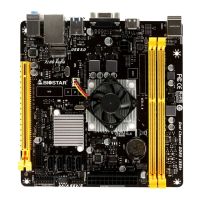
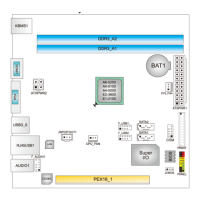
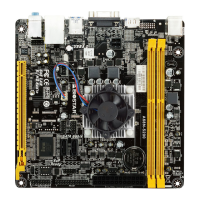
Visual representation of the motherboard's components and connector locations.
Instructions for connecting CPU and system fans to the appropriate motherboard headers.
Step-by-step guide on how to install DDR3 memory modules into the DIMM slots.
Details on the PCI-Express Gen2 x4 slot and how to install an expansion card.
Explanation of jumper settings, specifically focusing on clearing CMOS data.
Pin assignments and descriptions for ATX power connectors (ATXPWR1 and ATXPWR2).
Details the 16-pin front panel header for power, reset, LEDs, and speaker connections.
Information on Serial ATA connectors for connecting storage devices.
Pinout for USB 2.0 headers intended for front panel connections.
Details the front panel audio header supporting HD and AC'97 audio.
Information on the digital audio output connector for PCI bracket SPDIF.
Pinout for the serial port connector used for RS-232 communication.
Pinout for the printer port connector, typically for parallel printers.
How to access and navigate the BIOS setup utility for system configuration.
Methods and procedures for updating the motherboard's BIOS using various utilities.
Instructions for installing and launching motherboard-related software from the DVD.
Utility to personalize the boot logo using BMP images.
Guide for installing essential drivers from the provided Setup Driver DVD.
Explains CPU overheating issues and the system's automatic shutdown protection.
Lists POST BIOS beep codes and boot block beep codes for diagnosing issues.
Common probable issues and their corresponding solutions for system startup and operation.
Technical specifications of the motherboard presented in Arabic.
Technical specifications of the motherboard presented in French.
Technical specifications of the motherboard presented in German.
Technical specifications of the motherboard presented in Italian.
Technical specifications of the motherboard presented in Japanese.
Technical specifications of the motherboard presented in Polish.
Technical specifications of the motherboard presented in Portuguese.
Technical specifications of the motherboard presented in Russian.
Technical specifications of the motherboard presented in Spanish.
 General
| Form Factor | Mini ITX |
|---|---|
| Socket Type | Socket FT3 |
| Chipset | AMD A68H |
| Maximum Memory | 32GB |
| CPU | AMD A4-5000 APU |
| Memory Slots | 2 x DDR3 |
| Memory Speed | 1600/1333 MHz |
| Expansion Slots | 1 x PCIe 2.0 x16 |
| Storage | 2 x SATA 6Gb/s |
| USB Ports | 4 x USB 3.0, 2 x USB 2.0 |
| Video Output | HDMI, D-Sub |
| Integrated Graphics | AMD Radeon HD8330 Graphics |
| Audio | Realtek ALC662 |
| LAN | Realtek RTL8111G |
| RAID Support | RAID 0, RAID 1 |



 To Next Page