EasyManua.ls Logo

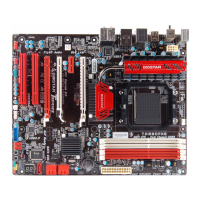
Biostar TA970XE - User Manual

Biostar TA970XE
35 pages
Print Icon
To Next Page IconTo Next Page
Loading...
TA970XE UEFI BIOS Manual
i
UEFI BIOS Setup...................................................................................... 1
1 Main Menu ............................................................................................. 3
2 Advanced Menu...................................................................................... 4
3 Chipset Menu ....................................................................................... 15
4 Boot Menu............................................................................................. 21
5 Security Menu ...................................................................................... 23
6 O.N.E Menu.......................................................................................... 24
7 Exit Menu ............................................................................................. 33

Other manuals for Biostar TA970XE

Questions and Answers

  • J
    Joseph MoralesJul 31, 2025
    What to do if Biostar TA970XE has a fatal error?
    • A
      Amanda ReynoldsJul 31, 2025
      If your Biostar Motherboard reports a fatal error, it indicates a serious system problem. A malfunctioning add-in card could be the cause. To troubleshoot, remove all expansion cards except the video adapter. If beep codes are generated, contact your system manufacturer's technical support. If beep codes are absent, reinsert the cards one by one until the problem reappears, identifying the faulty card.
  • N
    nataliejonesAug 8, 2025
    Why does my Biostar TA970XE show a display memory error?
    • F
      foleybillAug 8, 2025
      A display memory error on your Biostar Motherboard, related to the system video adapter, can occur for a couple of reasons. If the video adapter is an add-in card, try to reseat or replace it. However, if the video adapter is integrated into the system board, the board itself may be faulty.
  • M
    Michelle LarsenAug 14, 2025
    What to do if Biostar TA970XE has base memory read/write test error?
    • M
      Matthew FloresAug 14, 2025
      If your Biostar Motherboard shows a base memory read/write test error, try reseating the memory modules. If the problem persists, replace the memory with known good modules.
  • A
    Alexander WongAug 22, 2025
    How to fix Biostar Motherboard memory refresh timer error?
    • O
      Omar BishopAug 22, 2025
      To fix a memory refresh timer error on your Biostar Motherboard, reseat the memory modules. If the error continues, replace the existing modules with known good ones.

Summary

UEFI BIOS Setup Overview

Using Setup

Explains how to enter and navigate the UEFI BIOS setup utility.

General Setup Notices

Provides important notices regarding default settings and firmware updates.

1 Main Menu

BIOS Information

Displays system information like BIOS version, project code, and build date.

System Date and Time

Allows setting the system date and internal clock.

2 Advanced Menu

PCI Subsystem and Express Settings

Configures PCI, PCI-X, PCI Express settings, ROM priority, and latency.

ACPI and Wakeup Event Controls

Configures ACPI sleep states and system wake-up event controls.

CPU Configuration

Configures CPU features like C1E, SVM, and general CPU settings.

SATA Configuration

Detects and configures SATA devices and their operation modes.

CPU Smart Fan Control

Allows control of CPU fan speed based on temperature and modes.

USB Configuration

Manages USB devices, legacy support, and EHCI hand-off.

Super IO Configuration

Configures Super IO devices like serial and parallel ports.

3 Chipset Menu

North Bridge Configuration

Configures North Bridge parameters and memory information.

RX980 Port Settings

Configures settings for specific RX980 PCI Express ports.

South Bridge Configuration

Configures South Bridge settings including SATA, USB, and HD Audio.

Onboard PCI-E Devices

Configures onboard devices like HD Audio, LAN, and PCI-E options.

4 Boot Menu

Boot Configuration Options

Sets boot parameters like prompt timeout, NumLock state, and logo display.

Option ROM and Boot Priority

Configures Option ROM messages, interrupt capture, and boot device priorities.

5 Security Menu

Administrator Password

Sets or changes the administrator password for BIOS access.

User Password

Sets or changes the user password for power-on access.

6 O.N.E Menu

Overclocking Features

Activates BIO-unlockING, selects overclocking profiles, and CPU clock.

Voltage and Spread Spectrum Control

Adjusts CPU, NB, Memory voltages and enables/disables spread spectrum.

Memory and HT Configuration

Configures DDR3 memory timings, HT link, and MCT settings.

Advanced Memory Settings

Adjusts memory clock, tristate, remapping, and power down features.

G.P.U Phase Control

Controls G.P.U Phase Mode for power saving technology.

7 Exit Menu

Discard Changes and Exit

Abandons all changes made during the current session and exits setup.

Save Changes and Reset

Resets the system after saving the current BIOS settings.

Restore Defaults

Reloads the BIOS with factory default settings to resolve issues.

Launch Shell from Device

Attempts to launch an EFI Shell application from available devices.

Biostar TA970XE Specifications

General IconGeneral
Form FactorATX
SocketAM3+
ChipsetAMD 970
Memory Slots4
Max Memory32GB
PCI Express x162
PCI Express x12
Audio ChipsetRealtek ALC892
LANRealtek RTL8111E
Memory StandardDDR3
PCI Slots2
SATA 6Gb/s6
USB 3.02
USB 2.08
Audio Channels8
RAID SupportRAID 0, 1, 10
Multi-GPU SupportCrossFire

Related product manuals