EasyManua.ls Logo

Birch BP-525D - User Manual

Birch BP-525D
28 pages
Print Icon
To Next Page IconTo Next Page
Loading...
USER’S
MANUAL
BP-525D
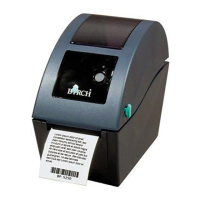
DIRECT THERMAL BAR CODE PRINTER

Questions and Answers

Summary

Introduction to BP-525 D Printer

Product Introduction

Introduces the BIRCH BP-525D series direct thermal bar code printer.

Moving Parts Warning

Caution regarding hazardous moving parts in the cutter module.

Battery Warning

Warning about the CR2032 lithium battery and risk of explosion.

Operations Overview

Unpacking and Inspection

Instructions for inspecting the printer and its included accessories after unpacking.

Printer Overview

Front View

Identifies the external components of the printer's front view.

Interior View

Identifies the internal components of the printer.

Rear View

Identifies the external ports and connections on the rear of the printer.

Printer Setup

Setting Up the Printer

Steps for physically setting up the printer and connecting it to a PC.

Loading the Media

Instructions for opening the cover, adjusting media holders, and loading media rolls.

Diagnostic Tool

Explains how to use the Diagnostic Tool for sensor calibration and printer configuration.

Printer Functions via Diagnostic Tool

Details various printer functions configurable via the Diagnostic Tool.

Install MicroSD Memory Card

LED and Button Functions

LED Indicator

Explains the meaning of different LED colors and patterns for status indication.

Regular Button Function

Describes the basic functions of the FEED button for feeding labels and pausing.

Power-on Utilities

Introduces power-on utilities for printer setup and hardware testing.

Gap;Black Mark Sensor Calibration

Details the procedure for calibrating the gap/black mark sensor using power-on utilities.

Calibration, Self-test, and Dump Mode

Explains how to perform calibration, self-test, and enter dump mode via power-on utilities.

Printer Initialization

Describes how to initialize the printer to restore factory default settings.

Self-test Function

Explains the purpose and output of the printer's self-test function.

Dump Mode Operation

Describes how the printer enters and operates in dump mode for debugging.

Set Black Mark Sensor as Media Sensor

Procedure to configure and calibrate the black mark sensor as a media sensor.

Set Gap Sensor as Media Sensor

Procedure to configure and calibrate the gap sensor as a media sensor.

Skip AUTO.BAS Program

How to use power-on utilities to interrupt the AUTO.BAS program.

Troubleshooting

LED Status Troubleshooting

Lists common printer problems based on LED status and provides recovery steps.

Print Problem Troubleshooting

Lists common printing issues, their possible causes, and solutions.

Printer Maintenance

Revise History

Birch BP-525D Specifications

General IconGeneral
Operating Temperature0°C to 45°C (32°F to 113°F)
Storage Temperature-20°C to 60°C (-4°F to 140°F)
Humidity5% to 85% relative humidity, non-condensing
Depth of Field20-280mm (UPC/EAN 100%, PCS=90%)
Scan Rate100 scans/sec
Interfaces SupportedUSB, RS-232, Keyboard Wedge
Resolution4 mil
Power Supply5VDC ± 5%

Related product manuals