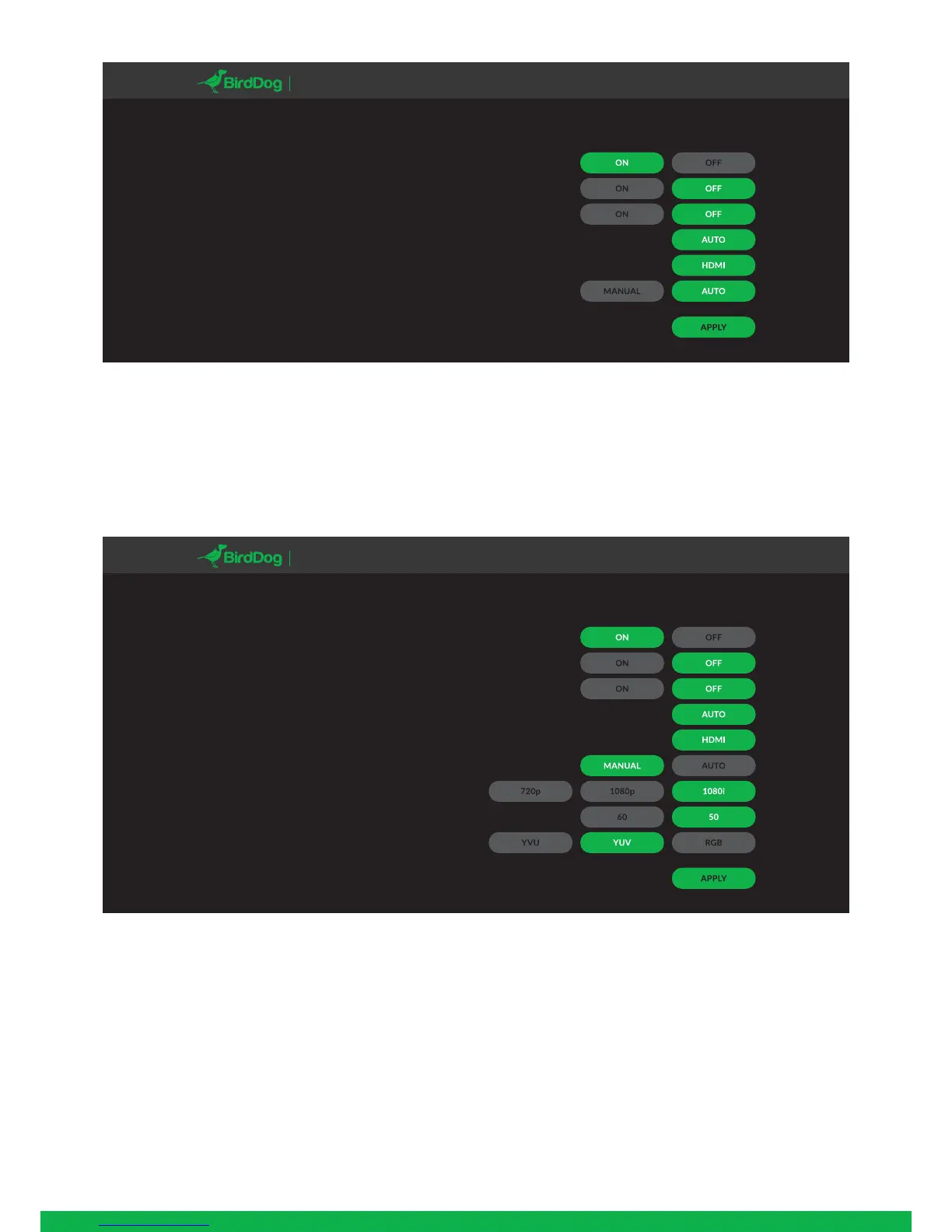
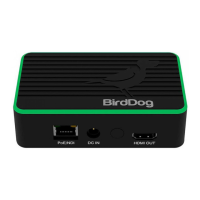
Manual input
Manual input configures Mini to only look at the selected
video source for a specific video format and color space.
This can be useful if your source is not correctly detected
by Mini.
BirdDog has taken as much care as possible to ensure any
source is automatically detected in the correct format,
however some cameras may send nonstandard timing
signals or incorrect metadata. In this case please configure
Mini with manual input to enable correct operation and
report your camera model and video format to BirdDog so
it can be added to the list of supported cameras.
Current video input:
Audiosetup:
Mute:
Tally:
Input selection:
Input:
Configuration:
AUTO/HDMI/1080i/25.0/YUV
DASHBOARD NETWORK VIDEO DECODE SETTINGS LOGOUT
MINI
Current video input:
Audiosetup:
Mute:
Tally:
Input selection:
Input:
Configuration:
Format:
Framerate:
Colorspace:
AUTO/HDMI/1080i/25.0/YUV
DASHBOARD NETWORK VIDEO DECODE SETTINGS LOGOUT
MINI
7


 To Next Page