EasyManua.ls Logo

Bissell CLEANVIEW 2831 Series - User Manual

Bissell CLEANVIEW 2831 Series
8 pages
Print Icon
To Next Page IconTo Next Page
Loading...
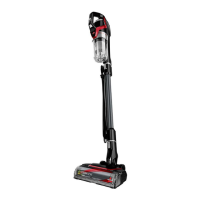
CLEANVIEW
®
PET SLIM
CORDED VACUUM
Series 2831
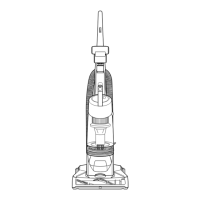
Product Overview
1. Hand Vacuum
2. Power Switch
3. Tank Release Button
4. Dirt Tank
5. Hand Vacuum
Release Button
6. Extension Wand
7. Foot Release Button
8. Tangle-Free Brush Roll
9. Motorized Floor Cleaning Foot
10. Cord Wrap
11. Foot Hose
Go online for a comprehensive walkthrough
of your new purchase!
This guide has everything you need to get ready for first use, including
setting up, using and maintaining your machine, but online you’ll find
additional resources like tips and troubleshooting, videos, product
registration, parts, and more. Go to support.BISSELL.com.
What’s in the Box? .............................................................2
Assembly .............................................................................. 3
Installing the Wall Mount & Tool Storage Station ... 3
Installing the Optional Febreze Filter .........................3
Using the Vacuum ..............................................................4
Attaching Tools for Hand Vac Use ............................... 4
Emptying the Dirt Tank .................................................... 5
Cleaning & Replacing the Filter .....................................6
Maintaining the Pet TurboEraser® Tool.......................6
Maintaining the Brush Roll ..............................................7
Troubleshooting .................................................................8
Warranty ............................................................................... 8
9
8
6
5
7
4
3
2
1
10
11

Other manuals for Bissell CLEANVIEW 2831 Series

Questions and Answers

  • J
    Jessica GonzalezAug 13, 2025
    What to do if my Bissell CLEANVIEW 2831 Vacuum Cleaner brush roll stops rotating?
    • J
      Jorge HamiltonAug 13, 2025
      If the brush roll of your Bissell Vacuum Cleaner stops rotating, unplug the appliance to reset the brush motor. Check for and remove any debris. If the problem continues, disconnect the foot, remove the bottom cover, and clear any debris from the suction path.
  • Z
    zbrowningAug 17, 2025
    Why won't my Bissell Vacuum Cleaner pick up dirt?
    • T
      Tracy CoxAug 17, 2025
      Your Bissell Vacuum Cleaner might not be picking up dirt due to several reasons. The filter could be dirty, so remove and rinse it, ensuring it's completely dry before putting it back. There might be a clog in the vacuum; disassemble the foot and Extension Wand to check for and clear any blockages. Also, the Dirt Tank might not be seated correctly; remove it and reseat it properly.
  • J
    Julie ThompsonAug 21, 2025
    What to do if my Bissell Vacuum Cleaner tank is full?
    • J
      Jeffrey ElliottAug 21, 2025
      If the tank of your Bissell Vacuum Cleaner is full, empty it.
  • S
    smithryanAug 25, 2025
    What to do if my Bissell CLEANVIEW 2831 Vacuum Cleaner filter is missing or dirty?
    • D
      diana34Aug 26, 2025
      Check to see if the filter is in place in your Bissell Vacuum Cleaner. Clean if necessary.
  • L
    Lori AdamsAug 29, 2025
    What to do if there is a clog in my Bissell Vacuum Cleaner?
    • W
      wreyesAug 29, 2025
      Remove the foot and extension wand from the hand vacuum of your Bissell Vacuum Cleaner. Check each section for debris buildup or clogs. Clear any debris or clogs before reassembling.
  • S
    Shawn BrownSep 1, 2025
    What to do if dirt is escaping from my Bissell CLEANVIEW 2831 Vacuum Cleaner?
    • J
      Janet DicksonSep 1, 2025
      If dirt is escaping from your Bissell Vacuum Cleaner, it could be due to a few reasons. First, check if the Dirt Tank is full and empty it if necessary. Also, the filter might be missing or dirty; ensure it's in place and clean it if needed. Finally, there might be a clog in the vacuum. Remove the foot and Extension Wand to check for and clear any blockages.
  • D
    Dillon ThomasSep 5, 2025
    How to fix a Bissell Vacuum Cleaner when the Brush Roll doesn’t rotate?
    • J
      Jacob Hernandez Jr.Sep 5, 2025
      If the Brush Roll on your Bissell Vacuum Cleaner isn’t rotating, ensure that you're using the correct power mode by pushing the switch all the way to Carpet Cleaning mode. Also, the Brush Roll might have debris or other entanglements. Unplug the vacuum to reset the brush motor, check for, and remove any debris before turning it back on. If the problem continues, disconnect the foot, remove the bottom cover, and clear any debris from the suction path.
  • D
    Diane SantanaSep 9, 2025
    What to do if the tank of my Bissell CLEANVIEW 2831 Vacuum Cleaner is not seated correctly?
    • M
      Michael WilkinsonSep 9, 2025
      Remove the tank from your Bissell Vacuum Cleaner and reseat it properly.

Summary

Whats in the Box?

Assembly

Installing the Wall Mount & Tool Storage Station

Instructions for mounting and organizing vacuum accessories.

Installing the Optional Febreze Filter

Guide on how to install the Febreze filter.

Using the Vacuum

Attaching Tools for Hand Vac Use

Steps for connecting accessories for hand vacuum mode.

Emptying the Dirt Tank

Cleaning & Replacing the Filter

Maintaining the Pet TurboEraser Tool

Maintaining the Brush Roll

Troubleshooting

Warranty

Bissell CLEANVIEW 2831 Series Specifications

General IconGeneral
BrandBissell
ModelCLEANVIEW 2831 Series
CategoryVacuum Cleaner
LanguageEnglish

Related product manuals