29
5.3 String
5.3.1 Prefix and Suffix:
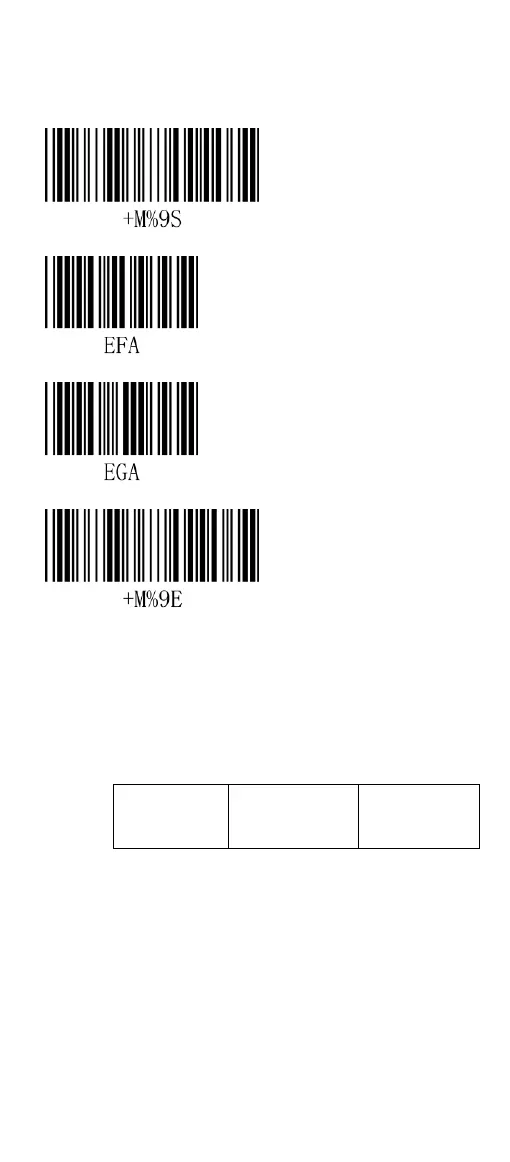
Start Configuration
Set up prefix (00H)
Set up suffix (00H)
End Configuration
Note:
The maximum characters can be set as prefix
and suffix are 10 ASCII characters, if the
setting is 0 means there is no prefix or suffix.
Formats of prefix and suffix are as follows:
The steps to setup prefix and suffix:
Scan “Enter to Setup” and “Prefix” barcode.
Find the ASCII code in appendix B.
Scan the desired barcode to set as
prefix/suffix.
Scan “End” barcode.
Scan “End Configuration Setup”.


 To Next Page