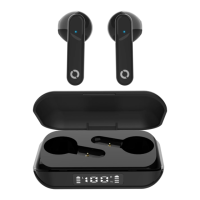
CHARGING THE CASE:
• Connect a Type C charging cable to the charging case (take care when inserting it into the
port) and connect the other end to an adaptor or USB port on computer to charge the case.
Important: Before connecting the charging cable to a power outlet, adaptor, or computer, make
sure they are switched o (no power running) first.
When the charging case is charging, you will see a green pulsating LED light.
Once fully charged, the LED will turn solid green.
Note: The charging case will take approximately 2 hours to charge. This is dependent on the
power outlet you connect to i.e. a computer USB will take longer.
Turning OFF:
• Place the earbuds back into the charging case.
OR
• Touch and hold the earbuds for 5 seconds until you hear an audible “Power o”.
Resetting the Earbuds:
• Place both earbuds into the charging case, keep the case open and press the reset button on
the charging case for 5 – 7 seconds.
WIRELESS (BLUETOOTH) CONNECTION:
Connecting to Bluetooth:
1. Open the charging case, the earbuds will begin auto-pairing with each other.
2. The LED on each earbud will will flash red and blue.
3. Go to your Bluetooth settings on your device (smartphone etc) and search for “TruSense TWS”,
select it to connect.
If you don’t connect the earbuds to a device within 5 minutes, they will automatically switch o.
BMECTWS27 TRUSENSE TWS



 To Next Page