Need help?
Do you have a question about the bitmore AURAL PRO TWS and is the answer not in the manual?
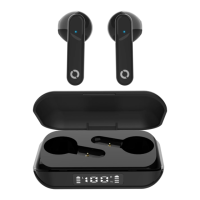
Identifies and labels the key physical parts of the Aural Pro TWS earbuds and charging case.
Details charging times, battery type, wireless range, playback duration, and earbud weight.
Instructions for initial setup, including removing protective film and charging the earbuds fully before first use.
Explains that earbuds automatically power on and pair when removed from the charging case.
Step-by-step guide to connect the earbuds to a Bluetooth-enabled device, including searching and pairing.
Provides solutions for common connection problems, such as one earbud not connecting or device not finding the earbuds.
Details how earbuds magnetically attach, automatically recharge in the case, and power off.
Explains how to charge the case via Micro-USB and how to interpret the digital power display for charge status.
Guides on how to manage phone calls and play/pause music using the touch function button.
Instructions for controlling music playback, including skipping tracks and adjusting volume via touch controls.
Explains how to use each earbud independently on different devices and provides a tip to avoid automatic pairing.
Essential safety warnings regarding device usage, handling, environment, and power sources to prevent damage or injury.
Outlines the 24-month limited guarantee, registration requirements, exclusions, and liability limitations for the product.
Details guarantee exclusions, notes on product care, battery life, and potential issues not covered.
Provides information about Bitmore's product philosophy, eco-friendly initiatives, and contact details.

 To Next Page

 General