BM-ECTWS26 AURAL PRO TWS | 4
CONNECTING TO BLUETOOTH
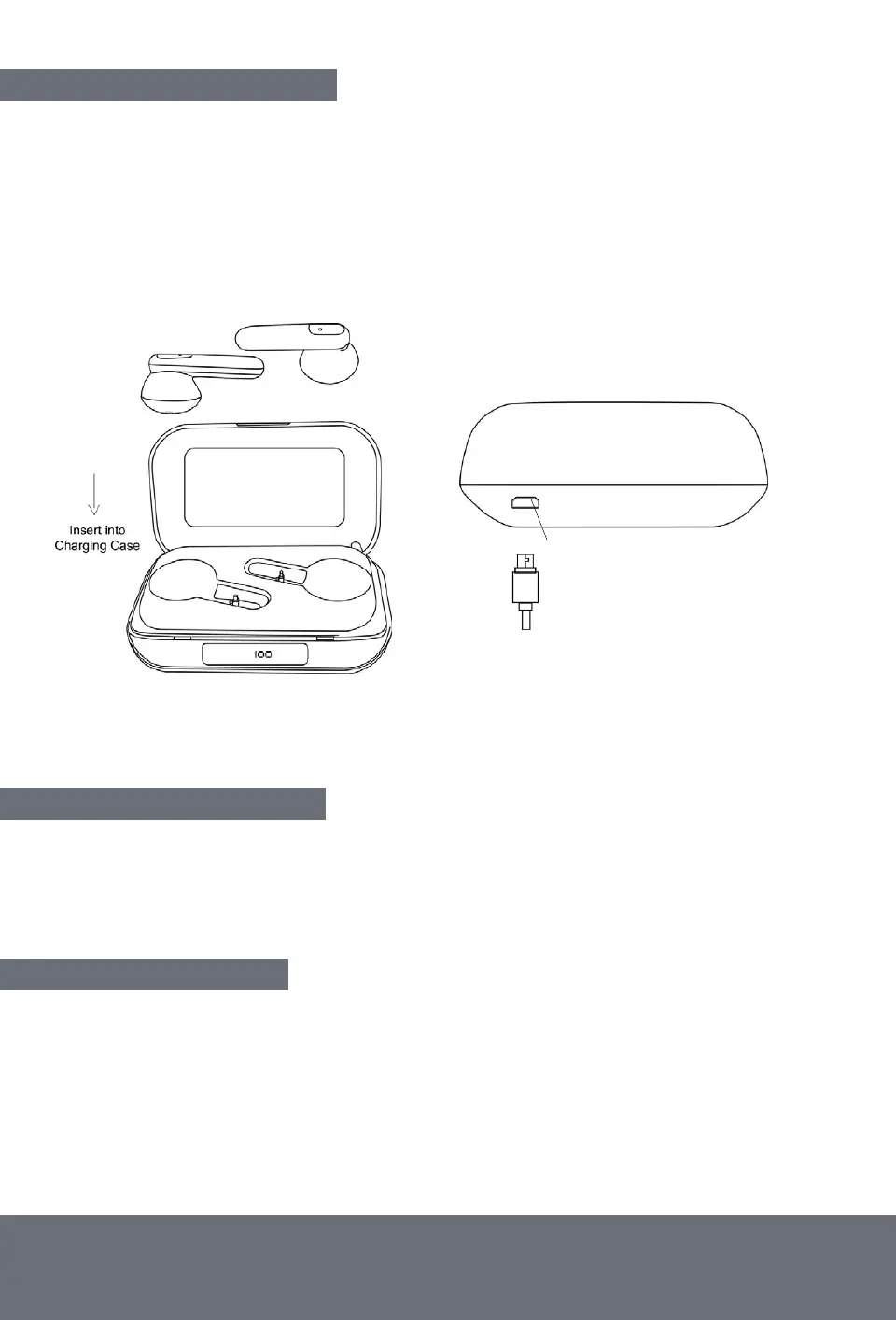
The Aural Pro TWS will power-off automatically when inserted into the charging case.
Tip! The charging case lid will not close if the earbuds are not inserted correctly,
please take extra care.
Ensure both the charging case and earbuds are fully charged before first use.
RECHARGING THE EARBUDS:
Insert the earbuds into charging case to recharge, they will magnetically snap into place
when inserted and will begin charging automatically if the case has power.
The earbuds will take circa 2hrs to charge.
RECHARGING THE CASE:
Insert the Micro-USB charging cable into charging input port (take care).
The Digital Power Display will light up when plugged in and charging. Charging Case is fully
charged when the display shows "100" (approx. 1.5hrs).
Micro-USB Charging Input Port


 To Next Page