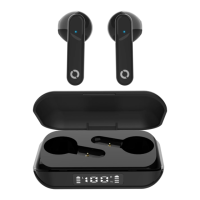
This document is a user guide for the Bitmore Vybe Pro Ear Buds, a pair of wired earphones with an in-line control unit. The product emphasizes its commitment to sustainability, indicating that it is made from 100% recycled plastic and is a "1% For The Planet" member and a "Sustainability Hero 2022."
Function Description:
The Bitmore Vybe Pro Ear Buds are designed for audio playback and hands-free calling, connecting to devices via Bluetooth. They feature an in-line control unit for managing power, charging, volume, call functions, and audio playback.
Important Technical Specifications:
- Connectivity: Bluetooth
- Charging Port: Micro USB
- Charging Time: Approximately 2 hours for a full charge.
- Bluetooth Range: Approximately 10 meters in an interference-free environment.
- Operating Temperature: 0-45 °C.
- Battery Type: Lithium-ion (partial charge on dispatch, full charge recommended before first use).
- Bluetooth Pairing Name: Vybe Pro
- Default Pairing Password (if requested): 0000
- Wall Adaptor Requirement: Genuine certified wall adaptor, maximum 5W output (avoid fast charge or high AMP output).
Usage Features:
- Power On: Press and hold the centre button on the in-line control until a blue-light flash is seen.
- Power Off: Press and hold the centre button for 3 seconds until a red-light flash is seen.
- Charging Indication: A continuous red light indicates charging; a blue light indicates a full charge.
- Low Battery Indication: A red light will flash, and a voice prompt will be heard. The earphones will automatically turn off when the battery is empty.
- Bluetooth Pairing: Ensure earphones are OFF. Press the centre button until red and blue lights flash. Search for "Vybe Pro" in your device's Bluetooth settings and connect. Use "0000" if a password is requested.
- Answering an Incoming Call: Briefly press the centre button.
- Rejecting an Incoming Call: Press and hold the centre button for 2 seconds.
- Ending a Call: Briefly press the centre button.
- Adjusting Volume (Audio Playback): Briefly press the (+) button to increase volume or the (-) button to decrease volume. A beep indicates maximum or minimum volume.
- Adjusting Volume (During Call): Long press the Volume + button to increase volume (a beep indicates maximum). Long press the Volume - key to reduce volume.
- Play/Pause Audio: Briefly press the centre button.
- Previous Song: Press and hold the (-) button for 2 seconds.
- Next Song: Press and hold the (+) button for 2 seconds.
- Redial Last Number: Double-click the centre button.
- Light Notifications:
- Standby mode: Blue light flashes once every 5 seconds.
- Active audio connection: Blue light flashes once every 2 seconds.
Maintenance Features:
- Charging: Use the supplied Micro USB cable or your own. Do not allow the Vybe Pro to get wet or expose it to high heat. Supervise children during use. For optimal battery health, avoid keeping the earphones plugged in for long periods after they are fully charged.
- Storage: Store in an ambient environment between 0-45 °C.
- Cleaning: Use a dry cloth only. Avoid liquids or chemical substances.
- General Care:
- Keep away from sources of high voltage or radio waves (including microwaves) to maintain Bluetooth range.
- Ensure the earphones are sufficiently charged and close to the paired device if sound becomes intermittent.
- Do not place any metals or metal objects on the device or product while in use and connected to a power source to avoid electrical shocks or other hazards.
- Do not leave the device connected when not in use or when charging is complete.
- Do not cover the product or device when in use.
- Do not expose to heat sources (fire, direct sunlight).
- Do not use or expose to high humidity, liquids, gels, aerosols, or heavy dust. Keep dry and clean. If liquid contact occurs, immediately unplug from power sources.
- Do not disassemble or modify the product.
- Avoid dropping or heavy impact.
- Only use attachments/accessories supplied by Bitmore or certified by your device manufacturer.
- This product is not a toy; do not leave children unsupervised.
- Use a genuine certified wall adaptor (e.g., one supplied by your device manufacturer); avoid fast charge or high AMP output adaptors.
- Do not leave the device unattended for charging overnight.
- Do not use faulty, damaged, or non-certified plugs.
- Do not use a plug with more than a 5W output.
- Do not operate in a closed environment such as a pocket, handbag, backpack, or under a pillow.
Warranty and Guarantee:
- Limited Guarantee: 24-month guarantee from the date of original purchase, covering defects in manufacture and workmanship.
- Registration: Register the device at bitmore.co.uk within 30 days of purchase for the guarantee to be valid and to access "Bitmore" membership benefits (giveaways, rewards, discounts).
- Exclusions: The guarantee does not cover damage caused by misuse, abuse, accident, unauthorized accessories, alteration, improper installation, unauthorized repairs/modifications, improper use of electrical/power supply, loss of power, dropped product, malfunction from lack of maintenance, transportation damage, theft, neglect, vandalism, environmental conditions, loss of use, or other conditions beyond Bitmore's control.
- Voiding the Guarantee: Failure to follow manual instructions, submersion in liquids, or purchasing opened/used/repaired/repackaged/resealed products will void the guarantee.
- Battery Degradation: The natural decrease in Lithium-ion battery capacity over time, with use, or due to environmental factors (cold, temperature fluctuations, long periods of disuse) is a slow, natural phenomenon and is not covered by the guarantee.
- Connected Devices: Devices connected to the product or app are not covered by the Bitmore guarantee.
- Remedy: The guarantee is limited to the replacement of defective parts; refunds are given if replacement parts are unavailable. Bitmore reserves the right to substitute products in lieu of repair or replacement.

 Need help?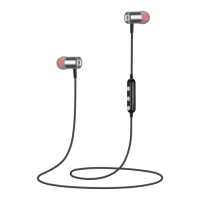

 To Next Page
 General