READ THE FULL MANUAL FOR SAFETY INFORMATION BEFORE FIRST USE
Power on:
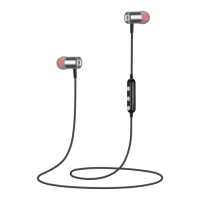
Press and hold the centre button on the inline control until you see a blue-light flash.
Power o:
Press & hold the centre button for 3 seconds until you see a red-light flash.
Charging:
Simply insert the supplied Micro USB charging cable (or your own) into the Micro USB slot on the
Vybe Pro inline control.
Note: Take care when inserting the charging cable into the charging port on the Vybe Pro. Do not
allow the Vybe Pro to get wet or expose to high heat. Supervise children during use.
Red light = charging.
Blue light = charged
A continuous red light is visible whilst charging until the earphones are fully charged. When the
charging is complete, a blue light replaces the red light. You can then disconnect the charging cable
from the earphones. For optimal battery health, it is advisable that the earphones should not be
kept plugged into a charger for a long period after they have been
fully charged. Charging usually takes 2 hours
Note: The Vybe Pro are partially charged, to get the full experience please charge them fully for
2hrs.
Low Battery
There will be a red light flashing and a voice prompt heard through the earphones when thebattery
becomes low. The earphones automatically turn o when the battery is empty.
Connecting to Bluetooth
Ensure that the earphones are turned OFF, then press the centre button until you see red
and blue lights flashing.
To pair your device, search for and connect to the earphones through the Bluetooth function
settings on your device. The Bluetooth pairing name of the earphones is: Vybe Pro.
Some devices may ask for a password too when attempting to connect to the earphones,
if asked, use: 0000.
BM-ICBTIE1 VYBE PRO EAR BUDS | 1
VYBE PRO EAR BUDS


 To Next Page