_______________________________________________________________________
BITTEL Page 8 of 14 MODA
Firstly, please install two pieces of 7# 1.5V batteries into the Remote
Time Controller. Pay attention to the polarity of the battery. Don’t mix
the old and new batteries.
Note: The anode of the battery should be toward outside. The battery
should be changed every two years.
Remote Time Control
Set time with the Remote Time Control
●Press TIME SET key, hour digits flashing, press UP/DOWN key to
adjust,
●Press TIME SET key, press UP/DOWN key to adjust minute,
●Press TIME SET key, press UP/DOWN key to adjust month,
●Press TIME SET key, press UP/DOWN key to adjust day,
●Press TIME SET key, press UP/DOWN key to adjust year,
●Press TIME SET key, LCD display the time, setting finished.
Set DST area code with the Remote Time Control
Press DST SET key, then press UP/DOWN key to set the area code:
00= DST OFF, 01=USA/Canada,
02=Europe/Russia/Swiss;
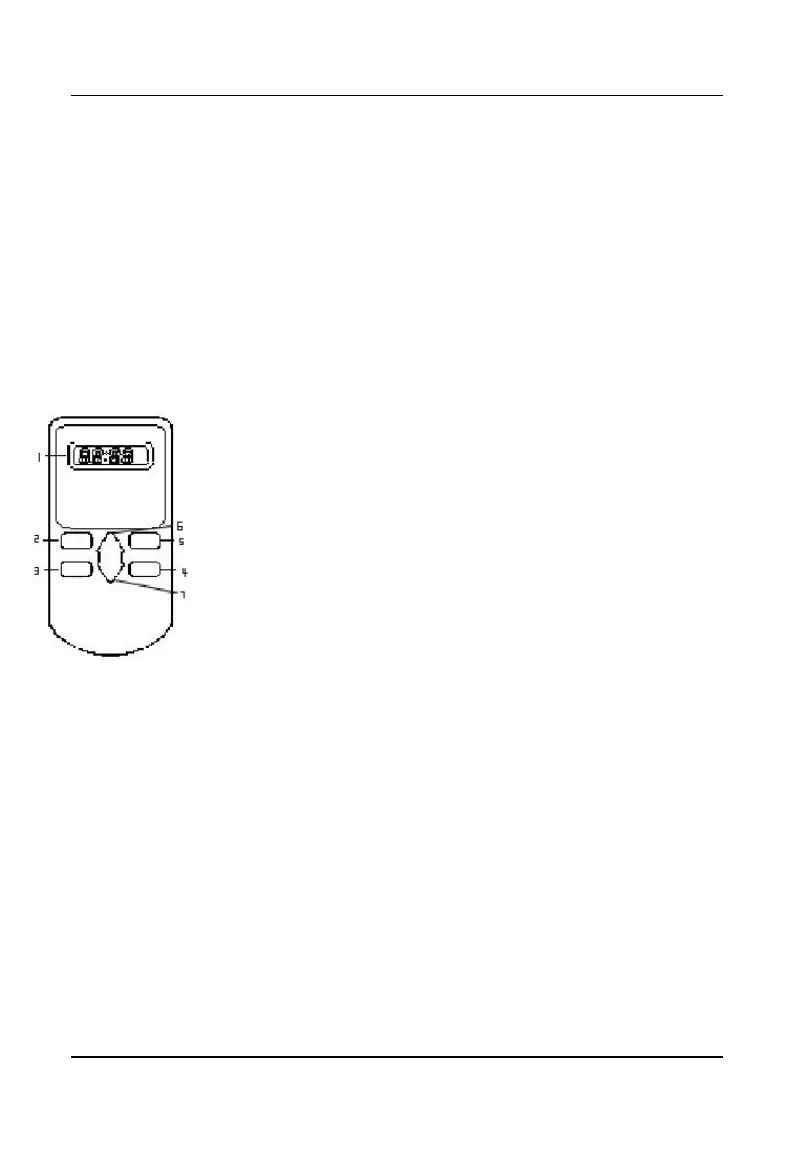
1. LCD Display
2. DST SET key——Set DST time.
3. TIME SET key——Set time and date.
4. TIME PROG key——Adjust time and date .
5. DST PROG key ——Adjust DST time.
6. UP key —— Upward key.
7. DOWN key——Downward key.


 To Next Page