Labeling
Operating instructions GLP
2 -- 15
6.562.98.5.01.18
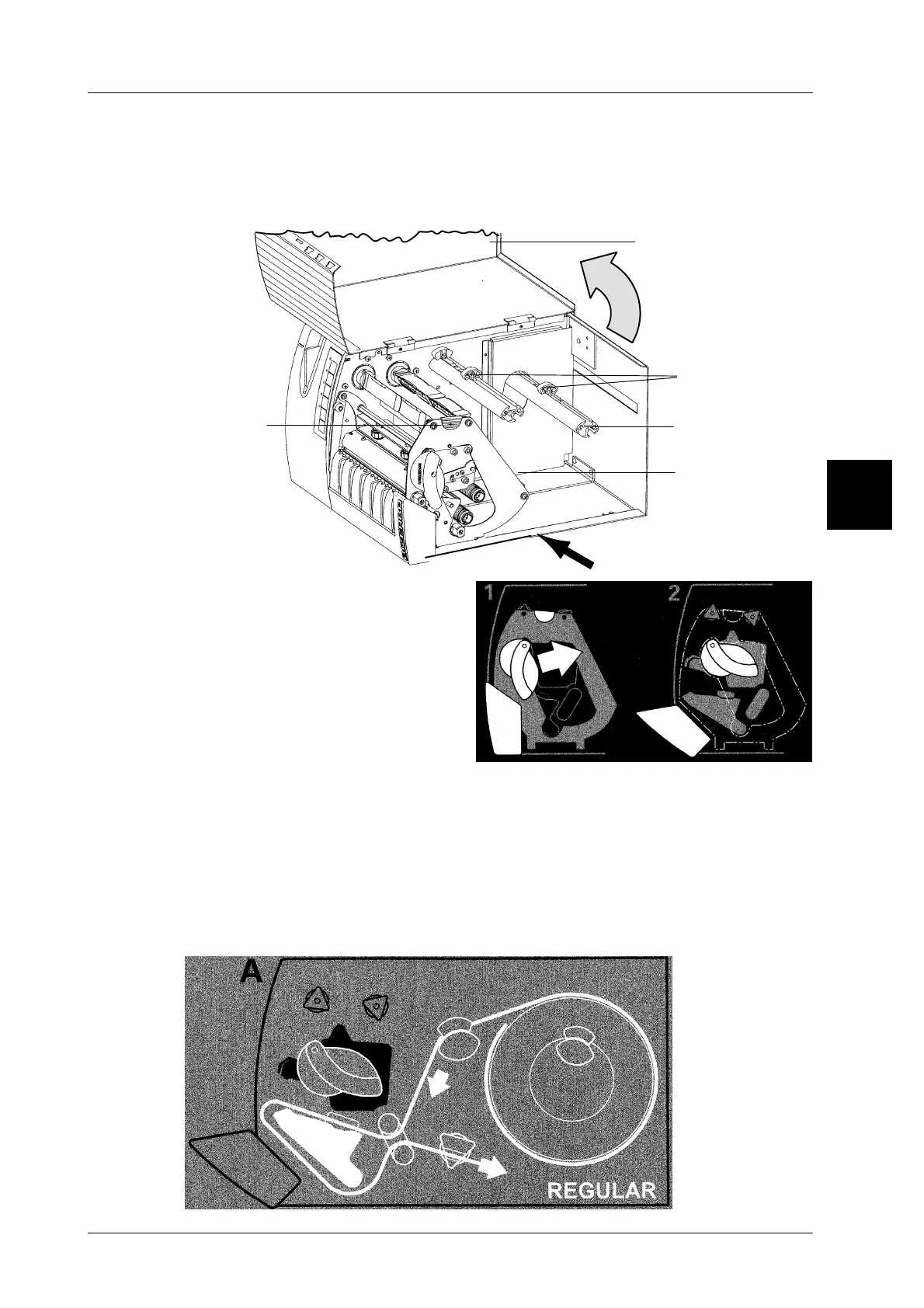
2.4.3 Replacing the label roll
The printer compartment containing the label supply roll and the tape winder for
the backing paper is easy to access when tilting the right--hand housing cover up-
ward. To do this, hold the housing cover at position A and tilt it upward.
Housing cover
Tape winder
Label roll
takeup reel
for backing
A
Side
part
Guiding
elements
of GLP
160
paper
-- Move the swivel lever in the direc-
tion of arrow as shown in the adja-
cent illustration 1. This causes the
printer to be opened (see illustra-
tion 2).
-- Tilt the side part of the GLP160 holding on the plastic handle.
-- Remove the wound up backing paper from the tape winder.
-- Remove the remaining label roll from the takeup reel.
-- Move the label roll onto the takeup reel (with the label facing the top).
--
Remove some labels from the backing paper over a length of approximatley 30 cm.
-- Insert the backing paper in the printer as per schematic drawing.
-- Move the guiding elements B to the outer edge of the backing paper.
2



 To Next Page