This document is a user manual for the BLACK+DECKER HP14 Cordless Drill/Driver, a versatile power tool designed for various drilling and fastening applications.
Function Description
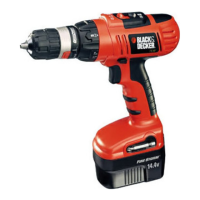
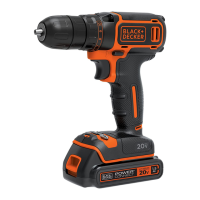
The BLACK+DECKER HP14 is a cordless drill/driver primarily used for drilling holes in different materials and driving/removing screws. Its cordless design offers portability and convenience, allowing users to work without the constraint of a power outlet. The tool features a keyless chuck for easy bit changes, a forward/reverse switch for drilling and driving, and a variable speed trigger for precise control over the application. It also incorporates a torque adjustment ring, enabling users to select the appropriate torque setting for different tasks and materials, preventing overtightening or damage to the workpiece. The HP14 is powered by a rechargeable battery pack, which ensures sustained operation.
Important Technical Specifications
Drill/Driver (HP14):
- Voltage: 14.4 V
- No-load speed: 0 - 350 rpm (low speed) / 0 - 1200 rpm (high speed)
- Torque: 28 Nm (20.6 ft-lb)
- Chuck: 1/2" (13mm) keyless chuck
- Max. drilling capacity:
- Metal: 1/2" (13mm)
- Concrete: 3/8" (10mm)
- Wood: 1-3/16" (30mm)
- Drill chuck capacity: 1/32" - 1/2" (1.5mm - 13mm)
- Keyless chuck: Yes
- No. of torque settings: 16 + 3 (16 clutch settings plus a drill mode)
- Reversible/electronic: Yes
- Weight: 1.65 kg (3.6 lb)
Charger:
- Voltage output: 17 V
- Voltage input: 220V ~ 50Hz, 120V ~ 60Hz, 127V/220V ~ 60Hz
- Current: 330 mA
- Approximate charge time: 3 - 5 hours
- Weight: 0.07 kg (0.15 lb)
Battery:
- Voltage: 14.4 V
- Capacity: 1.5 Ah
- Type: Lithium-Ion
Usage Features
The HP14 drill/driver is designed for user-friendly operation with several features enhancing its utility:
- Keyless Chuck (1): Allows for quick and easy bit changes without the need for a chuck key. Simply twist the chuck to tighten or loosen it around the drill bit or screwdriver bit.
- Torque Adjustment Ring (2): This ring allows the user to select from 16 clutch settings plus a drill mode. The clutch settings prevent overtightening screws and stripping screw heads, while the drill mode provides maximum torque for drilling applications.
- Forward/Reverse Switch (12): Located above the trigger, this switch allows the user to select the direction of rotation for drilling or driving/removing screws. It also serves as a lock-off mechanism when in the center position, preventing accidental activation.
- Variable Speed Trigger (7): The trigger provides variable speed control, meaning the speed of the drill increases as the trigger is pressed further. This allows for precise control, especially when starting a hole or driving screws.
- Soft Grip (6): The handle features a soft grip for enhanced comfort and reduced fatigue during prolonged use.
- Battery Release Button (8): Pressing this button allows for easy removal of the battery pack from the tool.
- Battery (9): The rechargeable Lithium-Ion battery provides cordless power, offering freedom of movement.
- Charger (15): Used to recharge the battery pack. The charger typically has indicator lights to show the charging status.
- Ventilation Slots (3): These slots help dissipate heat generated during operation, preventing the motor from overheating.
- On/Off/Speed Adjustment Switch (10): This switch allows the user to select between two speed ranges (low and high) to match the application requirements. Low speed is ideal for high torque applications like driving screws, while high speed is suitable for drilling.
Operating Instructions:
- Inserting and Removing Bits: To insert a bit, open the chuck by turning it counter-clockwise, insert the bit fully, and then tighten the chuck by turning it clockwise. To remove, reverse the process.
- Selecting Rotation Direction: Use the forward/reverse switch (12) to select the desired direction. Push to the left for forward (clockwise) rotation and to the right for reverse (counter-clockwise) rotation. The center position locks the tool.
- Setting Torque: Rotate the torque adjustment ring (2) to the desired setting. Lower numbers are for smaller screws and softer materials, while higher numbers and the drill symbol are for drilling and heavy-duty fastening.
- Selecting Speed: Use the speed adjustment switch (10) to choose between low speed (position 1) for higher torque or high speed (position 2) for faster drilling.
- Charging the Battery: Connect the charger (15) to a power outlet and insert the battery pack. The indicator lights on the charger will show the charging status. Ensure the battery is fully charged before first use.
Maintenance Features
Proper maintenance is crucial for ensuring the longevity and optimal performance of the BLACK+DECKER HP14 drill/driver.
- General Cleaning:
- Keep the ventilation slots (3) clean and free from dust and debris to prevent overheating.
- Regularly clean the tool's exterior with a soft, damp cloth. Do not use harsh chemicals or abrasive cleaners.
- Avoid allowing liquids to enter the tool's interior.
- Battery Care:
- Always use the BLACK+DECKER recommended charger for the battery pack.
- Do not charge the battery in extreme temperatures (too hot or too cold).
- Store the battery pack in a cool, dry place away from direct sunlight when not in use.
- If the battery pack is not used for extended periods, it should be recharged periodically to maintain its capacity.
- Do not attempt to disassemble or modify the battery pack or charger.
- Chuck Maintenance:
- Periodically inspect the chuck for any damage or wear.
- Ensure the chuck jaws are clean and free of debris to ensure a secure grip on bits.
- Accessory Use:
- Always use accessories (drill bits, screwdriver bits) that are compatible with the HP14 and are in good condition. Worn or damaged accessories can affect performance and safety.
- Storage:
- Store the tool, battery, and charger in a dry, secure place, out of reach of children and unauthorized users.
- Remove the battery from the tool when storing for extended periods.
- Troubleshooting: The manual includes a troubleshooting section to help users identify and resolve common issues, such as the unit not turning on, the battery not charging, or the unit shutting off unexpectedly. This section provides possible causes and solutions, guiding users through basic diagnostics.
- Professional Service: For repairs or more complex issues, the manual advises contacting an authorized BLACK+DECKER service center. Only qualified personnel should perform repairs to ensure safety and maintain the tool's warranty. Using unauthorized parts or service can void the warranty and pose safety risks.
- Environmental Protection: The manual emphasizes the importance of recycling the product and its components (battery, charger) at the end of their lifespan, rather than disposing of them with household waste. This promotes environmental responsibility and resource recovery.

 Need help?
 General




 To Next Page