12
MODEM ROUTER SWITCH
2.2.2 R
EAR
P
ANEL
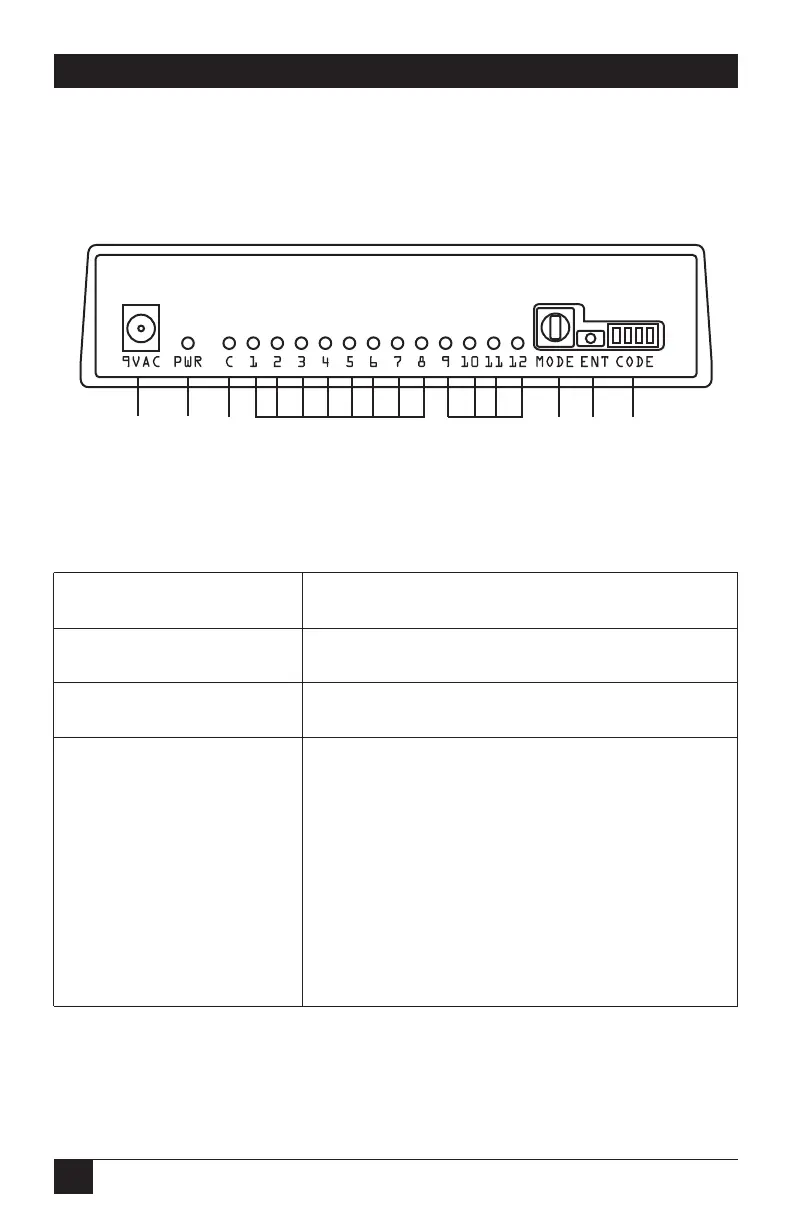
The switch’s rear-panel components are shown in Figure 2-2 and described in
Table 2-2. Detailed LEDs on the back of the unit operate with the Rotary Selection
Switch. The multicolored LEDs are red, green, and orange.
Figure 2-2. The 40418 switch’s rear-panel components.
Table 2-2. Rear-panel components and their functions.
Component Function
Power connector Attaches to a 9-VAC power source.
PWR LED Lights when the switch is powered on.
LED C Green = Run Mode, idle.
Red = Call in process (in or out). Will also show
the port number LED 1–8 when the connection
is made.
Red Flash = The last call was unauthorized.
Off = In Program Mode (non-run Mode).
❷
❸
❻
❼
❽
❶
❶
❷
❹
❺
❸



 To Next Page