Page 11
724-746-5500 | blackbox.com
Chapter 3: Installation
3. Installation
Before you can install the product, you need to prepare your site:
1. Determine where the computer is to be located and set up the computer.
2. Determine where you want to locate the remote USB device(s).
3. If you are using surface cabling, the product supports a maximum distance of
131 feet (40 m).
OR
If you are using premise cabling, ensure CAT5 cabling is installed between the
two locations, with CAT5 information outlets located near both the computer
and the USB device(s), and the total length, including patch cords, is no more
than 131 feet (40 m).
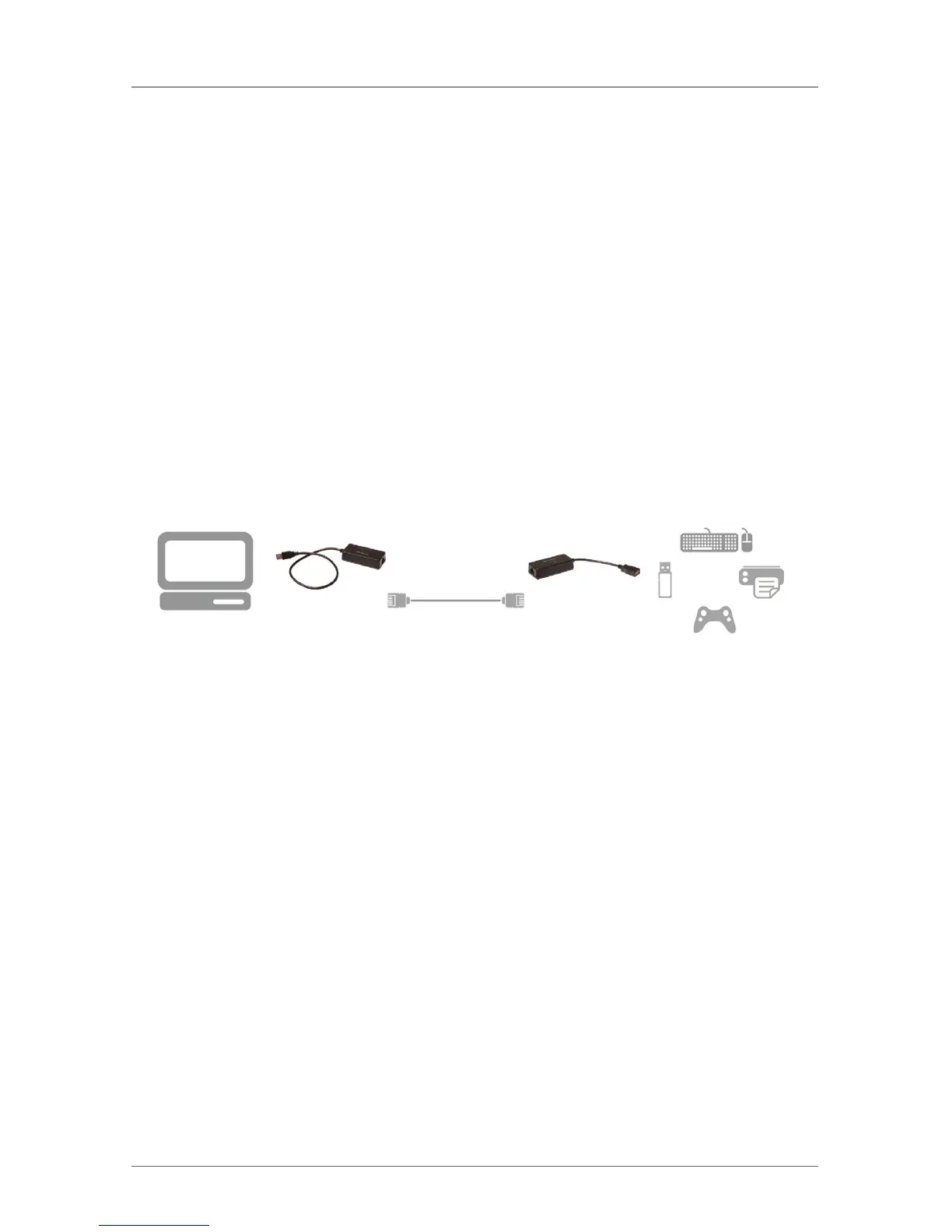
Remote
Extender
USB 1.1,
up to 131 ft. (40 m)
(CAT5/CAT6)
Local
Extender
Figure 3-1. Typical installation.
3.1 Installing the Local Extender Unit
1. Place the Local Extender unit near the computer.
2. Plug the USB cable from the Local Extender into an available USB 2.0/1.1
Type A Port on the computer.
3.2 Installing the Remote Extender Unit
1. Place the Remote Extender unit near the USB device(s) in the desired remote
location.
2. Plug in your USB Device.




 To Next Page