Page 19
724-746-5500 | blackbox.com
Chapter 4: Configuration
Configure the AC+Thin AP mode
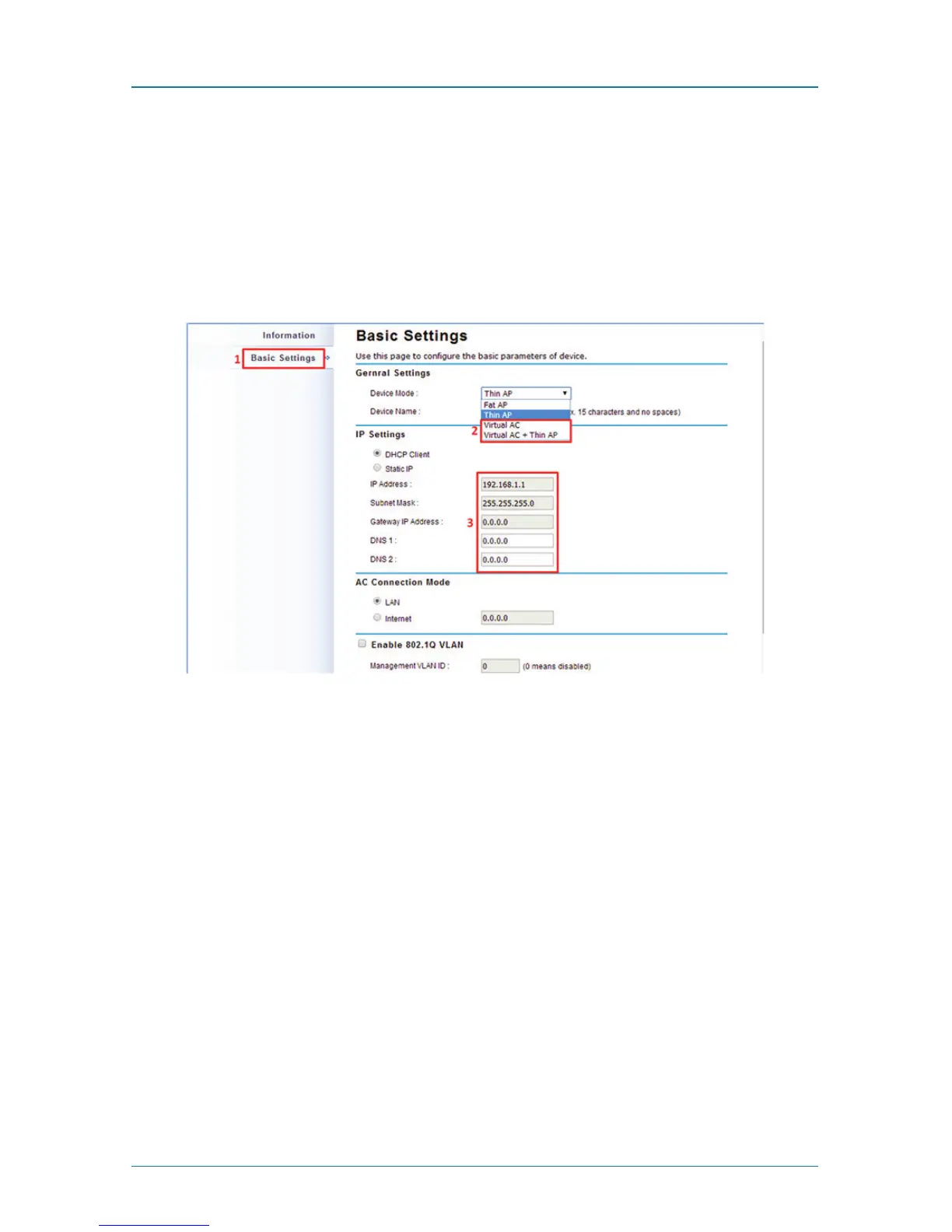
5. To operate as AC+Thin AP mode, go to Basic Settings. From the Device Mode
drop-down list, select “Virtual AC” mode. To use the extender as a virtual
controller and access point concurrently, select “Virtual AC + Thin AP” mode.
Then assign an IP address to the Wireless Ethernet Extender and specify subnet
mask, gateway, and DNS address, respectively. Press “Apply” and wait for
about 50 seconds to take effect.
Figure 4-4. Basic settings screen.
NOTE: AC+ Thin AP mode allows the Wireless Ethernet Extender to operate as
access controller and thin AP at the same time.
NOTE: To operate the extender as a standalone Access Point, wireless client, or
bridge, select FAT AP from device mode.
For Virtual Controller + Thin AP mode, if you need to configure the wireless set-
tings for the Wireless Ethernet Extender, especially SSID and encryption method,
go to Wireless Settings —> Wireless Networks and click on “#1 Wireless SSID”
for configuration. Click “Save” to save the settings.



 To Next Page