Page 33
724-746-5500 | blackbox.com
Chapter 4: Configuration
3. Repeat the above procedures to configure the remote IEEE 802.11b/g/n
Wireless Ethernet Extender.
4. Enter the actual distance in meters. For example, if the distance between the
two VAC bridges is 3 kilometers, enter 3000 in the field.
5. Use ping to check whether the link between the two bridges is OK.
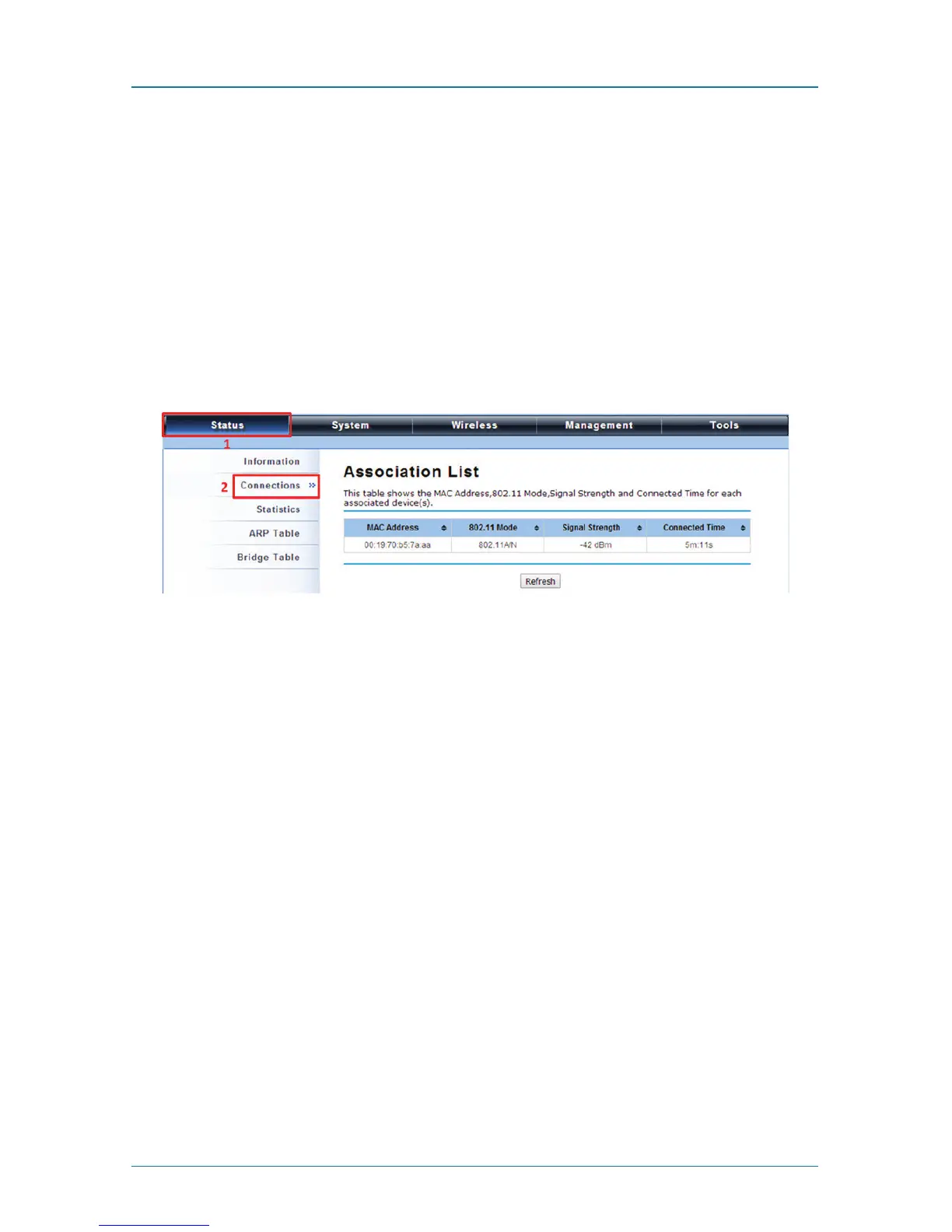
6. To get better wireless connectivity, go to Status —> Connections. If the
connection is established, it will display association information for the remote
bridge, including MAC address, wireless mode, signal strength, and connection
time.
Figure 4-32. Antenna Alignment screen.
AP Repeater Mode
1. Choose Wireless > Basic Settings. Choose “AP Repeater” from Wireless Mode,
and click “Apply” to save it. You can also change the other parameters to
optimize your application before clicking “Apply.”











 To Next Page