ENGLISH
BLACKSTONEPRODUCTS.COM/SUPPORT
OWNER’S MANUAL | ASSEMBLY GUIDE MODEL:
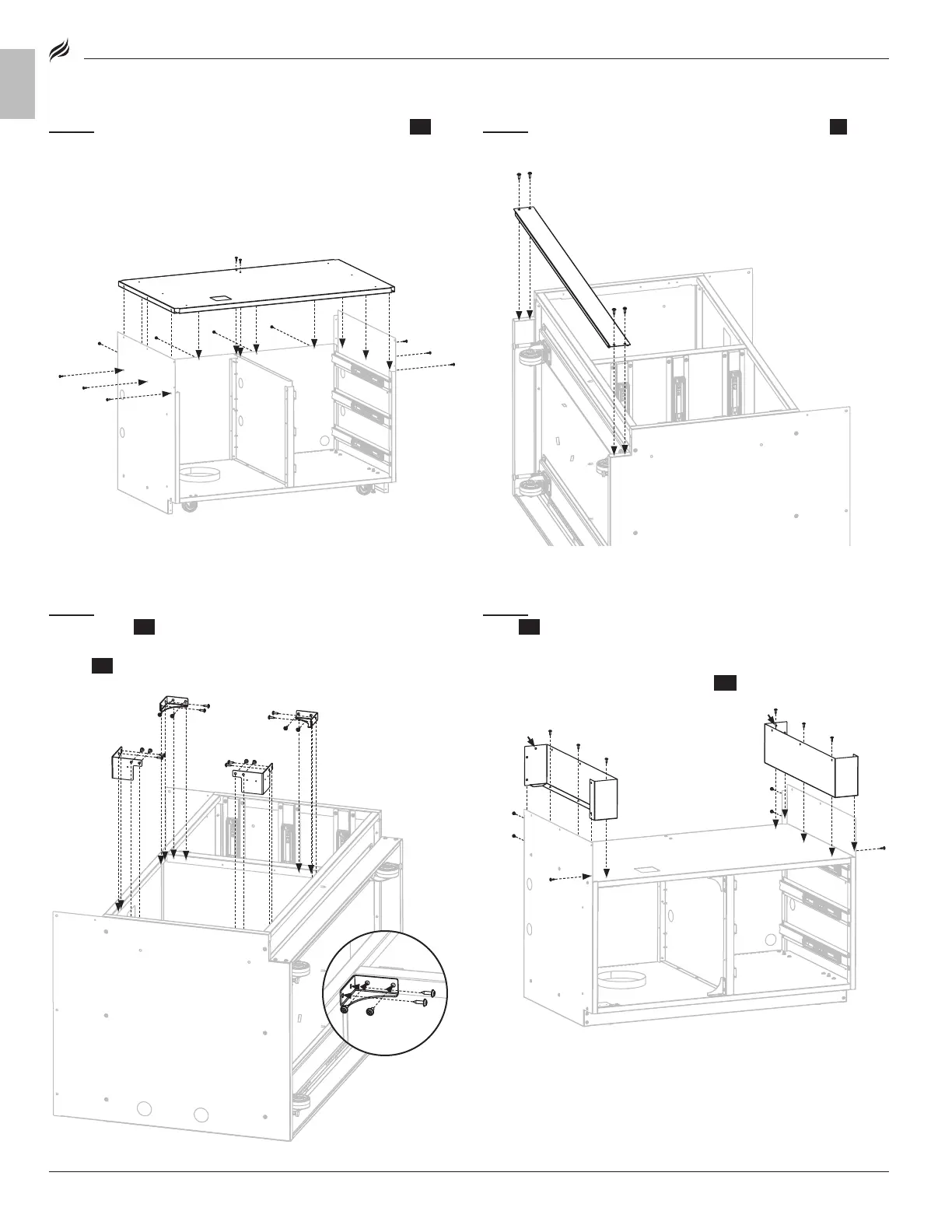
STEP 07
Use four (4) large screws [e.] to attach the toe kick {5} to the
left and right cabinet panels.
STEP 08
Use eight (8) large screws [e.] to attach the two (2) left
corner braces {14} to the cabinet panels.
Use eight (8) large screws [e.] to attach the two (2) right corner
braces {15} to the cabinet panels.
STEP 09
Use three (3) large screws [e.] to attach the left countertop
panel {21} to the cabinet top. Use three (3) large screws [e.] to attach
the panel to the left cabinet panel. (Note: Be sure to install with the
hole in the back)
Repeat with the right countertop panel {22}.
STEP 06
Use six (6) large screws [e.] to attach the cabinet top {19} to
the left and right cabinet panels.
Use four (4) large screws [e.] to attach the cabinet top to the rear
cabinet panel.
Use two (2) large screws [e.] to attach the cabinet top to the center
cabinet panel.
[e.] × 4
[e.] × 16
[e.] × 12
[e.] × 12


 To Next Page