This document describes the Blackbird 4K 3x1 HDMI® Switch, a device designed to distribute video from up to three HDMI source devices to a single HDMI display. It supports high-resolution video, advanced color spaces, and various HDR formats, making it suitable for modern home theater setups.
Function Description
The Blackbird 4K 3x1 HDMI® Switch acts as a central hub for multiple HDMI video sources, allowing users to switch between them and output the selected signal to a single display. This eliminates the need to constantly plug and unplug cables when using different devices like DVD players, Blu-ray players, or gaming consoles with a single TV or monitor. The switch is powered via USB, offering low power consumption.
Important Technical Specifications
- Video Inputs: 3x HDMI® ports
- Video Output: 1x HDMI port
- Maximum Video Resolution: 4K@60Hz
- Supported Color Spaces: YCbCr 4:4:4
- HDMI® Version: 2.0
- HDCP™ Version: 2.2/1.x
- Video Bandwidth: Up to 18Gbps
- Color Depth: 8 bits/channel
- Supported HDR Formats: HDR, HDR10, Dolby Vision™, Hybrid Log-Gamma (HLG)
- DVI™ Support: Complies with DVI™ 1.0 specifications
- Input Power: USB (5 VDC, 1A)
- Power Consumption: 1.5 watts
- Operating Temperature: +32 ~ +104°F (0 ~ +40°C)
- Storage Temperature: -4 ~ +140°F (-20 ~ +60°C)
- Operating Humidity: 20 ~ 90% RH, noncondensing
- Dimensions: 3.5" x 2.3" x 0.7" (89 x 59 x 19 mm)
- Weight: 2.1 oz. (60g)
Usage Features
The switch offers flexible control options for selecting video inputs:
- Manual Control: A "SWITCH" button on the top panel allows users to cycle through the available inputs (Input 1, Input 2, Input 3) sequentially.
- Remote Control: An included IR remote control provides direct access to each input.
- IN1 Button: Selects video input 1.
- IN2 Button: Selects video input 2.
- IN3 Button: Selects video input 3.
- Cycle Button: Cycles forward to the next available video input, similar to the physical button on the device.
- Input LEDs: Three dedicated LEDs on the device indicate which video input is currently selected, providing clear visual feedback.
- Connectivity:
- HDMI Inputs: Three ports for connecting HDMI source devices (e.g., DVD players, Blu-ray players).
- HDMI Output: One port for connecting to a single HDMI display (e.g., TV, monitor).
- DC 5V: A DC barrel connector for the included USB power cable.
- IR: A 3.5mm jack for connecting the included IR receiver, enabling remote control functionality.
Maintenance Features
The manual provides several guidelines for safe operation and basic maintenance:
- Indoor Use Only: The device is designed exclusively for indoor environments.
- Avoid Moisture: Do not expose the device to water or moisture. Keep liquids away from the unit. If moisture exposure occurs, immediately disconnect power and allow it to dry completely before reapplication.
- Handle with Dry Hands: Always ensure hands are dry when touching the device, power cord, or connected cables.
- Protect from Physical Stress: Avoid excessive vibration, extreme force, shock, or fluctuations in temperature and humidity.
- Temperature Control: Do not expose the device to excessively high temperatures or place it near heat sources (fireplaces, stoves, radiators). Avoid direct sunlight.
- Clean Environment: Do not place or install the device in areas with excessive dust, humidity, oil, smoke, or combustible vapors.
- Pre-Operation Check: Before use, inspect the unit and power cord for any physical damage. Do not operate if damage is present.
- Power Outlet Compatibility: Ensure the power outlet provides the correct type and level of power required by the device.
- Unplug When Not in Use: Disconnect the device from its power source when not in operation.
- Power Cord Care: Prevent damage to the power cord by avoiding crimping, pinching, walking on, or tangling. Ensure the cord does not pose a tripping hazard.
- Proper Disconnection: Always unplug the unit by grasping the connector head or adapter body, never by pulling on the power cord.
- Power Off Before Connections: Ensure power is turned off and disconnected before making any electrical connections.
- Remote Control Battery Care: Remove batteries from the remote control if it will be unused for an extended period.
- Cleaning: Clean the device using only a soft, dry cloth. For stubborn marks, moisten the cloth with warm water. Avoid chemical cleaners, solvents, or detergents.
- No User-Serviceable Parts: The device contains no user-serviceable parts. Do not attempt to open, service, or modify the unit.
These features and guidelines ensure the longevity and optimal performance of the Blackbird 4K 3x1 HDMI® Switch.

 Need help?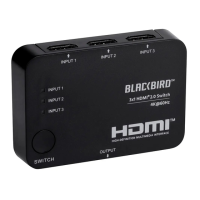

 To Next Page
 General