Need help?
Do you have a question about the Blackfire A3-29588 and is the answer not in the manual?
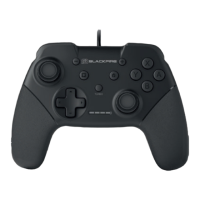
Identifies the placement of analog sticks, D-pad, and face buttons on the controller.
Details buttons like R, ZR, L, ZL and the USB connection port.
Details the items included in the controller package, such as the controller and manual.
Highlights ergonomic design, compatibility, button types, vibration motors, and cable length.
Provides step-by-step instructions for connecting the wired controller to the Nintendo Switch console.
Explains the procedure to activate the Turbo function for specific buttons.
Details the steps required to deactivate the Turbo function on a button.
Covers essential safety advice, including avoiding water, extreme temperatures, and dropping the device.
Provides guidance on proper cleaning, storage, and long-term preservation of the controller.
Advises against disassembly and outlines warranty limitations for unauthorized modifications.
Emphasizes adult supervision for children and specifies the product is for indoor use only.
 General
| Brand | Blackfire |
|---|---|
| Model | A3-29588 |
| Category | Video Game Controller |
| Language | English |

 To Next Page