5. WARNINGS AND SAFETY MEASURES
In order to make sure that the controller works properly, please follow the instructions below
strictly and do not misuse the product, keeping in mind the following warnings:
General Warnings
• Do not throw any of these devices into water, fire or drop them.
• Keep the devices away in a dry and safe place. Do not expose to direct sun light.
• Do not use the device or expose the device to high or low temperatures (extreme hot/cold
conditions or high levels of moisture). Not paying attention to this warning may damage the
product.
• Keep the controller and its components in a safe and clean place. Quick oscillations or dropping
the controller into hard surfaces may damage the device and/or its components.
• For product general cleaning, carefully wipe the controller with a damp & clean cloth. Avoid
putting a lot of pressure on the buttons or the surface of the controller.
• If you are not going to use the product for a long time keep the controller in a dry and safe
place, away from liquids, dust and dirt; do not expose it to direct sun light, extreme
temperatures (heat or cold) or air moisture fluctuations.
• Use the product properly and following strictly these instructions.
• Do not disassemble or attempt to repair the device or its components. There are no serviceable
parts inside. Changes or modifications not approved by Ardistel will avoid the user warranty.
Only Ardistel qualified personnel can repair or replace the product and its components.
• Please, keep the device and its components away from children. Children must be ALWAYS
under adult supervision.
• This product is ONLY for HOME INDOOR use only. Recycle it into electronic devices waste, not
into domestic waste.
For further assistance contact our customer service team in: soporte@ardistel.com.
5
1. PACK CONTENTS
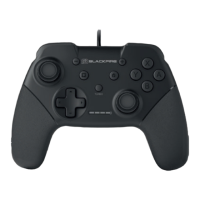
1 x Wired Controller for Nintendo Switch™*
1 x Instructions Manual
2. PRODUCT FEATURES
• Wired Controller compatible* with Nintendo Switch™ console.
• Ergonomic design specially for long gaming sessions.
• Included "+", "-", Capture & HOME buttons.
• Buttons: D-Pad, A, B, X, Y, L/R, ZL/ZR, and analogue joysticks -left and right-.
• TURBO/CLEAR function with LED indicator.
• VIBRATIONDUO™ exclusive vibration motors.
• Cable length: 3m.
(*) Not compatible with the following specifications: NFC function, Motion Sensor.
3. CONNECTION AND SETUP
In order to connect the controller to your Nintendo Switch™ system, please follow the steps
below:
• First, make sure your Nintendo Switch™ system is turned on, on TV mode and placed on the
dock.
• WARNING: Please make sure that the options "Controller Vibration" and "Pro Controller
Wired Communication" are ON, both inside menu SYSTEM SETTINGS > CONTROLLERS AND
SENSORS.
• Plug the USB cable connector into a free USB slot from your system.
• Next, press the HOME button and wait one minute.
• Now you can use the controller with your Nintendo Switch™ system.
4. TURBO FUNCTION
4.1. In order to enable the Turbo function, please follow the steps below:
• First, press and hold the button where you wish to enable the Turbo function.
• Next, press once the Turbo button.
4.2. In order to disable the Turbo function, please follow the steps below:
• First, press and hold the button where you wish to disable the Turbo function.
• Next, press once the Turbo button.
Note: the Turbo function LED light will blink in red anytime you press a button with the
function enabled. You cannot enable the Turbo function on the right and left joystick
buttons.
BLACKFIRE WIRED PRO CONTROLLER NSW FOR SWITCH™
• INSTRUCTIONS MANUAL •
EN


 To Next Page
 Loading...