Need help?
Do you have a question about the Blackfire BFX-C20 and is the answer not in the manual?
Lists all items included in the product package.
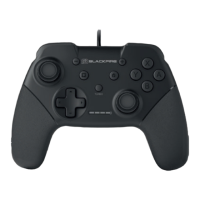
Details the key features and specifications of the controller.
Provides step-by-step instructions for connecting the controller to a PS4 system.
Guides users through the initial pairing process with the PS4 console.
Explains how to connect the controller for subsequent uses.
Explains how to charge the controller's battery and what the LED indicators mean.
Provides general safety advice and troubleshooting tips for controller operation.
Addresses issues where the controller fails to connect or function correctly.
Explains how to troubleshoot vibration issues in games.
Clarifies that the controller does not support motion or touchpad features.
Provides guidance on charging time and battery life issues.
Helps resolve issues where the controller works in menus but not in games.
 General
| Analog Sticks | 2 |
|---|---|
| Compatibility | PC |
| Features | Vibration feedback, Turbo function |
| Buttons | 12 |
| Cable Length | 1.8 meters |

 To Next Page