Blackmagic URSA Overview19
Camera Assist and Audio Station
Work Station Features
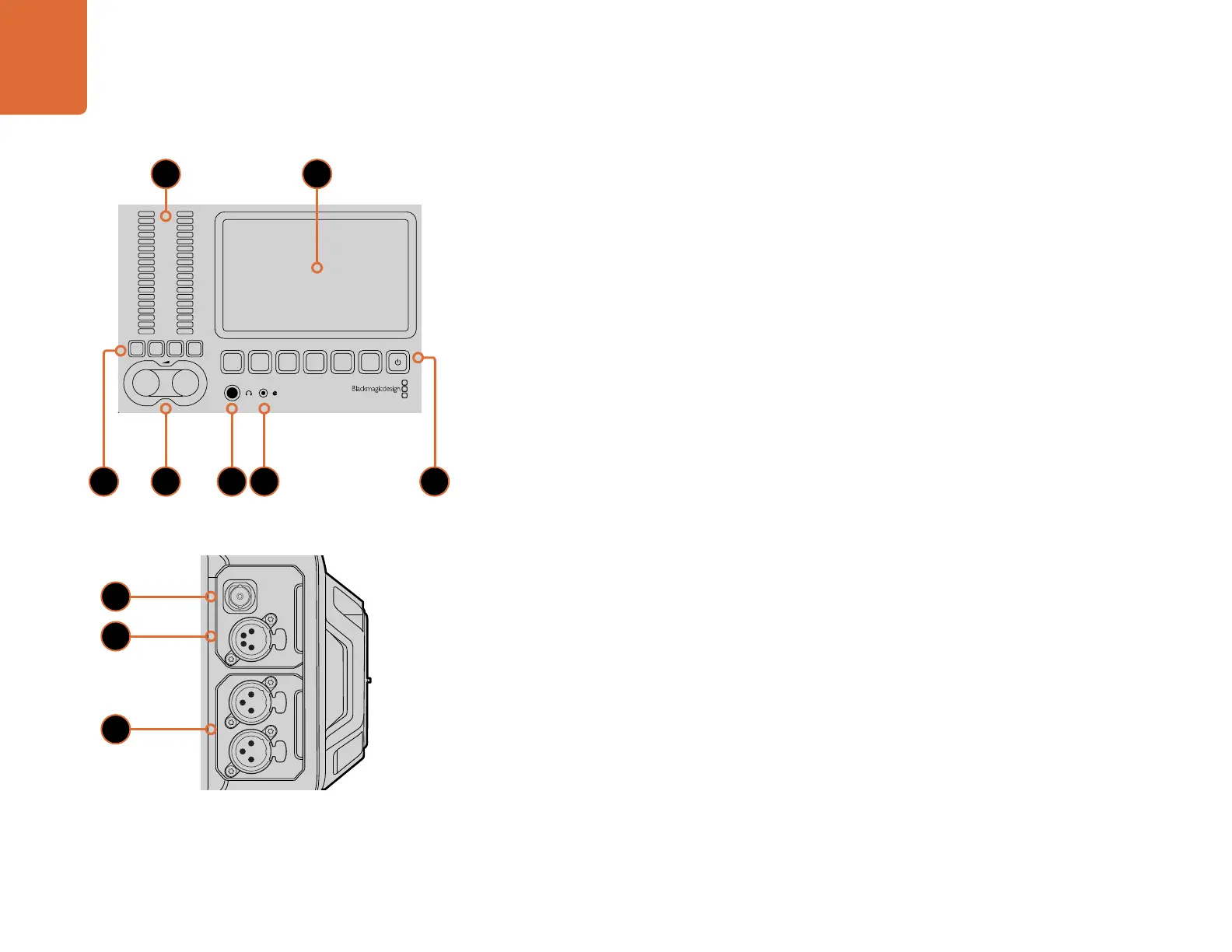
1. AUDIO METERS
Monitor your audio levels using the ch 1 and ch 2 audio meters. Page 24.
2. TOUCHSCREEN
The 5" touchscreen display is used for monitoring your camera image and scopes, and applying
camera settings. Page 25.
3. AUDIO MONITORING MUTE AND SOLO
Press these buttons to mute and monitor selected audio channels. Page 24.
4. AUDIO LEVEL ADJUSTMENT KNOBS
Adjustment knobs to set the recording levels for the left and right audio channels. Page 24.
5. HEADPHONES
1/4” jack output for headphones monitoring. Page 21.
6. LANC REMOTE
2.5mm stereo jack for LANC remote control. LANC supports record start and stop, iris and focus
control. Page 21.
7. WORK STATION BUTTONS
Activates various camera controls and the touchscreen menu for adjusting settings. Page 23.
8. HD-SDI MONITORING OUT
3G-SDI connector for down converted 1080 HD output. Pages 21 and 46.
9. +12 V POWER OUTPUT
4 pin XLR connector for powering accessories, such as the Blackmagic URSA viewfinder. Page 21.
10. XLR AUDIO IN
XLR inputs for plugging in external balanced analog audio with selectable 48 V phantom power. Page 21.
REC
ZOOM
DISP
PGM
1
CFAST
IRIS
FOCUS
REC
IRIS
FOCUS PEAK DISP MENU SLATE
2
IRIS
0
-6
-12
-18
-24
-30
-36
-42
-48
L R
SDI IN
REF IN
TIMECODE IN
TIMECODE OUT
12V
CH1
SOLO
CH1
MUTE
CH2
MUTE
CH2
SOLO
FOCUS PEAK DISP MENU SLATE
REC
ZOOM
DISP
PGM
1
CFAST
IRIS
FOCUS
REC
IRIS
FOCUS PEAK DISP MENU SLATE
2
IRIS
SDI OUT
0
-6
-12
-18
-24
-30
-36
-42
-48
L R
SDI IN
REF IN
TIMECODE IN
TIMECODE OUT
12V
CH1
SOLO
CH1
MUTE
CH2
MUTE
CH2
SOLO
FOCUS PEAK DISP MENU SLATE
PUSH PUSHPUSH
8
9
10
21
74 5 63



 To Next Page