Entering Metadata45
The Slate
The touchscreen on your Blackmagic URSA Mini, or the two touchscreens on Blackmagic URSA have
many purposes, one of which is to allow you to easily log metadata directly into the camera using
the 'slate' feature. Metadata is stored in the recorded files and is easily accessed by editing software.
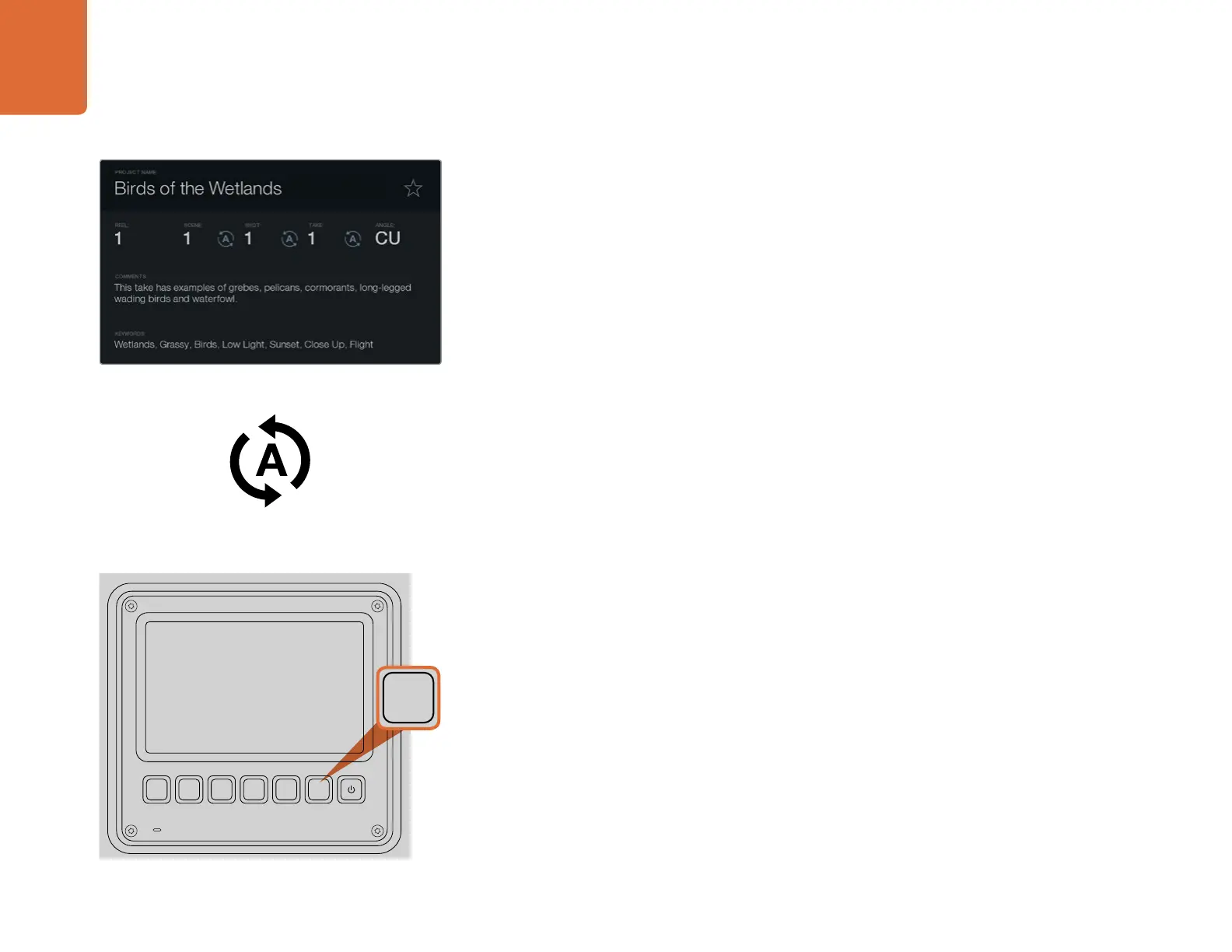
Step 1. In 'recording' mode, tap anywhere on the LCD screen, or press the 'slate' button on
Blackmagic URSA to make the slate appear.
Step 2. To enter or change details, tap the text area you wish to change and a touchscreen keyboard
will appear. Type in the desired information and tap the ‘enter’ key on the bottom right
corner of the keyboard. The information will be updated on the slate and will also be
recorded onto the file.
Step 3. If you want the scene, shot or take number to auto-increment, tap the corresponding auto-
increment icon so it is highlighted. Tap it again to turn off the auto-increment feature. You
will see the information auto increment with every recording.
If you wish to edit the metadata of a clip, cue the clip in playback mode and enter the slate screen
to display the clip's metadata. Change any information in the slate and tap the ‘update’ button to
confirm the change.
Entering words into the keywords field will allow you to use them as search terms in your library
database. This may be particularly useful for large projects where you have lots of material. The use
of keywords narrows down the number of clips to search through, saving valuable time when you
are editing.
All metadata is compatible with popular software such as Final Cut Pro X and DaVinci Resolve.
Log metadata directly into the camera using the
'slate' feature.
On Blackmagic URSA, press the 'slate' button to activate the
slate feature on a touchscreen.
Select the auto-increment icon if you want the scene,
shot or take number to auto-increment.
Entering Metadata
IRIS
FOCUS PEAK DISP MENU SLATE
2
IRIS
SDI OUT
0
-6
-12
-18
-24
-30
-36
-42
-48
L R
SDI IN
REF IN
TIMECODE IN
TIMECODE OUT
12V
CH1
SOLO
CH1
MUTE
CH2
MUTE
CH2
SOLO
FOCUS PEAK DISP MENU SLATE
PUSH PUSHPUSH
REC
ZOOM
DISP
PGM
1
CFAST
IRIS
FOCUS
REC
IRIS
FOCUS PEAK DISP MENU SLATE
2
IRIS
SDI OUT
0
-6
-12
-18
-24
-30
-36
-42
-48
L R
SDI IN
REF IN
TIMECODE IN
TIMECODE OUT
12V
CH1
SOLO
CH1
MUTE
CH2
MUTE
CH2
SOLO
FOCUS PEAK DISP MENU SLATE
PUSH PUSHPUSH



 To Next Page