7
ENGLISH
key (8) provided as shown in gure C.
u Use a screwdriver (18) (not supplied) to lock the sanding
base in position while you tighten the locking screw (9) as
shown in gure C1.
Fitting sanding sheets (g. D)
u Hold the tool with the sanding base (3) facing upwards.
u Place the sanding sheet (11) onto the sanding base (3)
making sure that the holes in the sheet (where applicable)
line up with the holes in the base as shown in gure D.
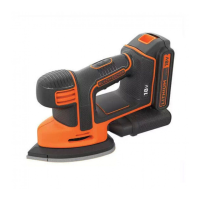
Large detail sanding base
With this sanding base, you can use the tool as a detail
sander or a ush sander.
Attaching the large detail sanding base (g. E, F, F1)
For detail sanding, the pointed end should face forward
(g. E).
For sanding large areas, the pointed end should face to the
rear (g. F)
u Attach the sanding base as described above under
"Attaching the random orbit sanding base".
u Press down on the sanding base until you hear it click into
place.
u Replace the locking screw (9) and secure with the alien
key (8) provided.
u Use a screwdriver (18) (not supplied) to lock the sanding
base in position while you tighten the locking screw (9) as
shown in gure F1.
Fitting sanding sheets (g. G)
u Detach the two diamond-shaped tips (14) from the
sanding sheet (12).
u Hold the tool with the sanding base facing upwards.
u Place the sanding sheet (12) onto the sanding base,
making sure that the holes in the sheet (where applicable)
line up with the holes in the base.
The diamond-shaped tip (13) can be reversed and replaced
when worn.
u When the front part of the tip is worn, detach it from the
sheet, reverse it and press it onto the sanding base again.
u When the whole tip is worn, remove it from the sanding
base and t a new diamond shaped tip (13).
Tip of the sanding base (g. H)
When the sanding base tip (5) is worn, it can be reversed
or replaced. When the diamond shaped tip holder (15) is
worn, it can be replaced. Spare parts are available from your
BLACK+DECKER dealer.
u Remove the screw (16).
u Reverse or replace the worn part.
u Fit and tighten the screw (16).
Finger attachment (g. I)
The nger attachment is used for ne detail sanding.
u Remove the screw (16).
u Remove the diamond-shaped tip holder (15) from the
sanding base.
u Fit the nger attachment (6) onto the sanding base.
u Fit and tighten the screw (16).
u Fit the appropriate sanding sheet (17) onto the nger
attachment.
Use
Warning! Let the tool work at its own pace. Do not overload.
Warning! Do not cover the ventilation slots when using the
tool. Make sure that the sanding base is at on the workpiece.
u Store the tool with a base in place.
u Keep hands away from the spindle area on the tool.
u Do not rest ngers on the base during use.
Switching on and off (g. J)
u To switch the tool on, set the on/off switch (1) to position I.
u To switch the tool off, set the on/off switch (1) to
position O.
Emptying the dust canister (g. K)
The dust canister (7) should be emptied after every ten
minutes of use.
u Pull the dust canister (7) to the rear and off the tool away
from the connection port (7a).
u Empty into a suitable receptacle and replace on tool.
Accessories
The performance of your tool depends on the accessory used.
BLACK+DECKER accessories are engineered to high quality
standards and designed to enhance the performance of your
tool. By using these accessories you will get the very best
from your tool.
The accessories supplied with your sander depend upon the
model that you have purchased. If you require an accessory
that is listed below but is not supplied withyour sander please
visitour website at www.blackanddecker.eu













 To Next Page