Page 8 Page 9
SET UP & USE
BATTERY INSTRUCTIONS
Batteries not included
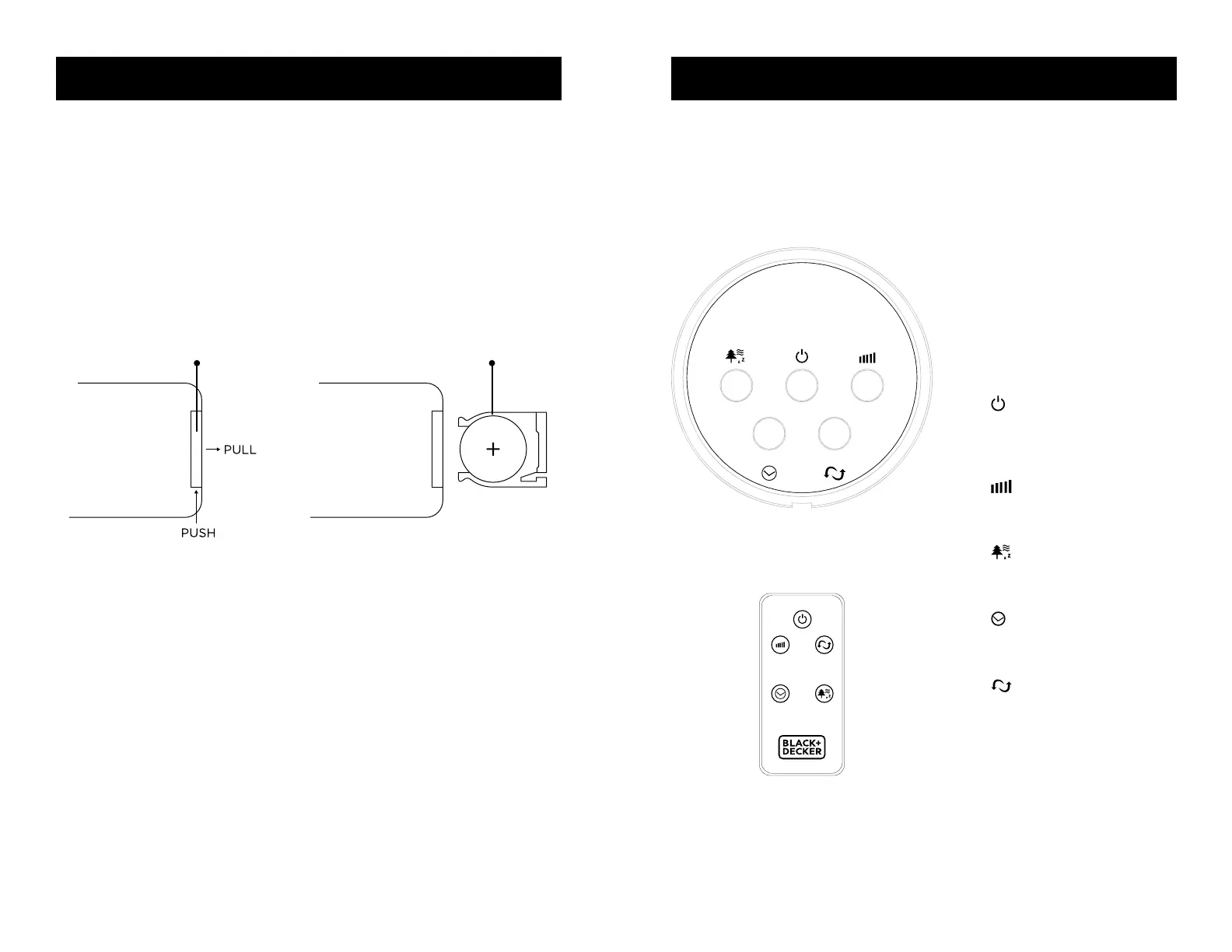
The remote control requires a CR2025 Lithium Battery to operate. Battery is not
included.
1. Push the button at the base of the battery cover to release the cover. Pull out the
battery cover as shown in the diagram.
2. Insert the battery making sure the “+” side is facing up.
3. Once battery is installed, push battery cover closed
CR2032
Battery
Remote Control
Battery Cover
SET UP & USE
The FAN may be operated by the
manual controls located on the
FAN (as shown in FIGURE 1) or
by your remote control (shown
in FIGURE 2). Place the FAN on a
stable at surface. Plug the cord
set into a 120V A.C. electrical
outlet.
1. POWER: Turn the FAN
on by pressing the ‘POWER’
button; Turn the FAN off by
pressing the ‘POWER’ button
again.
2. SPEED: You can adjust
the fan speed to the desired
level: low, medium, or high by
pressing ‘SPEED’ continuously.
3. MODE: Pressing the’
MODE’ button will set the FAN
into NORMAL, NATURAL, and
SLEEP mode.
4. TIMER: The fan is equipped
with a timer that allows you to
set its length
of operation
5. OSC: Pressing the ‘OSC’
button will start and stop the
oscillation function.
CONTROL PANEL
FIGURE 1
REMOTE CONTROL
FIGURE 2
OPERATION INSTRUCTIONS
CONTROL PANEL
POWER
SPEED
OSC
TIMER
MODE
POWER
SPEED OSC
TIMER MODE



 To Next Page