Page 12
SET UP & USE
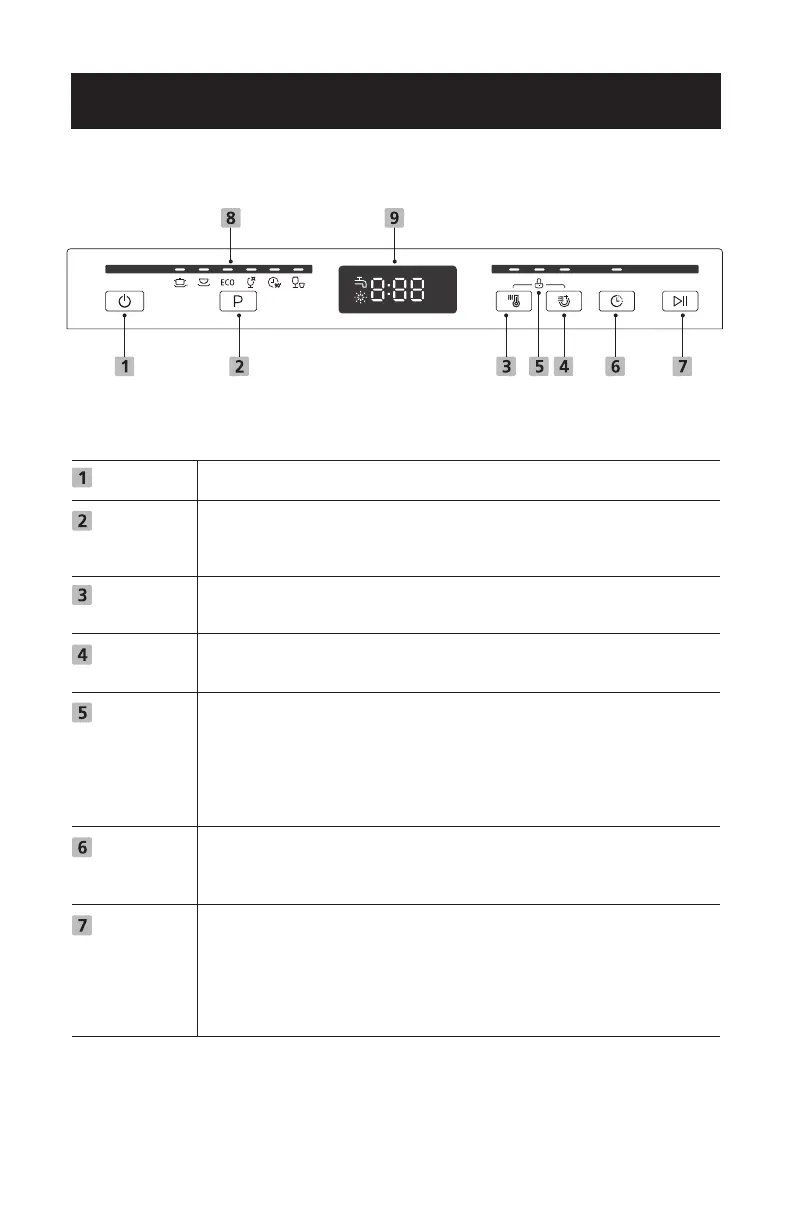
CONTROL PANEL
Power
Program
Hi Temp
Heated Dry
Control
Lock
Delay
Start /
Cancel
Press this button to turn on your dishwasher, the screen lights up.
Select the appropriate washing program, the selected program
indicator will be lit. After completing the program and function
selection, the Start / Cancel button to start.
When the “Hi Temp” function is selected, the temperature of the
water will be maintained at 140°F (60°C) max.
The “Heated Dry” function is selected. The water temperature is
at 158°F (70°C). (It can be used with all programs except glass.)
This option allows you to lock the buttons on the control panel,
so children cannot accidently start the dishwasher by pressing
the buttons on the panel. Only the Power button remains active.
To lock or unlock the buttons on the control panel, press and
hold the Hi Temp button + Heated button for 3 seconds simulta-
neously.
Press the Delay button to increase the delay start time. Delay a
cycle for up to 24 hours in one-hour increments. After setting
the delay time, press the Start / Cancel button to start.
1. To start the selected washing program.
2. Press the button for 3 seconds to cancel the program, when
the dishwasher is working.
3. Press the button for 3 seconds to cancel the delay start after
it has been programmed.



 To Next Page