ENGLISH
(Original instructions)
10
The program will switch the heating on for 2 hours starting at 16:00 on Monday and switch it off at 18:00, and on Wednes-
day it will switch on at 16:00 and switch off at 19:00.
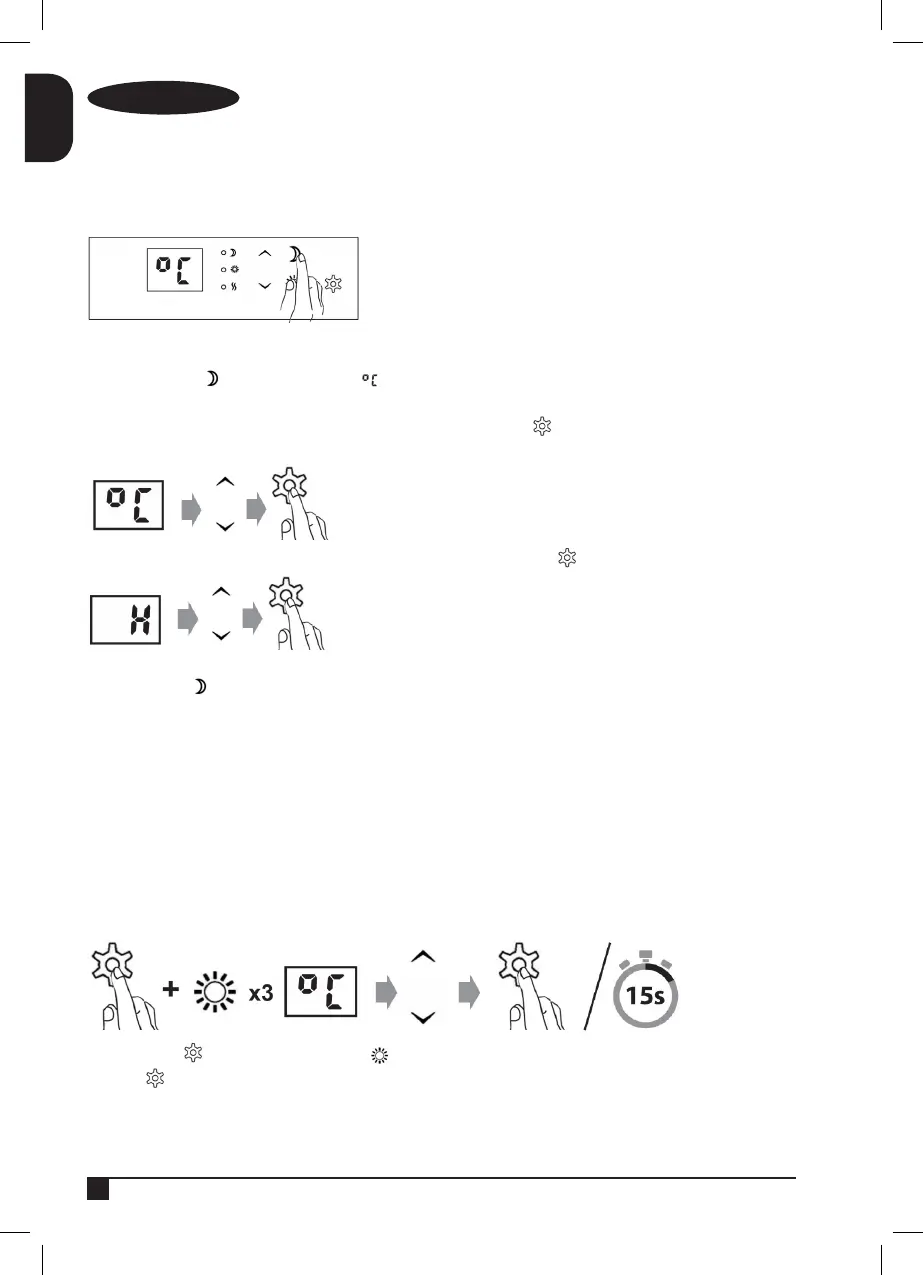
Programming the night-time timer
When you want to set the timer to make the heater operate during the evenings/nights (based on the actual time of
programming) press . The screen will display .
Enter the desired temperature for the night-time program. Save by pressing .
Enter the desired number of hours for the night-time program. Save by pressing .
* The control light will remain green when the heater is in an active program. The control light will turn red when the
programmed period is inactive, but programmed nonetheless.
Note: This program will be the same for
All the days of the week.
Example: At 20:00 we program 2h at 22°C
The heater will switch on at 20:00 every day of the week and switch off at 22:00.
Programming the desired daytime temperature.
Press and hold as well as pressing 3 times Enter the desired daytime temperature and leave it programmed by
pressing or wait 15 seconds. To program it automatically.


 To Next Page