ENGLISH
(Original instructions)
7
Function operation (only remote control)
Set the current time/day:
♦ Press button for one time and the display will show
“12” as default. Press “+/-“ to set the current hour.
♦ Press again, the display will show “30” as default.
Press “+/-“ to set the current minute.
♦ Press again, the display will show “d7” as default.
Press “+/-“ to set the current day (Monday-Sunday:
d1-d7).
♦ Then press OK to conrm the setting.
SET THE TEMPERATURE:
♦ During working status, press +/- buttons. The display will
show 23ºC as default.
♦ Press +/- to set the desired temperature (10-49ºC) and
then press OK to conrm it.
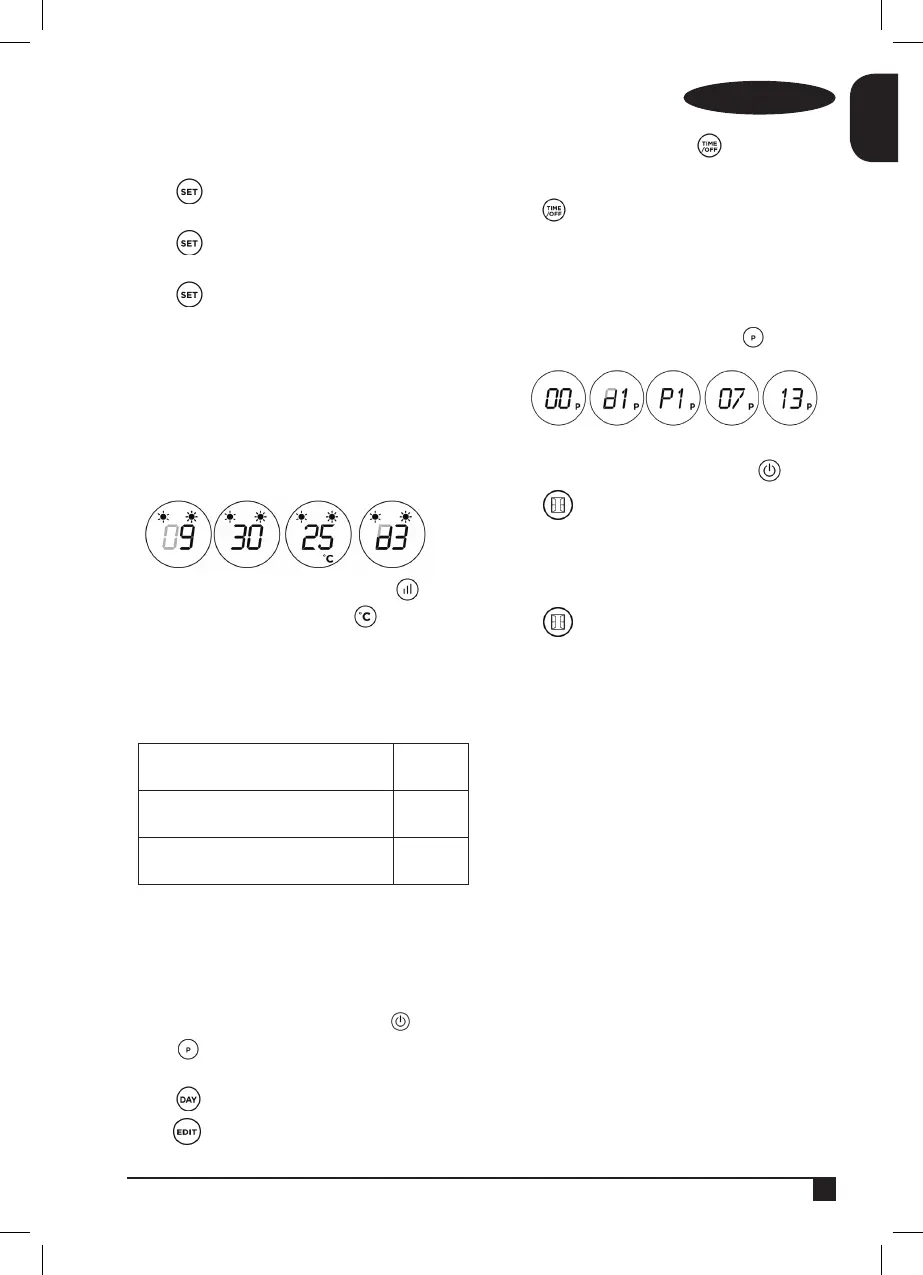
♦ Example: Wednesday, 9:30 AM, 25ºC, II heating.
♦ To cancel the setting temperature just press button
to choose heating I or II. The display will go off and
it will show “- -“.
NOTE:
♦ When setting the temperature, it will use a SMART
working way.
Setting temperature – ambient temper-
ature > 2ºC
2000W
0ºC < Setting temperature – ambient
temperature < 2ºC
1000W
Setting temperature – ambient temper-
ature = 0ºC
Fan
♦ The fan will work for 30 seconds and the it will stop. The
appliance will inter into standby mode.
Set weekly program:
♦ Set the weekly program after setting the current time/
day.
♦ If the product is not in working staus, press button.
♦ Press button. The appliance is ready to set the
weekly program.
♦ Press button and the display will show d1-d7.
♦ Press button and the display will show P1-P6.
♦ To set the program 1 (P1), press button and the
display will show “00” as default. Press this button
continuously to set the turn-on time.
♦ Press and the display will show the previous step
turn-on time by default. Press this button continuously to
set the turn-off time.
♦ Press +/- to set the temperature.
♦ Repeat these steps for the whole weekly program. Then
press OK to conrm.
♦ To cancel the weekly function, press the button and
“P” light will go off.
OPEN-WINDOW DETECTION FUNCTION:
♦ If the product is not in working staus, press button.
♦ Press and the appliance will show 23ºC as default.
Press +/- to set the temperature.
♦ When the ambient temperature drops 5-10ºC within 10
minutes, the product will stop working for 30min and it
will enter into standby mode.
♦ Press again to turn off the open-window detection
function.
Once you have nished using the appli-
ance:
♦ Turn the appliance off, using the on/off switch.
♦ Unplug the appliance from the mains.
♦ Clean the appliance.
Safety thermal protector:
♦ The appliance has a safety device, which protects the
appliance from overheating.
♦ When the appliance switches itself on and off repeatedly,
for reasons other than the thermostat control, check to
ensure that there are no obstacles that impede correct
air entry or expulsion.
♦ If the appliance turns itself off and does not switch itself
on again, disconnect it from the mains supply, and wait
for approximately 15 minutes before reconnecting. If the
machine does not start again seek authorised technical
assistance.
CLEANING
♦ Disconnect the appliance from the mains and allow it to


 To Next Page