ENGLISH
6
Hex nut with conical washer
Écrou Hexagonal muni d'une rondelle conique
Tuerca hexagonal con roldana conica
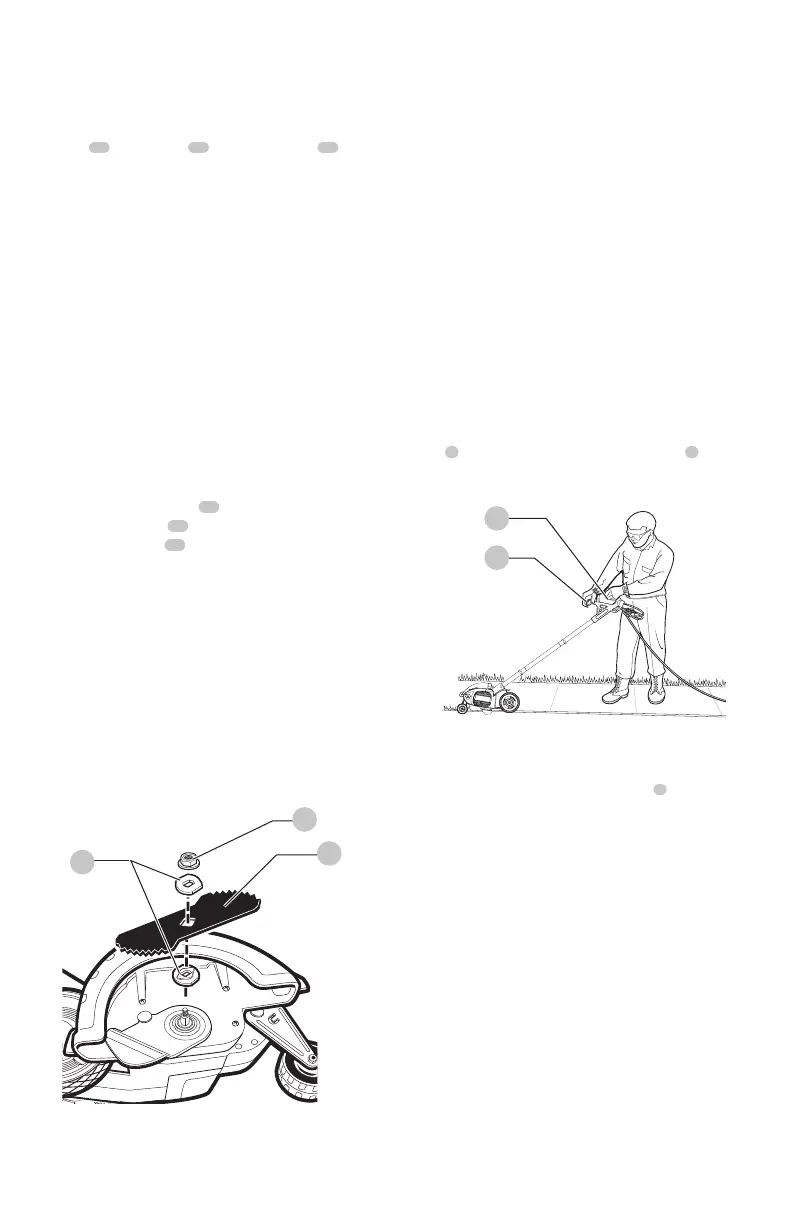
Proper Hand Position (Fig. J)
WARNING: To reduce the risk of serious
personal injury, ALWAYS use proper hand position
as shown.
WARNING: To reduce the risk of serious
personal injury, ALWAYS hold securely in anticipation of
a suddenreaction.
Proper hand position requires one hand on the main
handle
8
and one hand on the auxilliary handle
6
.
OPERATION
WARNING: To reduce the risk of
serious personal injury, turn unit off and
disconnect it from power source before making
any adjustments or removing/installing
attachments or accessories. An accidental start-up
can causeinjury.
Fig.I
13
14
15
Fig.J
8
6
Switch (Fig. A)
To turn tool ON, squeeze the trigger switch
7
. The trigger
has been designed so that it is very easy to hold in the ON
position. To turn tool OFF, release thetrigger.
NOTE: The edger is a major appliance and should not be
operated simultaneously with other major appliances on
the same householdcircuit.
Usage
1. Set cut depth at 1" and set edge guide to
the down position, refer to Assembly and
AdjustmentsInstructions.
2. Before starting the edger, line up the tool so the edge
guide rests against the edge of the paved surface.
Both rear wheels should be on the paved surface
whenedging.
NOTE: When there is heavy overgrowth of grass over the
paved surface it may drag on the guard. An initial cut may
be required with the edger on the grass side. This will
require lifting up the edge guide and may require reducing
the depth of cut (refer to To Change Position of the Edge
Guideinstructions).
Blade (Fig. I)
DANGER: Unplug tool. Wait for blade to
come to completestop.
The blade
13
, two spacers
14
and hex head nut
15
with
conical washer should be attached to your edger in the
order shown. Please check that the blade has been properly
mounted before using your edger. The edger blade has two
wear indicators that show when blade needs to be replaced.
When the blade wears to the small hole at each end of the
blade it will give only 1/4 " (6 mm) depth of cut and should
bereplaced.
NOTE: To increase blade life, keep initial cutting depth at
minimum and increase depth setting as bladewears.
Blade Replacement
DANGER: Unplug tool. Wait for blade to
come to completestop.
DANGER: Blade rotates momentarily after
the switch isreleased.
1. Loosen the hex head nut
15
(9/16"). Use a 1" wrench
on the outer spacer
14
, or a 2" x 4 " wood block
between the blade
13
and guard if necessary to hold
the blade fromturning.
2. Ensure inner spacer is on shaft—”flats” in spacer hole
must engage with “flats” onshaft.
3. Holding the spacer in place, put the blade on the shaft,
as shown (FigureI).
4. Hold the blade against the spacer and install the outer
spacer, again aligning the flats in the spacer with the
flats on theshaft.
5. Install the hex head nut and conical washer, then
tighten with awrench.
NOTE: Replace hex head nut and conical washer only
with identical replacementpart.



 To Next Page