10
ENGLISH
(Original instructions)
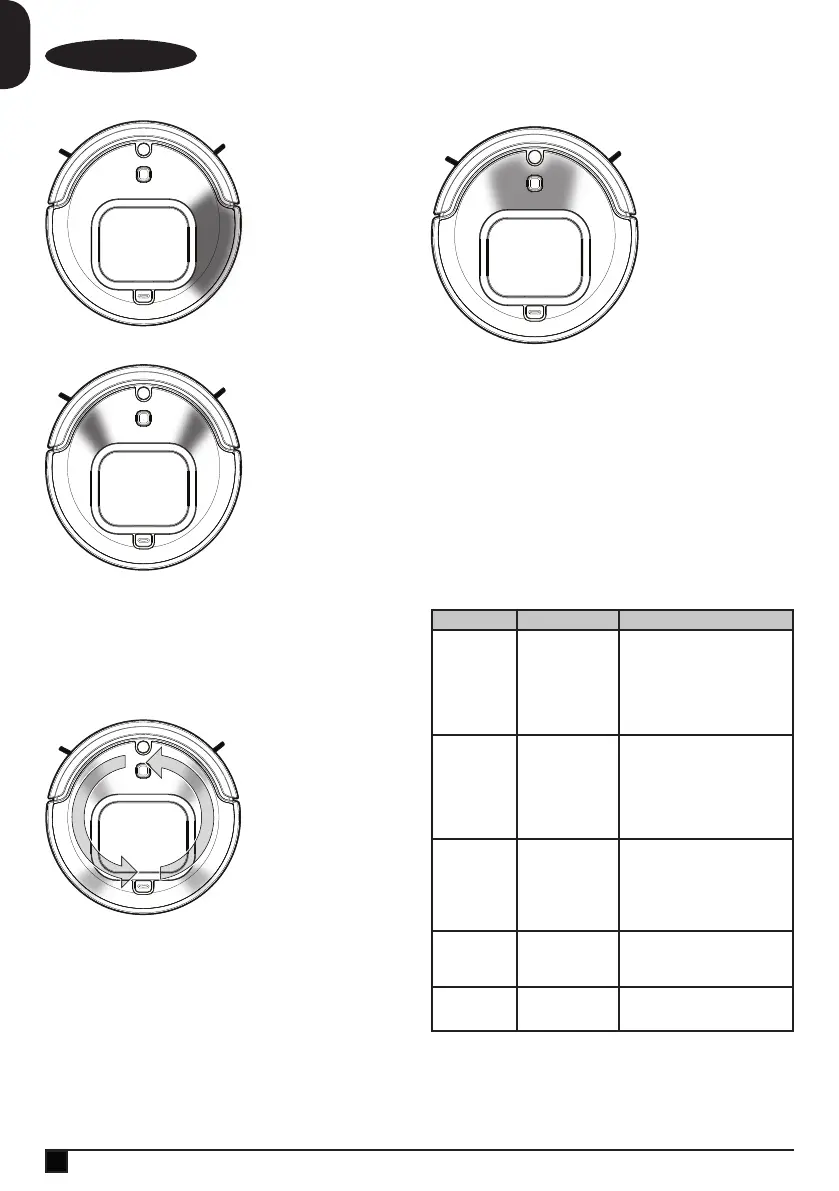
Error Display
Error Code C:
Right hand side ashing
Red to OFF.
Problem:
Right wheel stuck.
Solution:
Clear debris/obstruction
from right wheel. Press
the power button twice
to clear the error and
restart the vacuum.
Error Display
Error code D:
2 front sections ashing
Red to OFF.
Problem:
Side brush stuck.
Solution:
Clear debris/obstruction
from side brush. Press
the power button twice
to clear the error and
restart the vacuum.
NOTE: If there is hair wrapped around the side brush, you
may need to uninstall and reinstall the side brush.
Error Display
Error code E:
All LEDs Spinning
Pattern - Orange to
OFF.
Problem:
Dust Bin not fully
inserted.
Solution:
Press down on the
dustbin to fully install
into vacuum. Press the
power button twice to
clear the error and
restart the vacuum.
Error Display
Error code F:
Front center LED
section ashing Blue to
OFF.
Problem:
Unit shut down, battery
level too low to return to
charging dock
automatically.
Solution:
Manually return robot to
charging dock. Press
the power button twice
to clear the error and
restart the vacuum.
To clear an error
u After debris/obstruction has been removed from the
vacuum, clear the error by pressing the Start/Stop
button (3).
u To resume vacuuming, press the Start/Stop button ( 3 )
again.
Troubleshooting
Problem Possible Cause Possible Solution
Vacuum stops
cleaning
Vacuum is in error
state.
Vacuum has
completed Quick
Clean or Spot
mode.
Battery charge is
low.
Clear error (see error indication
table pg 9 - 10) .
Charge battery.
Vacuum does
not charge.
Charger is not
plugged in
correctly.
Power switch on
vacuum is not ON
Ensure the charger is fully plugged
into and the jack plug is properly
plugged into the vacuum or
charging dock.
Ensure power switch is “ON”.
Vacuum only
moves
backwards or
moves a few
inches before
backing up and
stopping.
Floor has dark
stripes or spots that
the vacuum detects
as a drop off or
stairs.
Sensors are dirty.
Only use vaccum on recommended
surfaces (pg 7).
Clean sensors with dry cloth.
Vacuum keeps
moving in small
circle.
A wheel is blocked.
Vacuum is
operating in SPOT
mode.
Remove debris from blocked wheel.
Vacuum does
not detect drop
off or stairs.
Sensors are
covered.
Clean sensors with dry cloth.





 To Next Page