EasyManua.ls Logo

Blackstar Debut 10E - User Manual

Blackstar Debut 10E
10 pages
Print Icon
To Next Page IconTo Next Page
Loading...
11
Owner’s Manual
Blackstar Amplification Ltd, Beckett House, 14 Billing Road, Northampton, NN1 5AW, UK
For the latest information go to: www.blackstaramps.com
Whilst the information contained herein is correct at the time of publication, due to our policy of constant improvement
and development, Blackstar Amplification Ltd reserves the right to alter specifications without prior notice.
Designed and Engineered by
Blackstar Amplification UK
198401M-2 11/20
Question and Answer IconNeed help?

Do you have a question about the Blackstar Debut 10E and is the answer not in the manual?

Summary

Important Safety Instructions

General Safety Guidelines

Follow all safety instructions and warnings for proper operation and to prevent hazards.

Electrical Safety Warnings

Critical warnings about electric shock and fire hazards, emphasizing disconnection and avoiding liquids or moisture.

Introduction

Features

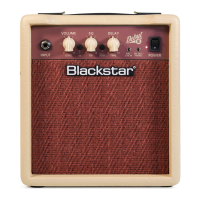
DEBUT 10 E Front Panel

INPUT

Connect your guitar here using a good quality screened lead.

VOLUME

Controls the volume for Clean and Overdrive Channels. Turning clockwise increases volume.

OD (OVERDRIVE)

Selects the Overdrive Channel. Switch in for Overdrive, out for Clean.

EQ;ISF (INFINITE SHAPE FEATURE)

Adjusts tonal signature from American to British characteristics.

DELAY ON;OFF

Engages or disengages the DELAY effect. Switch out means DELAY is off.

DELAY TIME

Controls delay time and feedback for spacious or slap-back effects.

MP3; LINE IN

Connect mobile phone, MP3 or CD player to jam along. Stereo connection.

SPEAKER EMULATED OUTPUT & HEADPHONES

Emulates speaker tone for recording or headphones. Disconnects internal speaker.

POWER INDICATOR LIGHT

Indicates when the amplifier is switched on.

POWER

Switch to turn the amplifier on and off.

DEBUT 10 E Rear Panel

MAINS INPUT

Connect the mains lead to a compatible power outlet as stated on the rear panel.

Technical Specification

Overview

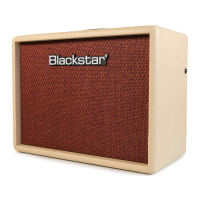
The Blackstar DEBUT 10E is a compact practice amplifier designed for guitarists, offering a range of tones and features in a portable package. It is engineered by Blackstar Amplification UK, a company known for its commitment to quality, reliability, and tone.

Function Description:

The DEBUT 10E serves as a versatile practice amplifier, providing both clean and overdrive channels to cater to different musical styles. Its core functionality revolves around delivering the "sound in your head" through innovative tone-shaping capabilities. The amplifier is suitable for practicing at home, jamming along with music, and even recording, thanks to its speaker emulated output.

Important Technical Specifications:

  • Power (RMS): 10 Watt
  • Weight (kg): 3 kg
  • Dimensions (mm): 252 (W) x 216 (H) x 142 (D)
  • Speaker Size: 3 inches

Usage Features:

Front Panel Controls:

  1. INPUT: This is the primary input jack for connecting your guitar. It is recommended to use a good quality screened guitar lead for optimal performance.
  2. VOLUME: This knob controls the overall output volume for both the Clean and Overdrive Channels. Turning it clockwise increases the volume.
  3. OD (OVERDRIVE) Switch: This switch engages the Overdrive Channel. When the switch is pressed in, the Overdrive Channel is active. When it is released (out), the Clean Channel is in operation.
  4. EQ/ISF (INFINITE SHAPE FEATURE): This patented control is a key feature of Blackstar amplifiers, allowing for extensive tonal customization.
    • Fully Counter-Clockwise: Provides a more "American" tonal characteristic, typically with a tight bottom end and a more aggressive mid-range.
    • Fully Clockwise: Delivers a more "British" tonal characteristic, often described as "woody" and less aggressive. This feature allows users to blend between these two distinct tonal profiles, effectively designing their own unique sound.
  5. DELAY ON/OFF Switch: This switch activates or deactivates the built-in delay effect. When pressed in, the delay is engaged; when out, the delay is off.
  6. DELAY TIME: This knob adjusts the parameters of the delay effect. Turning it clockwise increases both the delay time and feedback, creating a spacious, large room-like effect. Turning it counter-clockwise reduces the time and feedback, resulting in a more slap-back type of delay.
  7. MP3 / LINE IN: This stereo input allows you to connect external audio devices such as mobile phones, MP3 players, or CD players. Users can adjust the player's volume to balance it with their guitar sound, enabling them to play along with their favorite tracks.
  8. SPEAKER EMULATED OUTPUT & HEADPHONES: This output provides a speaker-emulated signal, replicating the tonal characteristics of a guitar speaker cabinet. It's ideal for direct connection to recording devices, mixing desks, or for private practice with headphones. When a cable is connected to this output, the combo's internal speaker is automatically disconnected.
  9. POWER INDICATOR LIGHT: This light illuminates when the amplifier is switched on, indicating that it is receiving power.
  10. POWER Switch: This switch is used to turn the amplifier on and off.

Rear Panel Controls:

  1. MAINS INPUT: This is where the mains power lead is connected. It is crucial to ensure that the power outlet's voltage, power, and frequency requirements match those specified on the amplifier's rear panel. If unsure, consult a qualified technician.

Maintenance Features and Safety Information:

The manual emphasizes several important safety and maintenance guidelines to ensure the longevity and safe operation of the DEBUT 10E:

  • General Safety:
    • Read and follow all instructions and warnings.
    • Do not use near water or expose to rain/moisture.
    • Clean only with a dry cloth.
    • Do not block ventilation openings; ensure the unit is used in a well-ventilated area.
    • Avoid placing near heat sources.
    • Protect the power cord from damage.
    • Use only manufacturer-specified attachments/accessories.
    • Unplug during lightning storms or long periods of disuse.
    • Refer all servicing to qualified personnel.
  • Electrical Safety:
    • Do not open the equipment case; there are no user-serviceable parts inside.
    • Do not defeat the safety purpose of polarized or grounding-type plugs.
    • Ensure the mains lead is compatible with local voltage and frequency.
    • Never break off the earth (ground) pin on the power supply cord.
    • The mains plug should remain readily accessible for disconnection.
    • Always replace damaged fuses with the correct rating and type.
  • Environmental Considerations:
    • Condensation can form if moved from a cold to a warm environment; allow the unit to reach room temperature before switching on.
    • All electrical and electronic products should be disposed of separately from municipal waste, using designated collection facilities.
  • Hearing Protection:
    • High loudspeaker levels can cause permanent hearing damage.
    • Avoid direct vicinity of loudspeakers operating at high levels.
    • Wear hearing protection if continuously exposed to high levels, especially when operating this amplification system, to prevent hearing loss in excess of permissible limits set by OSHA.

Additional Notes:

  • The DEBUT series is a product of extensive research and development by Blackstar's design team, composed of experienced musicians.
  • All Blackstar products undergo rigorous laboratory and road testing to ensure quality, reliability, and superior tone.
  • For more information on Blackstar products, users are encouraged to visit www.blackstaramps.com.

Blackstar Debut 10E Specifications

General IconGeneral
BrandBlackstar
ModelDebut 10E
CategoryMusical Instrument Amplifier
LanguageEnglish

Related product manuals