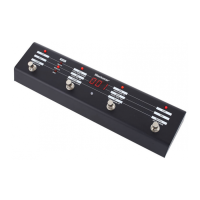
5. Switch LED 1
On when Patch 1 selected.
6. Switch LED 2
On when Patch 2 selected.
7. Switch LED 3
On when Patch 3 selected.
8. Switch LED 4
On when Patch 4 selected.
9. Patch Mode LED
On.
10. Effects Mode LED
Off.
11. Navigation Mode LED
Off.
12. Display
Shows the patch number currently active.
Note: the patches accessible from the front panel of the amp are:
Green bank = Patches 1-4
Orange bank = Patches 5-8
Red bank = Patches 9-12
13. Multi function LED
Green = Green Bank active
Orange = Orange Bank active
Red = Red Bank active
Off = Patch loaded is over 12
English
Features
The FS-10 is a multi-function footcontroller that allows access to
all 128 patches plus the tuner function. It operates in three modes:
Patch Mode – This mode allows you to switch between the three
banks of four patches accessible on the front panel of the amp
(patches 1-12) in addition to patches 13-128, plus access to the
tuner function and the ability to change to the other modes.
Effects mode – This offers individual switching of the effects within
a patch, operating more like traditional effects pedals. In this mode
the fourth switch is used to control the tap time function.
Navigation mode – Enables access to the complete set of 128
patches stored on the amp. These can be stepped through one at
a time, or in banks. Whilst in this mode you can also store patches.
Patch Mode
1. Switch 1
Press: Select Channel 1 on the front panel of the amp.
Hold: Change Mode (Patch/Effects/Navigation).
2. Switch 2
Press: Select Channel 2 on the front panel of the amp.
Hold: Change down a Bank.
Note: The first three banks correspond to the green, orange and
red banks accessible from the front panel of the amplifier.
3. Switch 3
Press: Select Channel 3 on the front panel of the amp.
Hold: Change up a Bank.
4. Switch 4
Press: Select Channel 4 on the front panel of the amp.
Hold: Enter Tuner Mode.
English
54


 To Next Page
 Loading...