EasyManua.ls Logo

Blackview AirBuds 2 - User Manual

Blackview AirBuds 2
10 pages
Print Icon
To Next Page IconTo Next Page
Loading...
TWS bluetooth headset
AirBuds 1/AirBuds 2
Question and Answer IconNeed help?

Do you have a question about the Blackview AirBuds 2 and is the answer not in the manual?

Summary

Product Overview

Multifunctional Area

Overview of the headset's functional parts and their labels.

Device Connectivity

First Pairing

Step-by-step guide for initial Bluetooth pairing of the earbuds.

Wearing Method

Instructions on how to properly wear the earbuds for optimal use and disconnection.

Operation Method

Control Functions

Details on touch controls for play, pause, volume, calls, and voice assistant.

About the Charging Box

Specifications

LED Indicator Status

Troubleshooting Common Questions

Headset Not Turning On

Troubleshooting steps for when the Bluetooth headset fails to power on.

Cannot Find Bluetooth Earphones

Solutions for issues where the phone cannot detect the Bluetooth earphones.

No Sound From Earphones

Steps to resolve problems with no audio output from the earbuds.

Low Voice or Mic Issues

Addresses problems with low voice volume or microphone performance.

Laggy or Disconnected Audio

Troubleshooting for intermittent audio or connection drops during use.

Headset Not Disconnecting

Solutions for when the headset fails to disconnect after closing the charging box.

Important Attention

Maintenance Recommendations

Overview

This document describes the Blackview TWS Bluetooth headset, specifically the AirBuds 1 and AirBuds 2 models. It covers product overview, device connectivity, wearing method, operation method, charging box information, LED indications, common questions and answers, attention points, and maintenance guidelines.

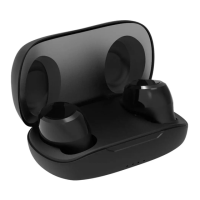
The Blackview TWS Bluetooth headset is designed for wireless audio playback and communication. It consists of two individual earphones and a charging case. The earphones feature a multifunctional area, a microphone, and an LED indicator. The charging case includes a charging port and LED indicators to show its status.

Function Description

The primary function of the Blackview TWS Bluetooth headset is to provide wireless audio. Users can listen to music, make and receive calls, and interact with a voice assistant. The headset supports both stereo (using both earphones) and mono (using a single earphone) modes.

Usage Features

First Pairing:

To initiate the first pairing, open the cover of the charging case. The wireless earphones will automatically power on and enter pairing mode. The red and blue indicator lights on the right earphone will flash alternately and quickly, indicating that it's ready to pair. Next, turn on Bluetooth on your device (e.g., smartphone), search for "AirBuds 1" (or "AirBuds 2" depending on the model), select it, and connect. A "Connected" voice prompt confirms successful pairing.

Subsequent Use:

After the initial pairing, the earphones will automatically turn on and connect to the previously paired device when taken out of the earphone box, simplifying the connection process for daily use.

Wearing Method:

The earphones are designed for synchronous transmission via Bluetooth, allowing both earphones to be used together for a stereo experience. Alternatively, a single earphone can be used independently. To disconnect and turn off the earphones, simply insert them back into the charging case and close the cover.

Operation Method (Touch Controls):

The earphones feature touch controls on the multifunctional area for various functions:

  • Play/Pause: Click once on either the L (left) or R (right) Airbud.
  • Previous Track: Click twice on the L Airbud.
  • Next Track: Click twice on the R Airbud.
  • Volume Up: Long press on the R Airbud.
  • Volume Down: Long press on the L Airbud.
  • Answer Call: Click twice on either the L or R Airbud.
  • Ring Off (End Call): Click twice on either the L or R Airbud.
  • Reject Call: Long press for 2 seconds on either the L or R Airbud.
  • Voice Assistant: Click 3 times on either the L or R Airbud to activate the voice assistant.
  • Enter Pairing State: Click 5 times on either the L or R Airbud to manually enter pairing mode.

Charging the Earphones and Charging Box:

The charging box itself is charged via a Type-C interface. While charging, the light on the charging box will flash. Once the earphones are placed inside the charging box and the cover is closed, they will automatically begin charging.

LED Indication Status:

The LED indicators provide visual feedback on the headset's status:

  • On: Solid Blue LED (for 1 second).
  • Off: No Light.
  • Overtime standby when no device is connected: No Light.
  • Bluetooth Pairing: Red & blue indicator lights flash alternately.
  • Connected: The blue light flashes slowly for 5 seconds.
  • Battery Low: The red light flashes twice quickly within five seconds.
  • Airbuds in the charging box - Charging: The corresponding light of the charging box is on.
  • Airbuds in the charging box - Fully Charged: No Light.
  • Charging Box - Charging: The last light of the battery indicator flashes slowly.
  • Charging Box - Fully Charged: 4 white lights stay on.
  • R/L Pairing: No Light.

Troubleshooting Common Issues:

  • Headset cannot be turned on: This usually indicates a low or dead battery. Place the earphones in the charging case, close the cover, and charge them for over an hour before attempting to turn them on again.
  • Phone cannot search for Bluetooth earphones:
    • Ensure the earphones are in power-on pairing state. If not, open the charging box, wear the headset, and tap either earphone 5 times until red and blue indicators flash alternately to initiate pairing.
    • If there's a setting problem with the phone's Bluetooth, restart your phone, clear all stored pairing data, and search for Bluetooth devices again.
  • No sound from earphones speakers:
    • Check the volume levels on both the earphone and the mobile phone. Adjust the volume using the right earphone's controls or the phone's volume keys.
    • Ensure the Bluetooth headset is properly connected to the mobile phone. Re-pair and reconnect if necessary.
    • Verify that the Bluetooth headset is within the limited working range (typically 10 meters).
  • Earphone cannot convey voice or voice is very low:
    • Ensure the Bluetooth headset is worn correctly on the ear for normal use and is not too far from your mouth.
    • Check if the microphone hole is blocked or if water has entered it. Clear any blockages or prevent water ingress.
  • Headset is laggy or disconnected:
    • Charge the Bluetooth headset if the battery is low.
    • Reduce the distance between the headset and the phone, and remove any obstacles.
    • Avoid strong signal interference nearby. Keep the headset as close to the phone as possible.
    • Do not place metal objects near the phone.
    • Try using a different phone or location to rule out device or environmental issues.
    • Avoid covering the Bluetooth with your hands to maintain signal stability, and keep the Bluetooth and phone in the same direction.
  • Headset not disconnected after closing the earphones box:
    • The charging box might be completely out of power. Charge the charging box.
    • The headset may not be placed correctly in the box, causing abnormal communication. Reopen the cover, take out the earphones, reinsert them correctly, ensuring the first and fourth lights in the box stay on, then close the cover.
    • If the charging box is damaged, it may need to be replaced.

Maintenance Features

Attention:

  • Do not disassemble the product yourself.
  • Use only standard charging cables and adapters to prevent damage and accidents.
  • Avoid using corrosive cleaning detergents on the product.
  • Keep the product away from rain, heating sources, or fire.

Maintenance:

To prolong the product's working life, follow these suggestions:

  • Keep the product dry and avoid damp places to prevent damage to internal circuits.
  • Avoid using the product during intense sports or in situations where sweat might infiltrate and damage it.
  • Protect the product from direct sunlight or high temperatures, which can shorten the lifespan of electrical components, damage the battery, or deform plastic parts.
  • Guard against intense vibration and impact from hard materials to prevent internal circuit damage.

Blackview AirBuds 2 Specifications

General IconGeneral
Battery Life (Earbuds)5 hours
Battery Life (with Charging Case)20 hours
Charging Time1.5 hours
Water ResistanceYes
IP RatingIPX4
Driver Size13mm
Operating Range10 meters
Frequency Response20Hz - 20kHz
Wireless TechnologyBluetooth

Related product manuals