Ver.00 Rev.06/19/18
1, Insert the USB end of cable into power adaptor, and connect Micro-USB end of the cable with the
wireless charger, the green LED indicator lights up after it is connected well.
○
2
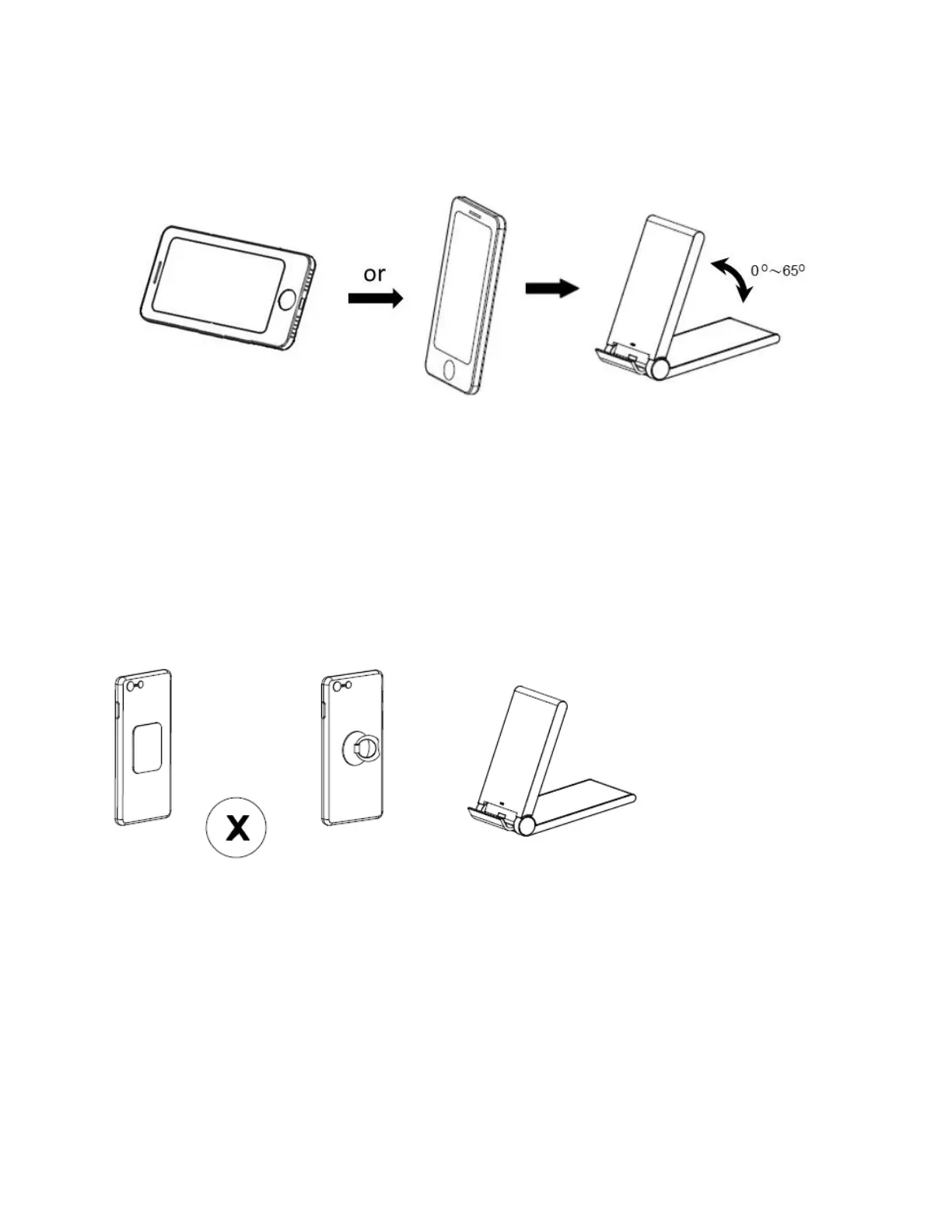
2, Put your mobile phone vertically or horizontally on the wireless charging stand and ensure its
center aligns with the center of wireless charger. Besides, you can adjust your wireless charging
stand angle from 0 t0 65 degree you want while using.
Note: Using an ultra-thick protective phone case (≥5mm) or a case with a magnetic/iron is not
recommended as it may affect the wireless charging function.
Caution
• Avoid dropping.
• Do not disassemble.
• No metal object between devices and wireless charging stand.
• Keep wireless charging stand away from any liquids or moisture.
• The maximum ambient temperature during use of this product must not exceed 45°C . Do not
place device in fire or other excessively hot environments.
• Only use dry cloth or brush to clean this product.
• Do not use if visible defects are observed on the wireless charging stand.


 To Next Page