EasyManua.ls Logo

Blanco BDW 203 - Control Panel Overview; Programme Guide; On;Off Button; Economy Button

Blanco BDW 203
22 pages
Print Icon
To Next Page IconTo Next Page
To Previous Page IconTo Previous Page
Loading...
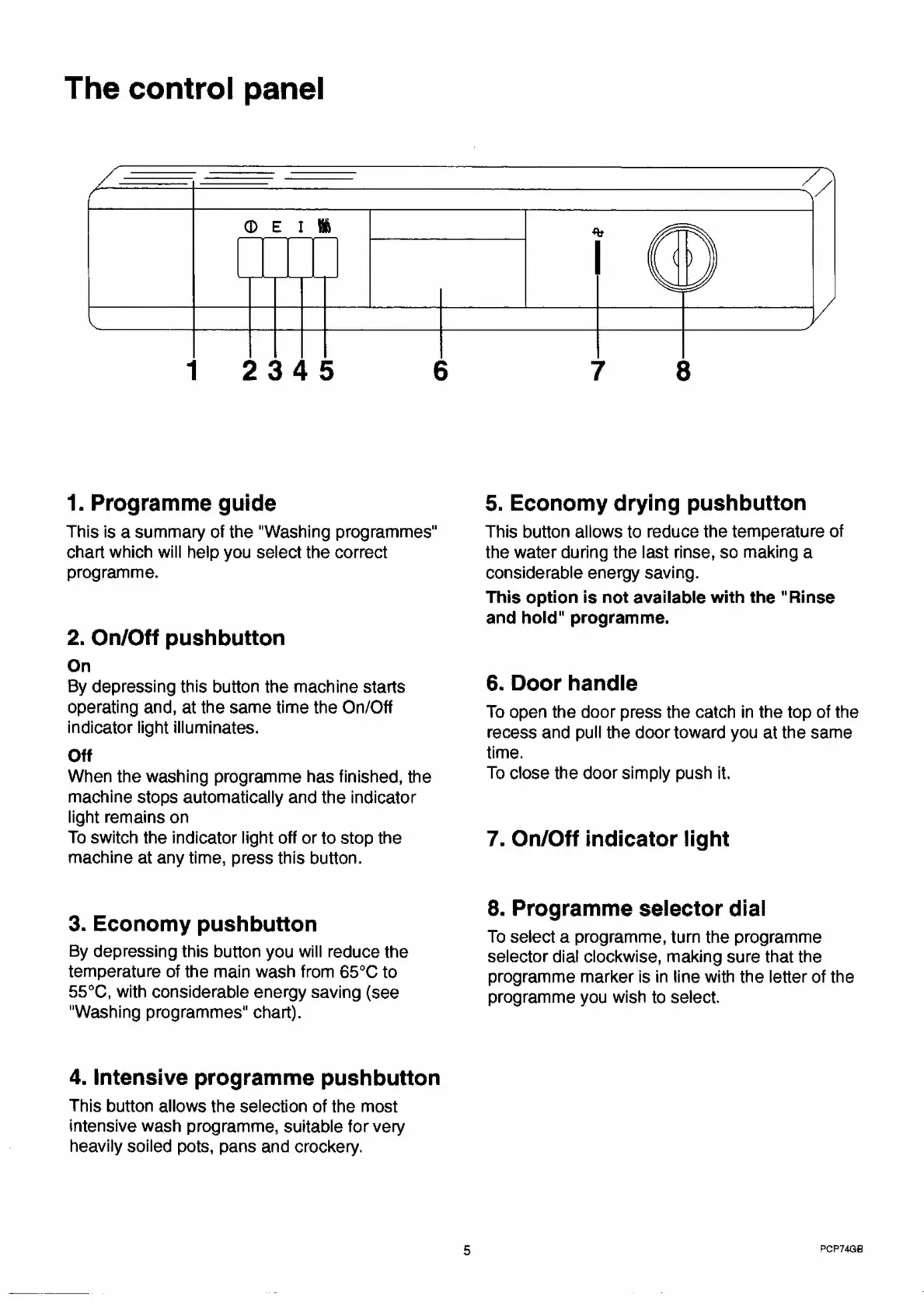
The
control
panel
1.
Programme
guide
This
is
a
Summary
of
the
"Washing
programmes"
chart
which
will
help
you
select
the
correct
programme.
2.
On/Off
pushbutton
On
By
depressing
this
button
the
machine
starts
operating
and,
at
the
same
time
the
On/Off
indicator
light
illuminates.
Off
When
the
washing
programme
has
finished,
the
machine
stops
automatically
and
the
indicator
light
remains
on
To
switch
the
indicator
light
off
or
to
stop
the
machine
at
any
time,
press
this
button.
3.
Economy
pushbutton
By
depressing
this
button
you
will
reduce
the
temperature
of
the
main
wash
from
65°C
to
55°C,
with
considerable
energy
saving
(see
"Washing
programmes"
chart).
4.
Intensive
programme
pushbutton
This
button
allows
the
selection
of
the
most
intensive
wash
programme,
suitable
for
very
heavily
soiled
pots,
pans
and
crockery.
5,
Economy
drying
pushbutton
This
button
allows
to
reduce
the
temperature
of
the
water
during
the
last
rinse,
so
making
a
considerable
energy
saving.
This
option
is
not
available
with
the
"Rinse
and
hold"
programme.
6.
Door
handle
To
open
the
door
press
the
catch
in
the
top
of
the
recess
and
pull
the
door
toward
you
at
the
same
time.
To
close
the
door
simply
push
it.
7.
On/Off
indicator
light
8.
Programme
selector
dial
To
select
a
programme,
turn
the
programme
selector
dial
clockwise,
making
sure
that
the
programme
marker
is
in
line
with
the
letter
of
the
programme
you
wish
to
select.
PCP74G8

Related product manuals