EN
11
22
/ USING YOUR APPLIANCE
••
KEYPAD BEEP
The beep of “+” and “-” keys may be turned on
or turned off when the hob isn’t in use.
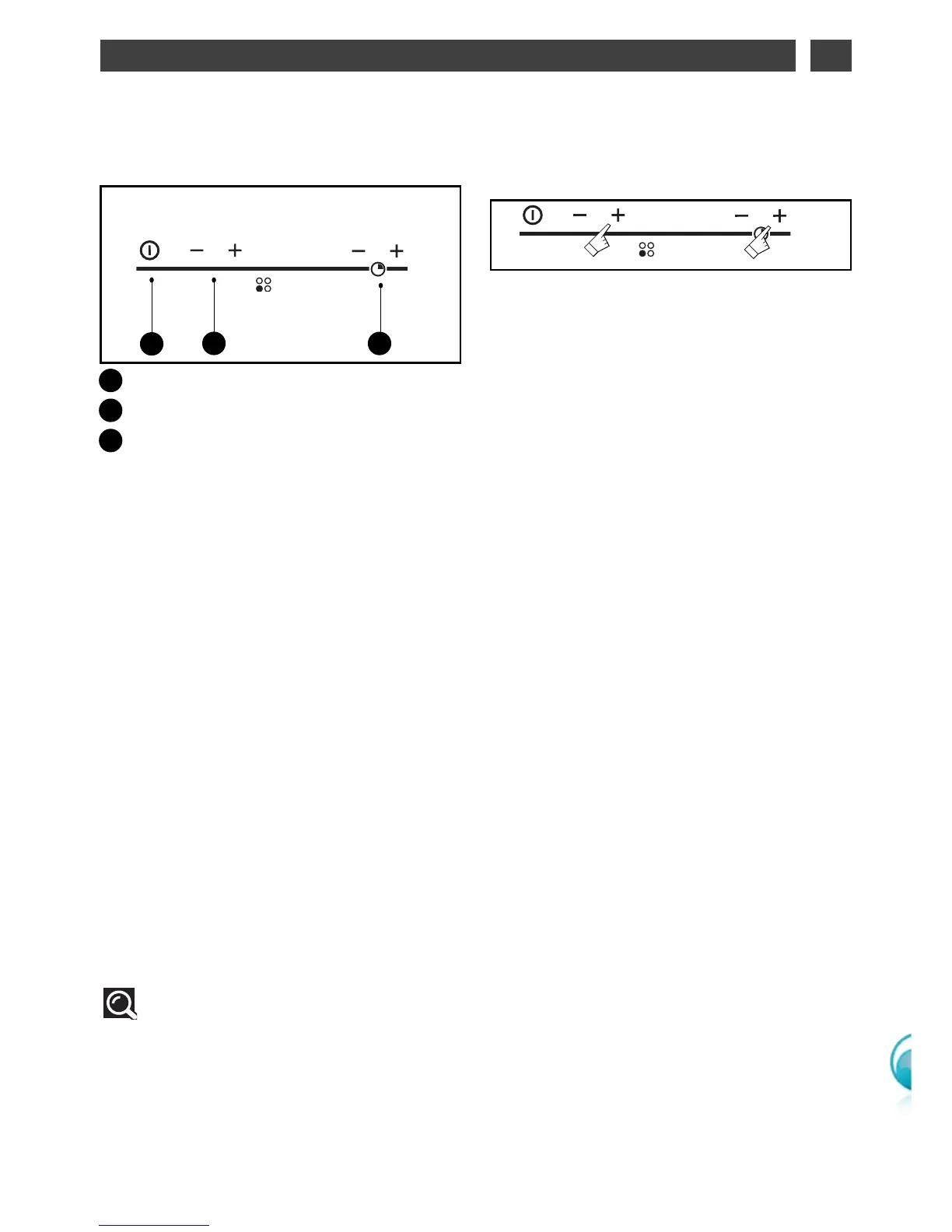
- To turn off the beep keep simultaneously the
"+" power button and the + timmer button
pressed on the right front cooking zone key-
pad until the display “bEEp” desappears on
the display.
- To turn on the beep keep simultaneously the
"+" power button and the + timmer button
pressed on the right front cooking zone key-
pad until the display “bEEp” appears on the
display.
BRINGING UP TO TEMPERA-
TURE QUICKLY
This function can be used to go to the cook-
ing temperature you want, quickly.
To use press “-“ button "P" will indicate. Push
“+” button, “P.” will indicate. Push “-“ button to
set the cooking power you require. After a
few seconds “P.” displays again confirming
that you are in "bring up to temperature quick-
ly" mode.
After a few moments, the hob displays the
cooking power; the quick increase phase has
finished, you are in conventional cooking
mode and you can then change the settings.
WWAARRNNIINNGG
-- HHaavviinngg pprreesssseedd ""PP.."" iiff yyoouu aarree nnoott aaddjjuussttiinngg aa
ccooookkiinngg ppoowweerr,, tthhee ccooookkiinngg zzoonnee wwiillll aauuttoo--
mmaattiiccaallllyy ttuurrnn iittsseellff ooffff..
-- WWhheenn tthhee ddiissppllaayy sshhoowwss ""PP.."" pprreessssiinngg tthhee
ppoowweerr bbuuttttoonnss wwiillll ccaanncceell tthhee ""qquuiicckk tteemmppeerraa--
ttuurree iinnccrreeaassee"" aanndd yyoouu wwiillll rreettuurrnn ttoo ccoonnvveenn--
ttiioonnaall ppoowweerr sseettttiinngg mmooddee..
POWERING ON
Press the start/stop button for the cooking
zone you want to use. A flashing 0 and a beep
indicate that the cooking zone is on. You can
then choose the desired power level.
If you do not select a power level, the cooking
zone will automatically turn itself off.
STOP
Press the start/stop button for the cooking
zone used or the power "
--
" button until
00
is
displayed.
ADJUSTING THE POWER
Press the + or - power button to adjust the
power level from 1 to P (maximum power).
When it is switched on you can move directly
to maximum power "P" by pressing the "
--
" but-
ton.
DESCRIPTION OF THE
CONTROL PANEL
••
Start/stop touch control.
Power - + touch controls.
Timer - + touch controls.
A
B
C
A B C
Tip
For simultaneous use, favour the use
of cooking zones located on opposite
sides of the hob.
On the same side, the use of a cooking
zone at maximum power results in an auto-
matic limitation of the other cooking zone
on that side, which is indicated in the power
level display.
••
••
••



 To Next Page