Need help?
Do you have a question about the Blaupunkt BT Drive Free 311 and is the answer not in the manual?
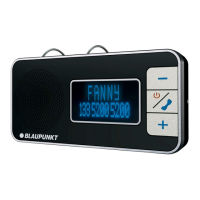
The Blaupunkt BT Drive Free 311 is a Bluetooth hands-free system designed for safe and convenient cell phone use while driving. This device features an LCD display that shows phone numbers or caller names, enhancing visibility and ease of use. It supports voice output (text-to-speech) in five different languages, providing audible announcements for device status and caller identification. The system also includes phone book synchronization with compatible cell phones, allowing users to access their contacts directly from the device. Advanced CVC technology for echo cancellation and noise suppression ensures excellent hands-free call quality, contributing to a safer driving experience.
To switch the device on, press and hold the MF button for 3 seconds until "Welcome" appears on the display and a voice announcement is heard. The BT Drive Free 311 will then automatically connect to the last paired cell phone, displaying its name and providing a voice announcement before entering standby mode. To switch off the device, hold the MF button for 5 seconds until "Power Off" is displayed and a voice announcement is heard. If no cell phone is connected, the device will automatically switch off after 10 minutes of inactivity. After approximately 20 seconds of inactivity, the device enters standby mode, displaying "BT DF 311" without backlight. The backlight activates with any button press or an incoming call.
The BT Drive Free 311 supports voice output in English, French, Italian, German, and Spanish. To select a language, hold the MODE button for 3 seconds in standby mode (without a Bluetooth connection). You will hear an announcement in the currently selected language. Repeat this step to cycle through the languages in the following order: English, French, Italian, German, and Spanish.
In standby mode, without a Bluetooth connection, you can adjust the volume for voice announcements using the "+" and "-" buttons. During a phone call, the volume can be adjusted in 15 increments using the "+" and "–" buttons. A tone will sound when the minimum or maximum volume is reached.
Before use, the BT Drive Free 311 must be paired and connected with a Bluetooth-ready cell phone. The device can be registered with two phones but can only be connected to one at a time. Ensure the BT Drive Free 311 is switched off and within one meter of the cell phone. Hold the MF button for at least 5 seconds until "Pairing" appears on the display and a voice announcement is heard, indicating the device is in registration mode. Activate Bluetooth on your cell phone and search for Bluetooth devices. Select "BT DF 311" from the list. If prompted, enter the PIN code "0000" and follow the cell phone's instructions. Upon successful pairing, the display will show "Paired" and a voice announcement will confirm. The cell phone will then automatically connect to the BT Drive Free 311. If pairing fails within 2 minutes, the device will switch off pairing mode and return to standby.
You can copy a single phone book entry or the entire phone book to the BT Drive Free 311, though not all cell phones support this feature. To copy a single entry, briefly press the MODE button in standby mode; "Waiting" will appear, and a voice announcement will be heard. Open your cell phone's phone book, select a contact, and send it via Bluetooth to "BT DF 311." The cell phone will establish a connection and copy the contact. To copy the entire phone book, ensure the BT Drive Free 311 is connected to your cell phone. In standby mode, press and hold the MODE button for 4 seconds. "Download Start" will appear, and a voice announcement will confirm. The number of transferred contacts will be continuously displayed. Once complete, "Completed" will appear, and a voice announcement will confirm. Note that transferring a new phone book will delete all previous contacts.
The BT Drive Free 311 supports A2DP, enabling audio streaming from your cell phone. Music stored on your cell phone can be played through the device. During an incoming call, music playback will be interrupted and will resume after the call ends.
The BT Drive Free 311 operates with a rechargeable lithium-ion battery, compatible with the Nokia BL-5B. Fully charge the battery before its first use. Connect the device to the vehicle charging adapter via the USB cable, then plug the adapter into the cigarette lighter. Alternatively, the device can be charged using the USB cable connected to a computer. During charging, the display shows "Charging." A full charge takes approximately 3 hours. When "Battery Full" is displayed, disconnect the device from the charger. A fully charged battery provides up to 10 hours of talk time and up to 480 hours of standby time. If the battery is low, "Battery Low" will appear, and a voice announcement will be heard every 30 seconds. If the charge becomes too low, the device will automatically switch off. Avoid overcharging, as it can reduce battery life. If the device is not used for an extended period, ensure the battery is fully charged and recharge it at least every 2 months to prevent complete discharge.
If a connection cannot be established between the BT Drive Free 311 and a cell phone, ensure the battery is charged, the cell phone's Bluetooth function is activated, and the device is connected. Maintain a distance of less than 10 meters between the devices, avoiding obstacles like walls or electronic devices that can interfere with transmission. If problems persist, remove the battery for several minutes. If necessary, contact the Service Centre of your dealer. The BT Drive Free 311 complies with Bluetooth specification v2.1 + EDR, but flawless function with all Bluetooth-ready cell phones from different manufacturers cannot be guaranteed due to compatibility variations.
To restore original factory settings, which deletes all paired cell phones, the phone book, and the call list, and sets English for voice announcements: In standby mode without a Bluetooth connection, hold the "+" and "-" buttons simultaneously for 5 seconds until "Erasing" appears. The process completes when "Erased" is displayed, and a voice announcement is heard. The BT Drive Free 311 will then automatically switch off.
 General
| Bluetooth Profiles | HSP, HFP |
|---|---|
| Operating Range | Up to 10 meters |
| Talk Time | Up to 15 hours |
| Standby Time | Up to 800 hours |
| Microphone | Built-in |
| Speaker | Built-in |
| Battery | Lithium-ion |
| Product Type | Bluetooth Hands-free Car Kit |
| Bluetooth Version | 2.1 + EDR |
| Charging Time | 3 hours |
| Compatibility | Bluetooth enabled devices |
| Additional Features | Voice dialing |

 To Next Page