EasyManua.ls Logo

Blaupunkt Los Angeles 500 - User Manual

Blaupunkt Los Angeles 500
18 pages
Print Icon
To Next Page IconTo Next Page
Loading...
Car Multimedia
Los Angeles 500
Operating instructions
www.blaupunkt.com
Question and Answer IconNeed help?

Do you have a question about the Blaupunkt Los Angeles 500 and is the answer not in the manual?

Summary

Device Controls Overview

Eject Button Function

Ejects a CD or DVD from the drive.

Menu and Source Selection Buttons

Accesses menus and allows source switching.

Power, Mute, and Volume Control

Controls device power, audio muting, and volume.

Infrared Receiver

Receives signals from the remote control.

Reset and Cover Access

Restores factory settings and provides access to ports.

Media and Input Sockets

Access points for SD card, AV-IN, and USB devices.

Touchscreen Interface

The primary display for user interaction.

DVD;CD Drive

Slot for inserting optical media discs.

Remote Control Functions

Playback and Repeat Controls

Manages playback, repeat functions, and seeking.

Setup and Menu Navigation

Accesses settings, menus, and title lists.

Source and Media Selection Buttons

Selects sources, audio, and displays information.

Numeric and Special Function Buttons

Input numbers, mute, quit playback, access EQ.

Safety and Precautions

Symbols Used in Manual

Explanation of warning and informational symbols.

Road Safety Guidelines

Safe operation of the device while driving.

General Device Safety

Precautions for device handling and installation.

Declaration of Conformity

Statement of compliance with EU directives.

Cleaning and Disposal Instructions

Proper maintenance and disposal of the unit.

Initial Setup and Operation

Scope of Delivery Contents

Items included with the Los Angeles 500 unit.

Placing Device in Operation

Securing and preparing the unit for use.

Powering the Device On and Off

Methods for switching the unit on and off.

Adjusting Volume and Muting

Controlling audio levels and muting the sound.

Main Menu Navigation

Accessing primary functions via the touchscreen.

Setting Radio Reception Area

Configuring the region for optimal radio tuning.

Radio Mode Functions

Starting and Selecting Radio

Accessing the radio source.

Memory Bank Management

Storing and recalling preset radio stations.

Tuning to Radio Stations

Manual tuning and seeking stations.

Manual Station Storage

Saving favorite stations to memory banks.

Automatic Station Storage (Travelstore)

Automatically finding and storing stations.

RDS Functionality

Utilizing Radio Data System features.

Advanced Radio Features

RDS Time Signal and Traffic Announcements

Synchronizing time and managing traffic alerts.

AF and REG Functionality

Automatic frequency tuning and regional program selection.

Seek Tuning Sensitivity

Adjusting automatic station seek behavior.

Media Playback Introduction

Overview of supported media formats and playback.

DVD;CD;USB;SDHC;iPod Media Playback

Basic Media Compatibility

Supported audio, video, and image file types.

Connecting and Using Media Devices

DVD;CD Media Handling

Inserting, ejecting, and playing optical discs.

USB Device Connection

Connecting and accessing USB storage devices.

SDHC Card Usage

Inserting and using SDHC memory cards.

iPod and iPhone Integration

Connecting and controlling Apple devices via USB.

Media Playback Controls

DVD Movie Playback Navigation

Controlling DVD movie playback and menus.

Audio Playback Operations

Playing audio files from various sources.

Advanced Media Playback Features

Video File Playback

Playing video files from discs, USB, or SDHC.

iPod;iPhone Audio Playback Control

Specific controls for audio streaming from Apple devices.

Image Playback and Bluetooth Setup

Displaying Image Files

Viewing photo files from media sources.

Starting and Registering Bluetooth

Activating and pairing Bluetooth devices.

Bluetooth Telephone Operation

Making and receiving calls via Bluetooth hands-free.

Bluetooth Mode

Starting Bluetooth Mode

Accessing the Bluetooth menu.

Registering Bluetooth Devices

Pairing new phones or devices for connectivity.

Bluetooth Phone Calls

Managing calls using the hands-free system.

Bluetooth Audio and External Inputs

Bluetooth Audio Streaming

Playing music wirelessly via Bluetooth.

Bluetooth Device Settings

Configuring Bluetooth options like auto-connect.

External Camera Input

Connecting and displaying a backup camera image.

External AV Input

Connecting and playing audio/video from external sources.

Sound and Basic System Settings

Volume Distribution (Fader;Balance)

Adjusting speaker output balance for all sources.

Equalizer Customization

Adjusting audio frequency response with presets or manual.

Video Input Configuration

Settings for camera input and external video.

General System Settings

Radio region, RDS, beep, calibration, SWC, factory reset.

Time and Clock Settings

Setting the device's clock display and time.

Basic Sound Adjustments

Controls for Loudness, subwoofer, and EQ.

Advanced Settings and Information

Language and Display Settings

Configuring UI, subtitle, audio, and menu languages.

Bluetooth Configuration Options

Settings for auto-connect, auto-answer, and pairing code.

DVD Parental Controls

Setting passwords and rating levels for DVD playback.

Volume Level Management

Adjusting minimum volume levels for all sources.

Warranty and Service Support

Information on product warranty and repair services.

Appendices and Compliance

Supported iPod;iPhone Devices

List of compatible Apple devices supported by the unit.

FCC and Industry Canada Compliance

Regulatory statements and certifications for device operation.

Overview

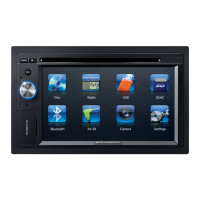
The Blaupunkt Los Angeles 500 is a car multimedia system designed for in-vehicle entertainment and communication. It features a touchscreen user interface, a DVD/CD drive, and various connectivity options for external media and devices.

Function Description:

The device serves as a central hub for audio, video, and communication within a vehicle. Its primary functions include:

  • Radio Mode: Allows tuning into FM stations, with features like manual and automatic station storage (Travelstore), RDS (Radio Data System) for displaying station names and time signals, traffic announcement priority (TA), and alternative frequencies (AF) for continuous reception. The REG function ensures consistent regional programming.
  • DVD/CD/USB/SDHC/iPod Media Playback: Supports playback of audio DVDs/CDs (CDDA), DVD/CD-R/RWs with audio, MP3, or WMA files. It also plays MP3/WMA files from USB data carriers and SDHC cards. Video and image files from DVDs/VCDs/CDs, USB data carriers, and SDHC cards can be viewed on the integrated display or a connected monitor. iPod® and iPhone® models can be connected via USB for audio playback and control.
  • Bluetooth Mode: Enables hands-free calling and audio streaming (A2DP/AVRCP) from registered cell phones and media playback devices. It supports automatic connection and answering of calls, and allows for defining a pairing code.
  • External Camera: Can be connected to a back-up or video camera, displaying the camera image on the screen.
  • External Audio/Video Sources: Features a front AV-IN socket for connecting external audio and video sources.
  • Sound Settings: Offers comprehensive audio adjustments including volume distribution (fader/balance), and a multi-band equalizer with preset options and custom adjustments for Bass, Mid, and Treble, as well as LPF, MPF, and HPF filters. Additional sound settings include Loudness, Subwoofer on/off, Sub filter frequency, Bass Q, and Mid Q.
  • Basic Settings: Allows customization of various device parameters such as language for the user interface and DVD menus, subtitle and audio language for DVDs, tuner region, RDS on/off, TA volume, confirmation beep, touchscreen calibration, steering wheel control (SWC) configuration, and factory reset. Video settings include camera input adjustment, external video input color system, and DivX® registration code display. DVD settings include parental controls with password protection and rating level definition.

Important Technical Specifications:

  • Vehicle System Voltage: 12 V
  • Installation: Designed for DIN slot installation.
  • Laser Class: Class 1 laser (for DVD/CD drive).
  • Supported Audio File Extensions: .MP3, .WMA.
  • WMA Files: Only without Digital Rights Management (DRM) and created with Windows Media® Player version 8 or later.
  • MP3 ID3 Tags: Version 1 and 2.
  • Bit Rate for Audio Files: MP3: 32 to 320 kbps; WMA: 32 to 192 kbps.
  • Maximum Files/Directories: USB medium: Up to 1500 entries per directory; SD cards: Up to 1500 files per directory.
  • DVD/CD Formats: DVD/CD-R/RW, Ø: 12 cm.
  • DVD/CD Data Formats: ISO 9669 Level 1 and 2, Joliet.
  • CD Burn Speed: Max. 16x (recommended).
  • USB Format/File System: Mass storage device/FAT32.
  • SD Card File System: FAT32.
  • Bluetooth®: Supports A2DP and AVRCP profiles.
  • Supported iPod®/iPhone® Generations: iPhone 4S, iPhone 4, iPhone 3GS, iPod touch (4th generation), iPod nano (6th generation), iPod nano (5th generation).
  • FCC Compliance: Part 15 of FCC Rules, Class B digital device.
  • Industry Canada Compliance: Licence-exempt RSS standard(s).

Usage Features:

  • Touchscreen User Interface: Intuitive control through a responsive touchscreen.
  • Rotary/Pushbutton: Multi-functional control for switching on/off, muting, and adjusting volume.
  • MENU Button: Accesses the main menu and source-specific menus.
  • SRC Button: Quickly switches between different audio/video sources.
  • Eject Button: Ejects CDs/DVDs.
  • Reset Button: Restores factory settings (caution: all personal settings will be lost).
  • Cover: Protects the SD card reader and front AV-IN/USB sockets.
  • Remote Control: Provides comprehensive control over all functions, including direct access buttons for various modes (EQ, RPT, SETUP, MIX, SCN, MUTE, VOL, PIC, CLEAR, TITLE, MENU, ANGLE, SUBTITLE, GOTO, BAND, DISP, ZOOM, AUDIO/MUSIC).
  • Direct Frequency Entry: Allows direct input of known radio frequencies via a numeric keypad.
  • Automatic Station Storage (Travelstore): Scans and stores the strongest FM stations in memory banks.
  • Repeat Functions: Offers various repeat modes for media playback (current track, current folder, all tracks).
  • Random Playback (MIX): Shuffles tracks for varied listening.
  • Folder View: Navigates through media files organized in folders.
  • Keypad for Direct Selection: Allows direct entry of title, chapter, movie, or playing time.
  • Parental Controls: Password-protected rating level for DVD playback.
  • Steering Wheel Control (SWC): Configurable for connected steering wheel controls.

Maintenance Features:

  • Cleaning Notes: Advises using a dry or slightly moistened cloth for cleaning the car sound system. Warns against using solvents, cleaning agents, or dashboard sprays that may damage the surface.
  • Disposal Notes: Emphasizes not disposing of the unit, remote control, or batteries in household trash, and instead using available return and collection systems.
  • Transport Securing Screws: Removable screws at the top of the device must be removed before startup.
  • Repair Service: Information on service partners is available on the Blaupunkt website.
  • Warranty: Manufacturer's warranty provided for products bought within the European Union, with terms available on www.blaupunkt.com.

Blaupunkt Los Angeles 500 Specifications

General IconGeneral
BrandBlaupunkt
ModelLos Angeles 500
CategoryCar Video System
LanguageEnglish

Related product manuals